Download PDFFree PDF. The Save button below keeps a bookmark and private notes in your account.
LogicBlue Technology LevelMatePRO Wireless RV Leveling System User Manual
Model: LMP001R
1. Setup Instructions
The LevelMatePRO is designed for simple and efficient installation. Follow these steps to get your device ready for use:
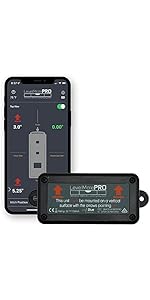
Mount the Device: Securely mount the LevelMatePRO unit in your RV using the included screws. The unit must be mounted on a vertical surface with the arrows pointing upwards.
Install Battery: The device operates on one Lithium Metal battery (CR2032), which is included. Ensure it is correctly installed.
Download the App: Download the LevelMatePRO app from your device's app store (compatible with iOS and Android).
Connect via Bluetooth: The app will guide you through connecting to your LevelMatePRO device via Bluetooth. This connection is designed not to interrupt your in-car Bluetooth.
Set Parameters: Follow the in-app instructions to set up your RV's specific parameters, such as vehicle dimensions.
Calibrate for Level: Once installed and connected, ensure your RV is perfectly level using traditional methods (e.g., bubble level). Then, use the app to calibrate and set this position as your 'level' baseline. This is crucial for accurate future readings.
Video: A detailed installation guide and review for the LevelMatePRO+ device, demonstrating the unboxing and setup process.
2. Operating Instructions
The LevelMatePRO system simplifies RV leveling with real-time feedback and user-friendly app features:
Real-time Leveling Feedback: The app displays precise measurements for both side-to-side and front-to-back leveling on a single screen. It provides real-time feedback on how much and which corner to adjust for perfect leveling.
Hitch Position Memory: The device can save and recall your hitch position, making it easy to reconnect your RV to your tow vehicle.
Effortless Adjustments: Use the app's guidance to make adjustments to your RV's level. The system removes guesswork, enabling fast and accurate single-person leveling, even in low-light conditions.
Advanced Technology: Utilizing a 3-axis digital accelerometer, the LevelMatePRO accurately calculates angles and height requirements, indicating not just how far off you are, but also how to correct it.
Image: Smartphone displaying the LevelMatePRO app interface, showing real-time leveling data for an RV.
Image: Visual guide illustrating three simple steps for leveling an RV using the LevelMatePRO app: arrive, open app, level from seat.
Video: A user highlights the simplicity of the LevelMatePRO, emphasizing its ease of use for quick and accurate RV leveling.
3. Maintenance
Proper maintenance ensures the longevity and accuracy of your LevelMatePRO device:
Battery Replacement: The LevelMatePRO uses a user-replaceable CR2032 Lithium Metal battery. If the device stops responding or the app indicates low battery, replace the battery. Keep a spare CR2032 battery and a small Phillips head screwdriver handy.
Cleaning: Keep the device clean and free from dust and debris. Use a soft, dry cloth for cleaning.
Storage: If storing the RV for an extended period, it is recommended to turn off the LevelMatePRO device to conserve battery life.
4. Troubleshooting
If you encounter issues with your LevelMatePRO, consider the following:
Device Not Connecting: Ensure the device is turned on and within Bluetooth range of your smartphone. Check if the battery needs replacement.
Inaccurate Readings: Verify that the device is securely mounted on a vertical surface with arrows pointing upwards. Re-calibrate the device by leveling your RV manually and then setting the level in the app.
Battery Drains Quickly: Ensure the device is turned off when not in use, especially during long storage periods.
5. Specifications
Feature
Detail
Product Dimensions
5 x 2 x 1.25 inches
Item Weight
5 ounces
Model Number
LMP001R
Batteries
1 Lithium Metal battery (CR2032) required (included)
Wireless Technology
Bluetooth
Accuracy
Accurate to 0.1 degrees
Compatibility
Motorhomes, travel trailers, and 5th wheels
Manufacturer
Command Electronics, LLC
Origin
Made in the USA
Image: Comparison table showing features and specifications across LevelMate models, including battery type and mounting options.
6. Warranty & Support
LogicBlue Technology is committed to providing high-quality products and customer satisfaction.
Return Policy: The product is eligible for a refund/replacement within 30 days of purchase.
Protection Plans: Extended protection plans (2-Year, 3-Year, Complete Protect) are available for purchase to cover your device beyond the standard warranty.
Quality Assurance: All LogicBlue Technology products are developed and produced in the USA, with each unit calibrated by internal engineers to ensure optimal function in various climates.
For further assistance or warranty claims, please refer to the contact information provided in your product packaging or visit the official LogicBlue Technology website.
Ask about setup, troubleshooting, compatibility, parts, safety, or missing instructions. Manuals+ will review the question and use this page’s manual context to help answer it.