
Product Overview
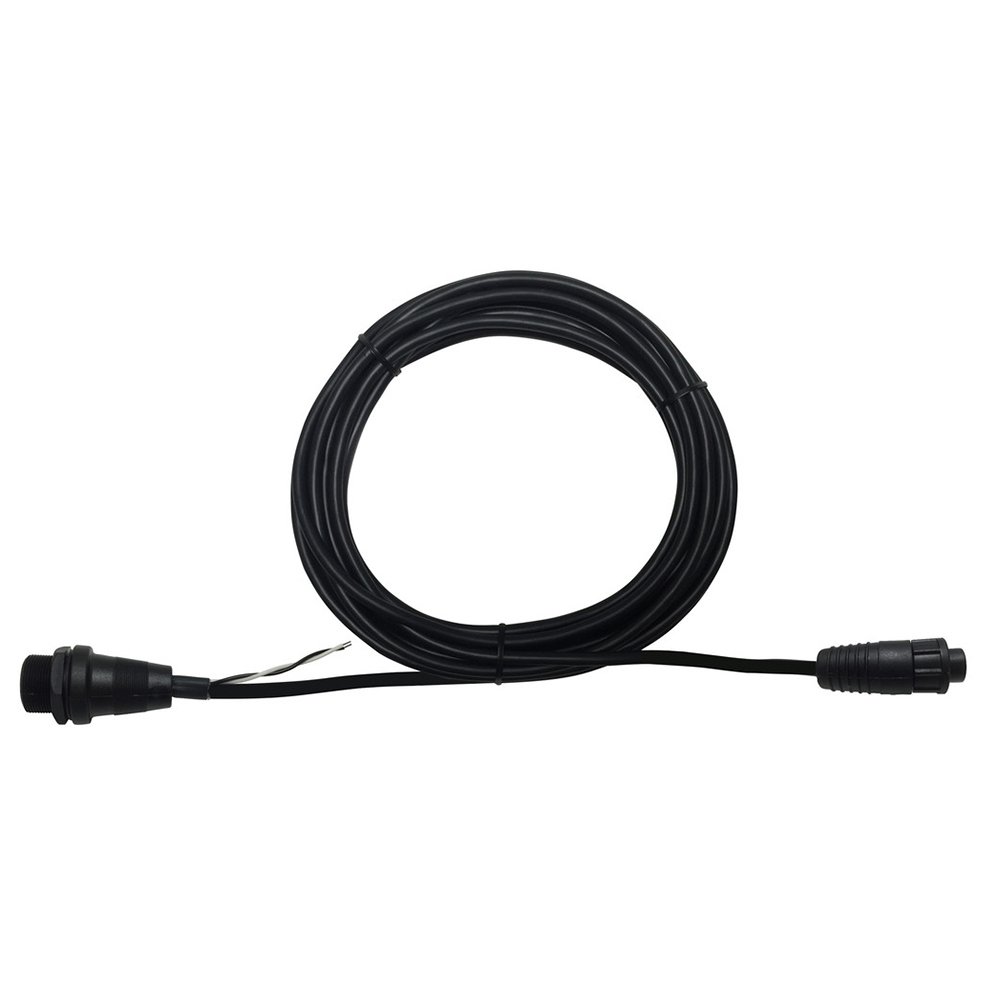
Image of the Standard Horizon S8101512 Routing Cable, showing its coiled form and connectors. This cable connects a RAM microphone to a compatible VHF radio.
The Standard Horizon S8101512 Routing Cable is a marine-grade connection cable designed to link your remote station microphone (RAM mic) to a compatible Standard Horizon fixed-mount VHF radio. This cable ensures reliable communication by providing the necessary electrical connection and signal routing between your RAM mic and the main radio unit. Its robust construction is suitable for marine environments, offering approximately 23 feet (7 meters) of length for flexible installation.
Safety Information
- Ensure all power to the VHF radio and associated equipment is OFF before connecting or disconnecting the cable.
- Avoid bending or kinking the cable sharply, as this can damage internal wiring.
- Keep connectors clean and dry to prevent corrosion and ensure optimal performance.
- Do not expose the cable to extreme temperatures or direct flame.
- If the cable appears damaged, do not use it. Contact Standard Horizon support for replacement.
Package Contents
Verify that all items are present in the package:
- 1 x Standard Horizon S8101512 Routing Cable
- 1 x Dashboard Mount (for RAM Mic, if applicable)
Setup and Installation
Follow these steps to properly install the S8101512 Routing Cable:
- Power Off: Ensure your Standard Horizon VHF radio and any connected accessories are powered off and disconnected from their power source.
- Identify Connectors: The S8101512 cable features an 8-pin male connector on one end and an 8-pin female connector on the other.
- Connect to RAM Mic: Locate the corresponding 8-pin port on your compatible RAM microphone (CMP25, CMP30, or CMP31). Carefully align the male connector of the routing cable with the RAM mic's port and push firmly until it clicks into place. Ensure the connection is secure.
- Route the Cable: Carefully route the cable from the RAM mic's installation location to the main VHF radio unit. Avoid routing it near heat sources, sharp edges, or areas where it might be pinched or stepped on. Use cable ties or clips to secure the cable along its path, preventing strain on the connectors.
- Connect to VHF Radio: Locate the designated 8-pin port on your Standard Horizon fixed-mount VHF radio for the RAM mic extension. Align the female connector of the routing cable with this port and push firmly until it is securely connected.
- Secure Connections: For marine environments, it is recommended to use dielectric grease on the connectors and ensure any threaded collars are tightened to provide a watertight seal, if applicable to your specific RAM mic and radio models.
- Power On: Once all connections are secure, restore power to your VHF radio and test the functionality of your RAM microphone.
Note: Refer to your specific RAM microphone and VHF radio manuals for detailed port locations and additional installation instructions.
Operation
The S8101512 Routing Cable is a passive component designed to extend the reach of your RAM microphone. Once properly installed, it facilitates the full functionality of your RAM mic, including:
- Voice Communication: Transmitting and receiving audio signals.
- Control Functions: Allowing the RAM mic to control the VHF radio's features (e.g., channel selection, volume, squelch, DSC functions) as designed.
- Power Supply: Delivering power from the main VHF unit to the RAM mic.
No specific operational steps are required for the cable itself beyond ensuring a secure connection. All operational controls are managed directly through your RAM microphone and VHF radio.
Maintenance
To ensure the longevity and reliable performance of your routing cable:
- Regular Inspection: Periodically inspect the entire length of the cable for any signs of wear, cuts, abrasions, or kinks. Check the connectors for corrosion or damage.
- Cleaning: If necessary, gently wipe the cable and connectors with a clean, damp cloth. Ensure connectors are completely dry before re-connecting. Do not use harsh chemicals or abrasive cleaners.
- Corrosion Protection: For marine installations, consider applying a small amount of marine-grade dielectric grease to the metal pins of the connectors to prevent corrosion, especially in saltwater environments.
- Secure Routing: Ensure the cable remains securely routed and fastened to prevent accidental snagging or damage.
Troubleshooting
If you experience issues with your RAM microphone after installing the routing cable, consider the following:
- No Power/Functionality:
- Ensure both ends of the routing cable are securely connected to the RAM mic and the VHF radio.
- Verify that the VHF radio is powered on and functioning correctly.
- Inspect the cable for visible damage (cuts, severe kinks). If damaged, replace the cable.
- Check the RAM mic's own power connection or battery (if applicable, though most RAM mics are powered by the main unit).
- Intermittent Connection:
- Disconnect and reconnect both ends of the cable to ensure a firm connection.
- Check for corrosion on the connector pins. Clean if necessary.
- Ensure the cable is not under tension or being pulled, which could cause intermittent contact.
- Poor Audio Quality:
- This is less common for a simple routing cable but could indicate internal damage.
- Test the RAM mic directly connected to the VHF radio (if possible) to rule out the cable as the source of the issue.
- Ensure the RAM mic itself is not damaged or experiencing issues.
If troubleshooting steps do not resolve the issue, contact Standard Horizon customer support or a qualified marine electronics technician.
Specifications
| Brand | STANDARD HORIZON |
| Model Name | Standard Horizon Routing Cable f/RAM Mics |
| Item Model Number | S8101512 (Note: Product data lists '0', but S8101512 is the primary identifier) |
| Compatible Devices | CMP25, CMP30, CMP31, SSM-70H RAM Mics |
| Connector Type | 8-pin |
| Connector Gender | Male-to-Female |
| Cable Type | Coaxial |
| Length | Approximately 23 feet (7 meters) |
| Item Weight | 1.4 pounds (0.64 kg) |
| Product Dimensions | 276 x 7 x 3 inches (approximate, as packaged) |
| Connectivity Technology | Wired |
Warranty and Support
For information regarding the warranty of your Standard Horizon S8101512 Routing Cable, please refer to the documentation provided with your original purchase or visit the official Standard Horizon website. For technical support, troubleshooting assistance beyond this manual, or to inquire about replacement parts, please contact Standard Horizon customer service directly.
Official Website: www.standardhorizon.com