
Hantek 6074BE
Hantek 6074BE Digital Oscilloscope User Manual
Model: 6074BE | Brand: Hantek
1. Introduction
The Hantek 6074BE is a 4-channel USB digital oscilloscope designed for a wide range of applications, including automotive diagnostics, electronic circuit testing, and general laboratory use. It features a 70MHz bandwidth, 1GSa/s real-time sampling rate, and high input sensitivity, making it a versatile tool for waveform analysis. This device connects to a computer via USB, utilizing software for display and control, and supports various Windows operating systems.
2. Safety Information
Please read and understand all safety instructions before operating the Hantek 6074BE oscilloscope. Failure to follow these instructions may result in injury or damage to the instrument.
- Electrical Safety: Always ensure proper grounding when connecting the oscilloscope to a power source or test circuit. Avoid contact with live circuits.
- Environmental Conditions: Operate the device in a dry environment, away from moisture, dust, and direct sunlight. Maintain appropriate temperature and humidity levels as specified in the technical data.
- Probe Usage: Use only probes supplied or recommended by Hantek. Ensure probes are correctly calibrated and rated for the voltage being measured.
- Maintenance: Do not attempt to open or repair the device. Refer all servicing to qualified personnel.
3. Package Contents
Verify that all items listed below are present in your package. If any items are missing or damaged, please contact your supplier.
- Hantek 6074BE Digital Oscilloscope Unit
- Oscilloscope Probes (Quantity: 4)
- USB Cable
- Software Installation CD
- Test Leads and Accessories (e.g., alligator clips, test hooks)

Figure 3.1: The Hantek 6074BE oscilloscope unit shown with its standard accessories, including probes, test leads, USB cable, and software CD.
4. Product Overview
The Hantek 6074BE is a compact, black-cased unit with four BNC input connectors on one side and USB interfaces on the other. The device is designed for robust use with protective end caps.
4.1 Front Panel (Input Side)
- CH1, CH2, CH3, CH4 BNC Connectors: These are the four analog input channels for connecting oscilloscope probes. Each channel can serve as a trigger source.
4.2 Rear Panel (Interface Side)
- USB Interface: Standard USB 2.0 port for connecting the oscilloscope to a computer. This port also provides power to the device.
- USBXI Interface: An additional interface for specific system integrations.
- PRG Button: Program button, typically used for firmware updates or specific functions.
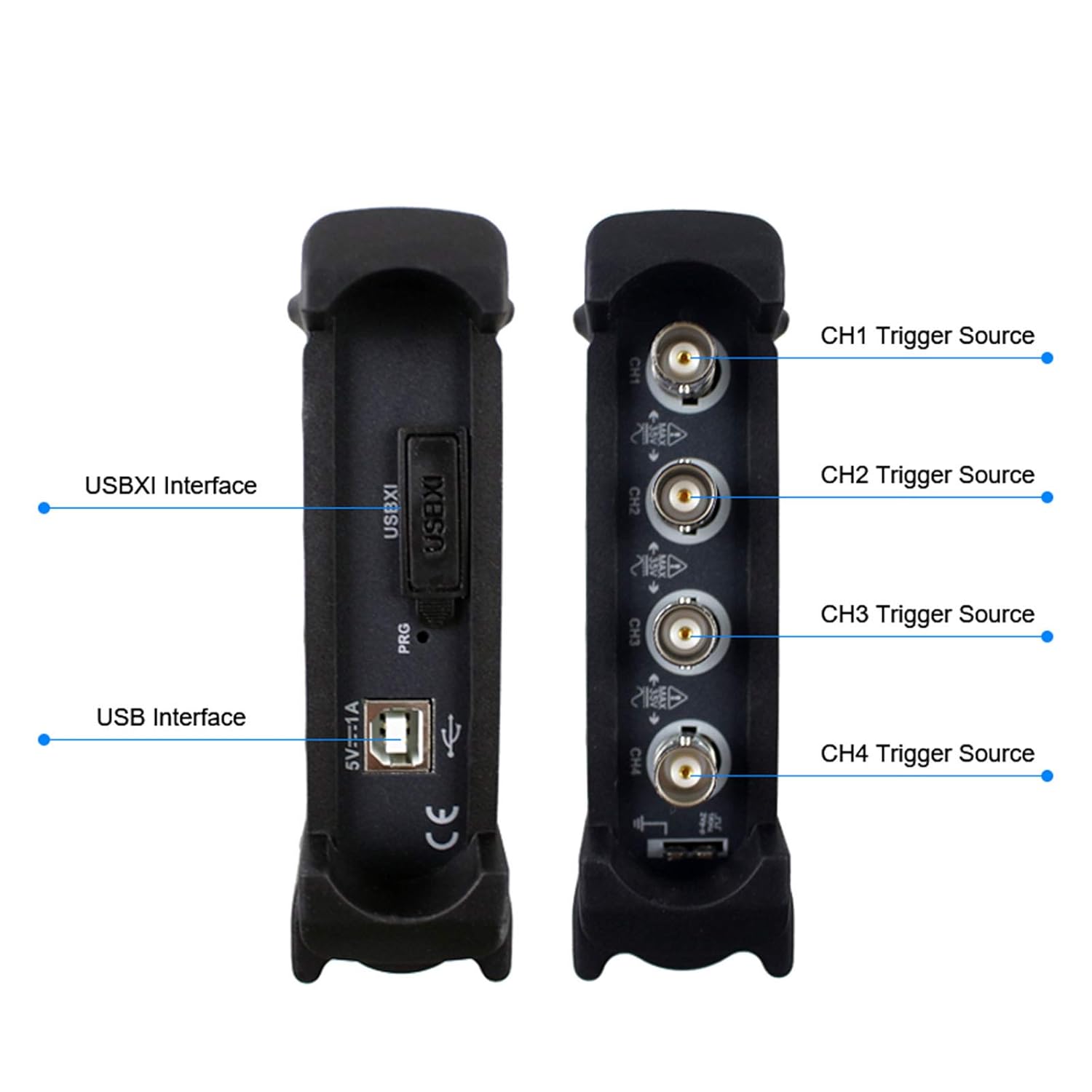
Figure 4.1: Detailed view of the Hantek 6074BE's interfaces, showing the USBXI, USB, and the four BNC input channels (CH1-CH4) with their respective trigger source labels.

Figure 4.2: Top view of the Hantek 6074BE digital oscilloscope, displaying the Hantek brand logo.
5. Setup
5.1 System Requirements
The Hantek 6074BE oscilloscope requires a computer running one of the following operating systems:
- Windows 10
- Windows 8
- Windows 7
5.2 Hardware Connection
- Connect one end of the supplied USB cable to the USB port on the Hantek 6074BE unit.
- Connect the other end of the USB cable to an available USB 2.0 port on your computer. The device will power on automatically.
- Attach the oscilloscope probes to the desired BNC input channels (CH1-CH4) on the oscilloscope.
5.3 Software Installation
- Insert the provided software installation CD into your computer's CD/DVD drive. If your computer does not have a CD drive, download the latest software and drivers from the official Hantek website (www.hantek.com).
- Follow the on-screen instructions to install the Hantek oscilloscope software and necessary drivers. It is crucial to install the drivers for the device to be recognized by your operating system.
- Once the installation is complete, restart your computer if prompted.

Figure 5.1: The Hantek 6074BE oscilloscope connected to a desktop computer, demonstrating a typical setup for operation.
6. Operating Instructions
6.1 Launching the Software
After successful installation, launch the Hantek oscilloscope application from your desktop shortcut or Start Menu. The software interface will appear, ready to display waveforms.
6.2 Basic Waveform Display and Control
Connect your probes to the circuit under test. The software provides controls for adjusting vertical scale (Volts/Div), horizontal scale (Time/Div), and trigger settings. Use the on-screen menus and controls to:
- Adjust Vertical Scale: Set the voltage per division for each channel (2mV-10V/DIV).
- Adjust Horizontal Scale: Control the time base for viewing waveforms.
- Position Waveforms: Move waveforms vertically and horizontally on the screen.
- Enable/Disable Channels: Turn individual channels on or off as needed.
6.3 Measurement Functions
The Hantek 6074BE software includes over 20 types of automatic measurement functions to analyze waveform parameters. These include peak-to-peak voltage, RMS voltage, frequency, period, and more. Additionally, a PASS/FAIL check function allows for automated testing against predefined limits.
6.4 Trigger Functions
The oscilloscope features resourceful trigger functions to stabilize and capture specific events in a waveform. Common trigger types include Edge, Pulse, Video, Slope, and Alternate. Configure the trigger source (CH1-CH4), level, and slope to capture the desired signal.
6.5 Waveform Record and Replay
The software allows for recording and replaying waveforms, which is useful for capturing transient events or analyzing signals over extended periods. This function enables detailed post-acquisition analysis.

Figure 6.1: The Hantek 6074BE oscilloscope connected to a computer, showing the software interface with multiple waveform displays and diagnostic options.

Figure 6.2: The Hantek 6074BE oscilloscope in use, connected to a circuit board and displaying waveforms on a tablet, illustrating its portability and application versatility.
7. Maintenance
7.1 Cleaning
To clean the exterior of the oscilloscope, use a soft, damp cloth. Do not use abrasive cleaners or solvents, as these can damage the casing. Ensure the device is powered off and disconnected from all circuits before cleaning.
7.2 Storage
When not in use, store the Hantek 6074BE in a dry, dust-free environment at a moderate temperature. Protect the BNC connectors and USB ports from dust and physical damage by using protective caps if available.
7.3 Probe Care
Handle oscilloscope probes with care. Avoid bending or stressing the probe cables excessively. Store probes properly to prevent damage to the tips and connectors. Periodically check probe compensation for accurate measurements.
8. Troubleshooting
This section provides solutions to common issues you might encounter with your Hantek 6074BE oscilloscope.
| Problem | Possible Cause | Solution |
|---|---|---|
| Device not recognized by computer | Drivers not installed or corrupted; loose USB connection. | Ensure USB cable is securely connected. Reinstall the device drivers from the provided CD or Hantek website. Try a different USB port. |
| No waveform displayed | Probe not connected; channel disabled; incorrect trigger settings; signal too small or too large. | Verify probe connection to the circuit and oscilloscope. Ensure the channel is enabled in the software. Adjust trigger level and mode. Adjust vertical (Volts/Div) and horizontal (Time/Div) scales. |
| Unstable or rolling waveform | Incorrect trigger settings. | Adjust the trigger level to a stable point on the waveform. Change the trigger type (e.g., to Edge trigger). Ensure the trigger source is correctly selected. |
| Inaccurate measurements | Probe compensation incorrect; incorrect probe attenuation setting in software. | Perform probe compensation adjustment. Verify that the probe attenuation setting in the software matches the physical probe (e.g., 1X, 10X). |
9. Specifications
The following table details the technical specifications of the Hantek 6074BE Digital Oscilloscope.
| Parameter | Specification |
|---|---|
| Analog Bandwidth | 70 MHz |
| Real-time Sampling Rate | 1 GSa/s |
| Channels | 4 CH |
| Vertical Resolution | 8 Bit |
| Memory Depth | 64 K |
| Input Sensitivity | 2mV-10V/DIV |
| Interface | USB 2.0 (Plug & Play) |
| Operating System Support | Windows 10, Windows 8, Windows 7 |
| Automatic Measurements | 20+ types, including PASS/FAIL Check |
| Manufacturer | Hantek |
| UPC | 718760121131 |

Figure 9.1: Visual representation of key specifications for the Hantek 6074BE, highlighting its 70MHz analog bandwidth, 64K storage depth, and 1GSa/s real-time sampling rate.

Figure 9.2: The bottom panel of the Hantek 6074BE, displaying the model number, bandwidth, sample rate, and a QR code for additional information or support.
10. Warranty and Support
Warranty information for the Hantek 6074BE Digital Oscilloscope is typically provided with your purchase documentation. Please refer to the warranty card or contact your point of purchase for specific details regarding warranty coverage and duration.
For technical support, software updates, or additional resources, please visit the official Hantek website:
Related Documents - 6074BE
 |
Hantek 6000BC/BD/6074BE Цифровой осциллограф - Руководство пользователя Полное руководство пользователя для цифровых осциллографов Hantek серии 6000BC, 6000BD и 6074BE. Описание функций, настроек, примеров использования и технических характеристик. |
 |
Hantek HT-6022BE Oscilloscope User Guide and Safety Precautions Comprehensive user guide and safety precautions for the Hantek HT-6022BE digital storage oscilloscope. Learn proper usage, connection, measurement techniques, and essential safety warnings to prevent damage and ensure safe operation. |
 |
Hantek 6022BE User Manual: Portable PC Oscilloscope Guide Download the Hantek 6022BE user manual for this portable PC-based USB oscilloscope. Learn about its features, setup, operation, and troubleshooting for testing, research, and educational applications. |
 |
Hantek2D82 Automotive Diagnostic Oscilloscope User Manual | Comprehensive Guide Explore the Hantek2D82 Automotive Diagnostic Oscilloscope. This user manual provides detailed information on its features, operation, safety, technical specifications, and troubleshooting for automotive diagnostics, DMM, and waveform generation. |
 |
Hantek 6022BL User's Manual: Getting Started, Operation, and Features Comprehensive user manual for the Hantek 6022BL USB digital storage oscilloscope. Covers system requirements, software installation, driver setup, general features, operating basics, understanding functions, application examples, and technical specifications. |
 |
Hantek DSO2D20 数字示波器用户手册 - 操作与功能指南 获取 Hantek DSO2D20 系列数字示波器的官方用户手册。本指南详细介绍了设备的安全操作、功能设置、测量技术、触发模式、系统配置及故障排除,是用户掌握和高效使用该示波器的必备资源。 |