
BRESSER LR-ARCH

Bresser Ambition Rangefinder User Manual
Model: LR-ARCH
1. Introduction
The Bresser Ambition Rangefinder is a precision optical instrument designed to accurately measure distances for various applications, particularly in archery and hunting. This lightweight device integrates seamlessly with most modern compound bows and crossbows, providing critical distance information to enhance accuracy.
It features an OLED display for clear readability and a continuous scan mode to keep users informed of changing distances to potential targets. This manual provides comprehensive instructions for the proper setup, operation, and maintenance of your Bresser Ambition Rangefinder.
2. Safety Information
WARNING: This product can expose you to chemicals including lead, which is known to the State of California to cause cancer and birth defects or other reproductive harm. For more information go to www.P65Warnings.ca.gov.
- Do not look directly into the laser beam or point it at others.
- Keep the device out of reach of children.
- Use only the specified battery type (CR2).
- Do not attempt to disassemble or modify the device. This will void the warranty and may cause harm.
- Avoid exposing the device to extreme temperatures or direct sunlight for prolonged periods.
3. Product Components
Your Bresser Ambition Rangefinder package includes the following items:
- Bresser Ambition Rangefinder Unit
- Lens Cleaning Cloth
- Microfiber Bag for Transport and Storage

Figure 3.1: Front view of the Bresser Ambition Rangefinder.
This image displays the main unit of the Bresser Ambition Rangefinder, showcasing its compact design and the optical lenses used for distance measurement.
4. Setup
4.1 Battery Installation
The Bresser Ambition Rangefinder requires one CR2 battery (included). To install the battery:
- Locate the battery compartment cover, usually on the side or bottom of the unit.
- Open the cover by twisting or sliding it according to the indicator.
- Insert the CR2 battery, ensuring the correct polarity (+/-) as indicated inside the compartment.
- Close the battery compartment cover securely.
4.2 Mounting the Rangefinder
The rangefinder is designed for easy mounting on most modern compound bows and crossbows. It features three axes of adjustment for precise positioning.
- Attach the rangefinder's mounting bracket to your bow or crossbow's existing sight or scope rail. Ensure it is securely fastened.
- Utilize the adjustment screws on the mounting bracket to align the rangefinder with your sight. Adjust for horizontal, vertical, and rotational alignment to ensure accurate readings relative to your aiming point.
- Tighten all screws once the desired position is achieved.
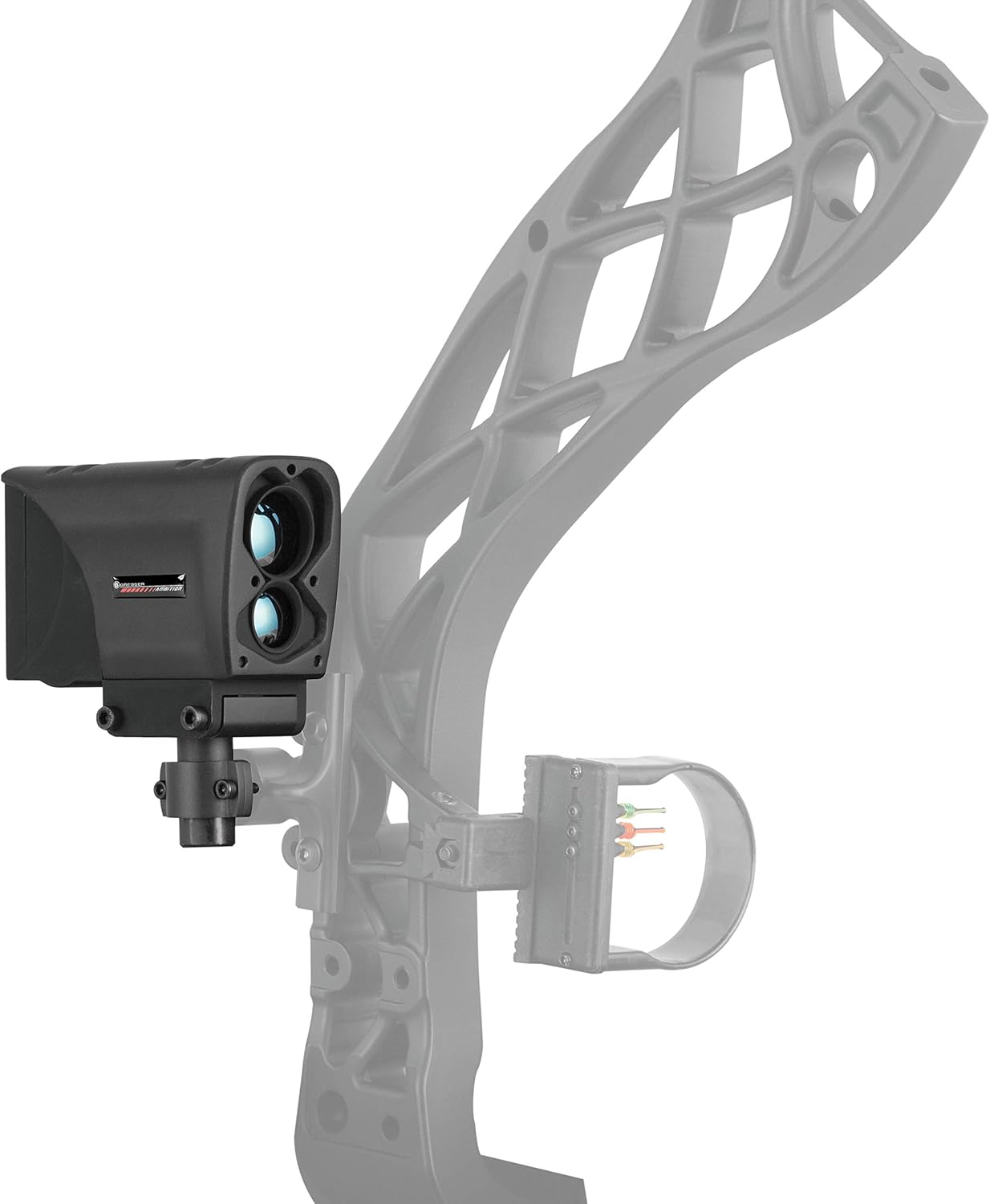
Figure 4.1: Rangefinder mounted on a compound bow.
This image illustrates the Bresser Ambition Rangefinder attached to a compound bow, demonstrating its integration with the bow's existing sight system.
5. Operating Instructions
5.1 Powering On/Off
To power on the device, press the main power button located on the unit. The OLED display will illuminate. The device will automatically power off after a period of inactivity to conserve battery life.
5.2 Measuring Distance
The Bresser Ambition Rangefinder can accurately measure distances from 5 to 100 yards with an accuracy of +/- 1 yard.
- Aim the rangefinder at your target.
- Press the measurement button (often the same as the power button, or a dedicated button). The distance will be displayed on the OLED screen.
5.3 Scan Mode
The scan mode provides continuous distance readings as you pan the rangefinder across different targets. This is particularly useful for tracking moving targets or quickly assessing distances in varied terrain.
- To activate scan mode, press and hold the measurement button.
- While holding the button, slowly pan the rangefinder across the area you wish to measure. The display will update continuously with the distance to objects in the laser's path.
- Release the button to exit scan mode.

Figure 5.1: Rear view showing the OLED display.
This image provides a rear view of the rangefinder, highlighting its OLED display which shows distance readings clearly, even when mounted on a bow.
6. Maintenance
6.1 Cleaning
To ensure optimal performance and longevity of your rangefinder:
- Use the provided lens cleaning cloth to gently wipe the optical lenses. Avoid using abrasive materials or harsh chemicals.
- For the body of the unit, a soft, damp cloth can be used to remove dirt or debris.
- Ensure the device is dry before storing.
6.2 Storage
When not in use, store the rangefinder in the provided microfiber bag to protect it from dust and scratches. Store in a cool, dry place away from direct sunlight and extreme temperatures.
6.3 Water Resistance
The Bresser Ambition Rangefinder is designed with a waterproof rating of IP54, providing protection against splashing water from any direction. While it is resistant to light rain, it should not be submerged in water.
7. Troubleshooting
| Problem | Possible Cause | Solution |
|---|---|---|
| Device does not power on. | Low or dead battery; incorrect battery installation. | Replace the CR2 battery; ensure correct polarity. |
| Inaccurate distance readings. | Dirty lenses; obstruction in laser path; target too far or too close. | Clean lenses with provided cloth; ensure clear line of sight; verify target is within 5-100 yard range. |
| Display is dim or flickering. | Low battery; extreme temperature. | Replace battery; allow device to acclimate to moderate temperatures. |
8. Specifications
| Feature | Detail |
|---|---|
| Brand | BRESSER |
| Model Number | LR-ARCH |
| Color | Black |
| Measuring Range | 5 to 100 yards |
| Accuracy | +/- 1 yard |
| Display Type | OLED |
| Battery Type | CR2 (included) |
| Water Resistance Level | IP54 (Waterproof) |
| Item Weight | 0.5 Pounds |
| Item Dimensions (LxWxH) | 7.28 x 5.67 x 3.86 inches |
9. Warranty Information
For detailed warranty information regarding your Bresser Ambition Rangefinder, please refer to the warranty card included with your product or visit the official BRESSER website. Warranty terms and conditions may vary by region and product.
10. Customer Support
If you encounter any issues or have questions not covered in this manual, please contact BRESSER customer support. Contact information can typically be found on the BRESSER website or on the product packaging.
For more information about BRESSER products, visit: BRESSER Store on Amazon
Ask a question about this manual
Ask about setup, troubleshooting, compatibility, parts, safety, or missing instructions. Manuals+ will review the question and use this page’s manual context to help answer it.