
Introduction
This manual provides essential information for the proper installation, operation, and maintenance of your Focal IMPULSE4.320 Ultra Compact 4/3/2-Channel Amplifier. Please read this manual thoroughly before attempting installation or operation to ensure optimal performance and safety.
The Focal IMPULSE4.320 is a D-Class ultra-compact amplifier designed for easy integration into various vehicle audio systems. It offers versatile 4, 3, or 2-channel operation and is compatible with both original equipment manufacturer (OEM) and aftermarket head units.
Product Overview

Figure 1: Front view of the Focal IMPULSE4.320 Ultra Compact Amplifier.
The IMPULSE4.320 amplifier is engineered for compact size, allowing for flexible installation options within a vehicle's dashboard or other confined spaces. Its D-Class architecture ensures efficient power delivery.

Figure 2: The amplifier shown next to a pen, illustrating its compact dimensions.
Setup and Installation
Proper installation is crucial for the amplifier's performance and longevity. It is recommended that installation be performed by a qualified professional.
Mounting
The amplifier's compact design allows for surface mounting in various locations. Ensure the chosen location provides adequate ventilation and is protected from moisture and excessive heat.

Figure 3: Top view of the amplifier, highlighting its heat sink design for thermal management.
Wiring Connections
The IMPULSE4.320 supports both high-level (speaker level) and low-level (RCA) inputs. It is compatible with all head units, including those with automatic start-up features.
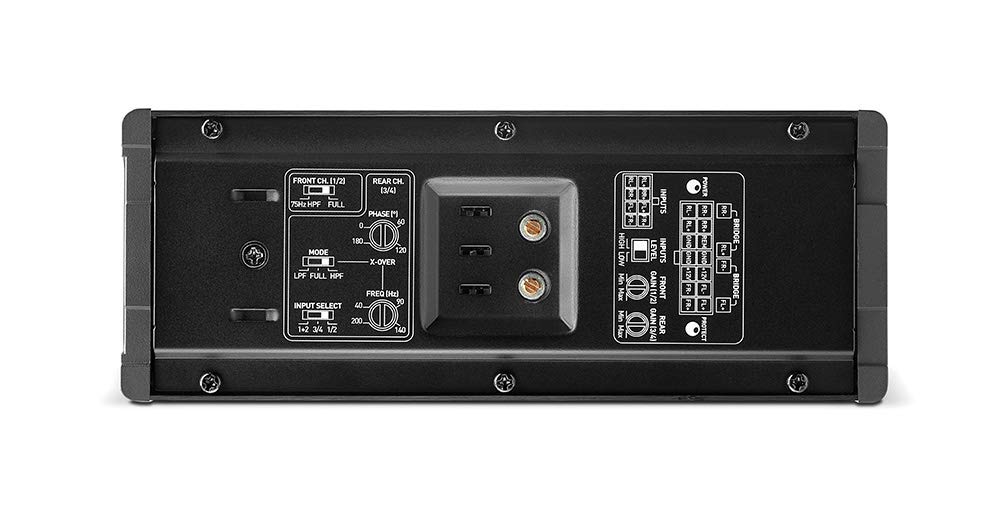
Figure 4: Control panel of the amplifier, showing input select, gain controls, and crossover settings.

Figure 5: Power and speaker output terminals for wiring connections.
- Power Connection: Connect the main power cable to the vehicle's battery, ensuring an inline fuse is installed close to the battery. Connect the ground cable to a clean, unpainted metal surface on the vehicle chassis.
- Remote Turn-On: The amplifier features automatic start-up with your original head unit. If your head unit does not provide a remote turn-on signal, the amplifier can detect an audio signal to power on.
- Input Connections:
- High-Level Input: Connect directly to your head unit's speaker outputs. The high input is sensitive; if using this method, set gains to approximately 1/4 of the maximum.
- Low-Level Input (RCA): For optimal control and sound quality, use RCA cables from your head unit's pre-outs.
- Speaker Outputs: Connect your speakers to the appropriate output terminals. The amplifier supports 4, 3, or 2-channel configurations. Refer to the wiring diagram in the full product manual for specific bridging instructions.
- ISO Compatibility: Optional ISO cable accessories (IY-AC Impulse 4.320) are available for semi "Plug&Play" setups with compatible head units.
Operating the Amplifier
Gain Adjustment
The gain controls (labeled "GAIN") on the amplifier's control panel allow you to match the amplifier's input sensitivity to the output level of your head unit. Start with the gain set to minimum and slowly increase it until you achieve the desired volume without distortion. As noted, if using high-level inputs, a gain setting around 1/4 is often sufficient due to the input's sensitivity.
Crossover Settings
The amplifier includes adjustable crossover filters (LPF/HPF) to optimize the frequency response for your speakers. Adjust these settings to prevent speakers from playing frequencies outside their optimal range, which can improve sound clarity and prevent damage.
Channel Mode Selection
The IMPULSE4.320 can operate in 4-channel, 3-channel (e.g., 2 channels for front speakers + 1 bridged channel for a subwoofer), or 2-channel (bridged) modes. Select the appropriate mode based on your speaker configuration.
Maintenance
The Focal IMPULSE4.320 amplifier requires minimal maintenance. Keep the unit clean and free from dust and debris. Ensure that all connections remain secure. Avoid exposing the amplifier to extreme temperatures or moisture.
Periodically check the wiring for any signs of wear or damage. If any issues are observed, consult a qualified technician for repair.
Troubleshooting
If you experience issues with your amplifier, refer to the following common troubleshooting steps:
- No Power:
- Check the inline fuse on the power cable.
- Verify all power and ground connections are secure.
- Ensure the remote turn-on signal (if used) is active, or that the automatic start-up feature is functioning correctly with an audio signal.
- No Sound:
- Confirm input cables (RCA or high-level) are properly connected to the head unit and amplifier.
- Check speaker wire connections at both the amplifier and the speakers.
- Ensure the head unit is powered on and playing audio.
- Verify gain settings are not set too low.
- Distorted Sound:
- Reduce the gain setting on the amplifier.
- Check for proper crossover settings.
- Ensure speaker impedance matches the amplifier's capabilities.
- Inspect speaker wires for shorts or damage.
If problems persist after performing these checks, contact Focal customer support or a qualified car audio technician.
Specifications
| Feature | Specification |
|---|---|
| CEA Power (4 Ohms) | 4 x 55W rms |
| Power Max (2 Ohms) | 4 x 80W rms |
| Power Bridged (4 Ohms) | 2 x 160W rms |
| Bandwidth | 10Hz / 20KHz |
| Minimum THD | 0.02% |
| SNR | 80 dBA |
| Weight | 1.2 lbs (0.54 kg) |
| Dimensions (L x W x H) | 6-7/8 x 2-5/8 x 1-7/8 inches (175 x 66.5 x 47mm) |
| Number of Channels | 4 (configurable to 3 or 2) |
| Mounting Type | Surface Mount |
Warranty Information
Focal products are designed and manufactured to the highest quality standards. For detailed warranty terms and conditions, please refer to the official Focal website or the warranty card included with your product. Keep your proof of purchase for any warranty claims.
Customer Support
For technical assistance, product inquiries, or service, please visit the official Focal website or contact their authorized customer support channels. You can find contact information and frequently asked questions on their website:


