
Introduction
The Jebao APP-6000 is a high-performance submersible pump designed for use in various water features, including fish ponds, fountains, and waterfalls. This pump is engineered for energy-efficient operation and is suitable for continuous duty applications. Its robust design ensures reliable water circulation and aeration for aquatic environments.
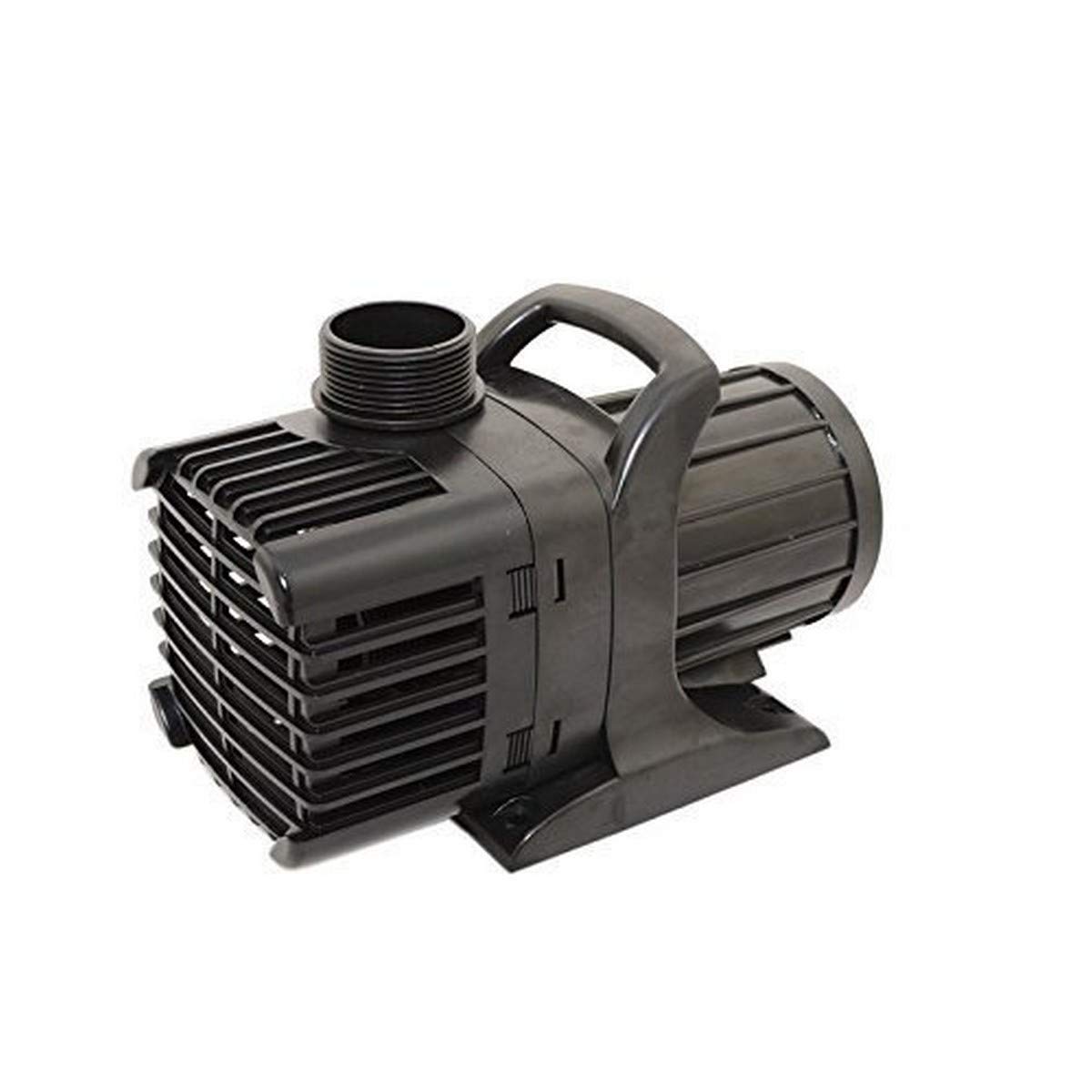
Image: The Jebao APP-6000 pump unit with its power cord.
Safety Instructions
Please read and understand all safety instructions before operating the pump. Failure to follow these instructions may result in electric shock, fire, or serious injury.
- Electrical Safety: This pump is UL Listed and equipped with a 3-prong US plug. Always connect to a properly grounded outlet. Do not remove the grounding prong. Do not use with extension cords unless they are rated for outdoor use and properly grounded.
- Submersion: The pump is designed for complete submersion in water. Never operate the pump dry, as this can cause severe damage to the motor.
- Water Quality: The pump is suitable for pumping particles up to 6mm in size. Larger particles may clog or damage the impeller.
- Temperature: Do not operate the pump in water temperatures exceeding 95°F (35°C) or below freezing.
- Maintenance: Always disconnect power before performing any maintenance, cleaning, or installation procedures.
- Children and Pets: Keep children and pets away from the pump and water feature during operation and maintenance.
- Fish Safety: The pump utilizes a powerful, efficient magnetic drive motor and is fish-safe as no oil is used in its operation.
Package Contents
Verify that all components are present and undamaged upon opening the package:
- Jebao APP-6000 Pump Unit
- 28-foot Power Cord with 3-prong US plug
- Multi-size Insert Fittings (accepts 1" ID to 2" ID flex tubing)
Features
- Versatile design ideal for fish ponds, fountains, and waterfall applications.
- Powerful and energy-efficient magnetic drive motor.
- Oil-free operation ensures safety for aquatic life.
- Designed for continuous duty operation.
- Capable of pumping particles up to 6mm in diameter.
- Completely submersible for reliable underwater performance.
- UL Listed for safety compliance.
- Equipped with a long 28-foot power cord and a 3-prong US plug.
Specifications
| Model Number | APP-6000 |
| Maximum Flow Rate | 6300 Gallons Per Hour (GPH) |
| Maximum Lifting Height (Max-Head) | 24.6 Feet |
| Voltage | 115 Volts (AC) |
| Amperage | 2.95A |
| Inlet/Outlet Size | 2" MPT (Male Pipe Thread) |
| Accepts Tubing | 1" ID to 2" ID Flex Tubing |
| Product Dimensions (L x W x H) | 11" x 5" x 6" |
| Item Weight | 11 Pounds |
| Power Source | Corded Electric |
| Material | Plastic |
| Cord Length | 28 Feet |
Setup & Installation
Follow these steps for proper installation of your Jebao APP-6000 pump:
- Placement: Position the pump in the deepest part of your pond or water feature, ensuring it is fully submerged. Avoid placing it directly on the bottom sediment to prevent clogging. Consider using a pump stand or placing it on a flat, stable surface.
- Connect Tubing: Attach the appropriate multi-size insert fitting to the pump's outlet. Connect your flexible tubing (1" ID to 2" ID) securely to the fitting. Use a hose clamp if necessary to ensure a watertight seal.
- Route Power Cord: Carefully route the 28-foot power cord to a grounded electrical outlet. Ensure the cord is not kinked, pinched, or exposed to sharp objects. Avoid placing the cord where it can be tripped over.
- Electrical Connection: Plug the 3-prong US plug into a properly grounded, weather-protected GFCI (Ground Fault Circuit Interrupter) outlet.
- Final Check: Before powering on, ensure the pump is fully submerged and all connections are secure.

Image: The Jebao APP-6000 pump shown with included multi-size hose fittings for connection.
Operating Instructions
The Jebao APP-6000 pump is designed for straightforward operation:
- Power On: Once installed and fully submerged, plug the pump into the grounded GFCI outlet. The pump will begin operating immediately.
- Monitor Flow: Observe the water flow from your fountain or waterfall to ensure it is consistent and adequate.
- Continuous Operation: This pump is designed for continuous duty. It can run 24/7 if desired, provided it remains fully submerged and free from obstructions.
- Power Off: To stop the pump, simply unplug it from the electrical outlet.
Maintenance
Regular maintenance will ensure the longevity and optimal performance of your pump:
- Disconnect Power: Always unplug the pump from the power source before attempting any maintenance.
- Clean Impeller: Periodically remove the pump from the water and inspect the impeller chamber. Debris such as leaves, algae, or small stones can accumulate and reduce performance or damage the impeller. Clean the impeller and its housing with a soft brush and clean water.
- Check Intake Screen: The pump features an intake screen to filter larger particles. Regularly clean this screen to prevent blockages and maintain optimal water flow.
- Inspect Tubing: Check the connected tubing for kinks, blockages, or leaks that could impede water flow.
- Winterization: In regions with freezing temperatures, remove the pump from the pond before the first freeze. Clean it thoroughly and store it in a frost-free location, submerged in a bucket of water to keep seals moist, or completely dry if recommended by the manufacturer.
Troubleshooting
| Problem | Possible Cause | Solution |
| Pump does not run | No power to the pump; Impeller jammed; Motor failure | Check electrical connection and GFCI outlet; Disconnect power and clean impeller; Contact manufacturer support if motor failure is suspected. |
| Reduced water flow | Clogged intake screen or impeller; Kinked or blocked tubing; Insufficient water level | Disconnect power and clean intake screen and impeller; Inspect and clear tubing; Ensure pump is fully submerged. |
| Pump is noisy | Debris in impeller; Pump not seated properly; Air in system | Disconnect power and clean impeller; Ensure pump is on a stable, flat surface; Check for air pockets in tubing. |
Warranty & Support
For specific warranty details, please refer to the documentation provided at the time of purchase or contact your retailer. Jebao products typically come with a manufacturer's warranty covering defects in materials and workmanship.
If you require technical assistance, replacement parts, or have questions not covered in this manual, please contact Jebao customer support through their official website or the retailer from whom you purchased the product.


