
1. Introduction
This instruction manual provides essential information for the safe and effective use of your Eurolite 3-Socket IP44 Outdoor Power Strip. Please read this manual thoroughly before installation and operation, and retain it for future reference. This power strip is designed for outdoor use, offering three splash-proof sockets with protective covers and a 3-meter cable.
2. Product Overview
The Eurolite 3-Socket IP44 Outdoor Power Strip is designed to provide convenient and safe power distribution in outdoor environments. It features a robust construction and protective covers for its sockets.
Components:
- Power strip unit with integrated cable.
- Three (3) IP44-rated sockets with individual protective hinged covers.
- One (1) illuminated ON/OFF switch.
- One (1) 3-meter power cable with a Schuko plug.
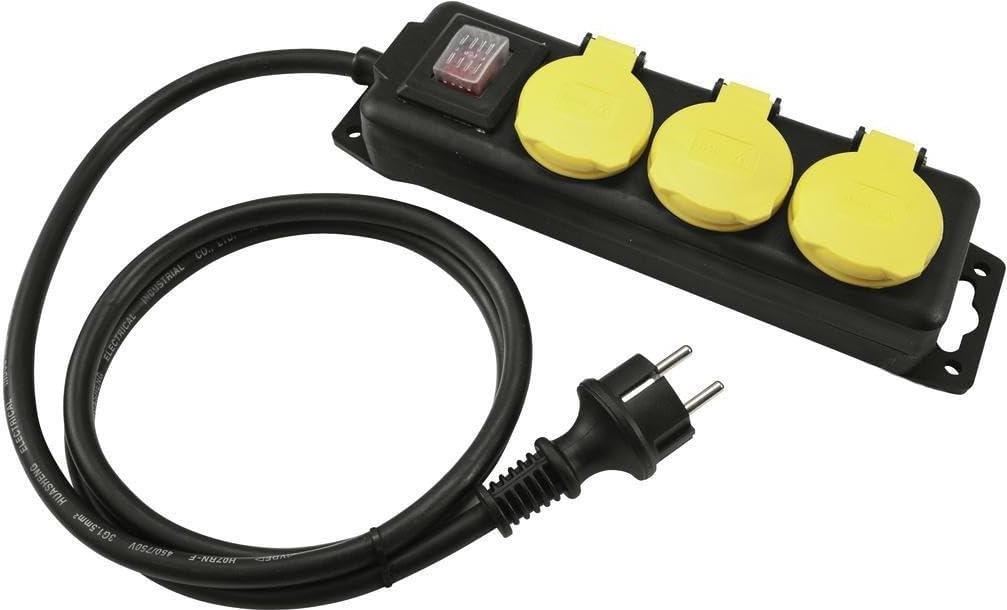
Image 1: Eurolite 3-Socket IP44 Outdoor Power Strip. This image displays the black power strip unit with three yellow, hinged, splash-proof socket covers. A red illuminated ON/OFF switch is visible on the unit. The coiled 3-meter black power cable with a Schuko plug is also shown.
3. Setup
- Unpack: Carefully remove the power strip from its packaging. Inspect the unit, cable, and plug for any signs of damage. Do not use if damaged.
- Placement: Position the power strip on a flat, stable surface in the desired outdoor location. Ensure it is not submerged in water or placed in areas prone to standing water. The IP44 rating protects against splashing water, not immersion.
- Secure (Optional): The power strip housing may include mounting holes for permanent installation. Use appropriate screws and anchors for your surface if securing the unit.
- Connect to Power: Plug the power strip's Schuko plug into a suitable, grounded outdoor power outlet. Ensure the outlet is also rated for outdoor use and protected by a Residual Current Device (RCD) for added safety.
4. Operating Instructions
- Power On/Off: Use the illuminated red ON/OFF switch on the power strip to control the power supply to all three sockets. When the switch is illuminated, power is supplied.
- Connecting Devices: Lift the protective yellow cover of an available socket. Insert the plug of your device firmly into the socket.
- Protecting Sockets: When a socket is not in use, ensure its protective yellow cover is securely closed to maintain the IP44 splash-proof rating.
- Disconnecting Devices: Before removing a device's plug, it is recommended to switch off the power strip using the ON/OFF switch. Then, carefully pull the plug straight out from the socket.
Important: Always ensure the total power consumption of all connected devices does not exceed the maximum rated capacity of the power strip.
5. Maintenance
- Cleaning: Always unplug the power strip from the main power supply before cleaning. Wipe the unit with a soft, damp cloth. Do not use abrasive cleaners or solvents. Ensure the unit is completely dry before reconnecting to power.
- Inspection: Regularly inspect the power strip, cable, and plug for any signs of wear, cuts, cracks, or other damage. Pay close attention to the socket covers to ensure they seal properly. If any damage is found, discontinue use immediately and replace the unit.
- Storage: When not in use for extended periods, store the power strip in a dry, clean, and protected area, away from direct sunlight and extreme temperatures. Coil the cable neatly to prevent kinks or damage.
6. Troubleshooting
| Problem | Possible Cause | Solution |
|---|---|---|
| No power to connected devices. |
|
|
| Socket covers do not close properly. |
|
|
7. Specifications
- Brand: Eurolite
- Model: 3-Socket IP44 SW 3m
- Number of Sockets: 3
- Protection Rating: IP44 (Splash-proof)
- Cable Length: 3 meters
- Cable Type: H07RN-F 3G1.5mm²
- Voltage Rating: 450/750V
- Item Weight: 798 Grams
- International Article Code (EAN): 04026397563856
8. Safety Information
Failure to follow these safety instructions may result in fire, electric shock, or injury.
- Electrical Safety: Always ensure the power strip is connected to a properly grounded outlet. Do not use if the cable, plug, or housing is damaged.
- IP44 Rating: The IP44 rating indicates protection against splashing water from any direction. It is NOT waterproof and should not be submerged in water or used in areas where it could be flooded.
- Overload Protection: Do not exceed the maximum power rating of the power strip. Overloading can cause overheating and fire.
- Children and Pets: Keep the power strip and connected cables out of reach of children and pets to prevent accidents.
- Modifications: Do not attempt to open, modify, or repair the power strip. This can void the warranty and create safety hazards. Contact qualified personnel for repairs.
- Environmental Conditions: Avoid using the power strip in extreme temperatures or highly corrosive environments.
- Unplug When Not in Use: Disconnect the power strip from the main power supply when not in use or during electrical storms.
9. Warranty and Support
This product is covered by a standard manufacturer's warranty. For specific warranty terms and conditions, please refer to the documentation provided with your purchase or contact your retailer. For technical support or service inquiries, please contact Eurolite customer service or your authorized dealer.
For more information, visit the Eurolite brand page.
