
1. Introduction
The CELLSTAR CSD-610FHR is a high-performance, separate-type drive recorder designed for comprehensive vehicle surveillance. Its unique design allows for flexible installation of both the main unit and the camera, providing optimal coverage for your driving and parking needs.
Key Features:
- Separate Camera Design: Allows flexible mounting of the camera in various locations, not just the front windshield.
- HDR (High Dynamic Range) Technology: Ensures clear video recording by suppressing overexposure and underexposure, even in rapidly changing light conditions.
- Parking Mode: Records for up to 12 hours after the engine is turned off (requires optional GDO-10 constant power cord).
- Full HD Recording: Captures high-resolution video with a 2-megapixel SONY Exmor CMOS sensor.
- 3G Sensor: Automatically detects impacts and records emergency events.
- SD Card Management: Includes a 16GB microSD card and features a patent-pending system for SD card format guidance and error monitoring.
- Radar Detector Intercommunication: Compatible with CELLSTAR radar detectors for integrated operation (requires optional GDO-06/GDO-07/GDO-16 communication cord for 12V vehicles).
- Wide Voltage Compatibility: Supports both 12V and 24V vehicles.
This manual provides essential information for the proper installation, operation, and maintenance of your CSD-610FHR drive recorder.

Figure 1: The drive recorder can provide crucial evidence in dangerous driving situations.
2. Setup and Installation
The CSD-610FHR features a separate main unit and camera, allowing for flexible installation. Ensure the camera has a clear view of the road and the main unit is accessible for operation without obstructing your driving view.
2.1 Included Components
Before installation, verify that all components are present:
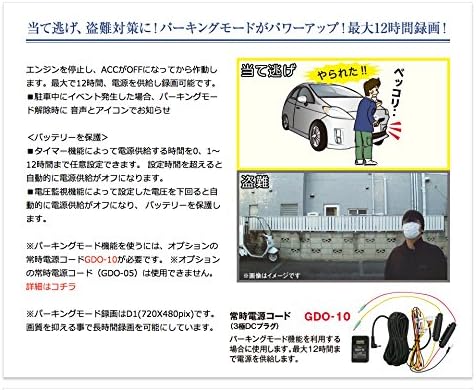
Figure 2: All components included in the CSD-610FHR package.
- Drive Recorder Main Unit
- Separate Camera
- Mount Base (x2)
- Ball Joint (for main unit)
- Ball Joint (for dashboard)
- Double-sided Tape (for glass)
- Double-sided Tape (for dashboard)
- Camera Connection Cord (9.0m)
- DC Cord (3-pole plug)
- Degreasing Cleaner
- 16GB microSD Card (with case and adapter)
- Cord Clips (x5)
- Instruction Manual (this document)
2.2 Camera Installation Examples
The separate camera can be installed on the front windshield, dashboard, or rear window. Choose a location that provides an unobstructed view and does not interfere with airbags or driver visibility.
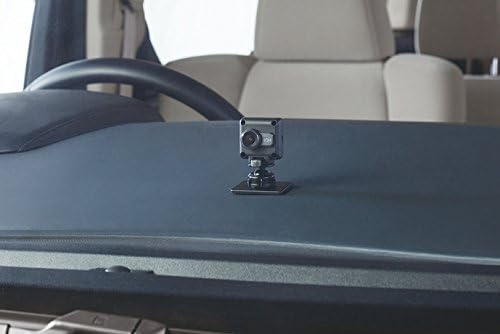
Figure 3: Camera mounted on the dashboard.

Figure 4: Camera mounted on the rear window.

Figure 5: Rear camera installation example.

Figure 6: Flexible camera installation options.
2.3 Main Unit Installation Examples
The main unit can be installed on the dashboard or near the steering wheel, ensuring the display is visible and controls are accessible.
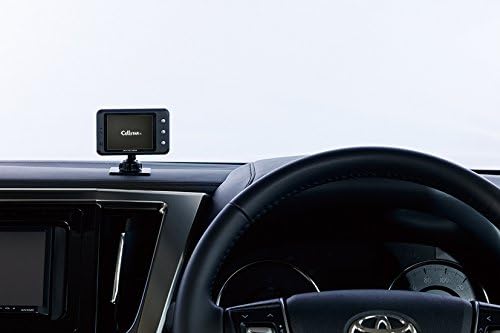
Figure 7: Main unit mounted on the dashboard.

Figure 8: Main unit mounted near the steering wheel.
3. Operating Instructions
3.1 Basic Recording
Once powered on, the CSD-610FHR automatically begins continuous recording. The recording status is indicated on the 2.4-inch LCD screen. Videos are saved to the included 16GB microSD card.
3.2 HDR (High Dynamic Range) Function
The HDR function enhances video quality by correcting for extreme brightness differences, preventing washed-out whites and crushed blacks. This ensures clear recordings even when transitioning from dark tunnels to bright sunlight, or during night driving with strong headlights.

Figure 9: HDR function comparison: HDR Off (left) vs. HDR On (right).
3.3 Parking Mode
The parking mode feature allows the drive recorder to continue monitoring and recording for up to 12 hours after the engine is turned off (ACC OFF). If an event (e.g., impact) occurs during parking, the device will notify you with an audible alert and an icon on the screen upon your return.
Important: Parking mode requires the optional GDO-10 constant power cord (sold separately) for continuous power supply. The GDO-05 constant power cord is not compatible.
- Battery Protection: The system includes a timer function (0-12 hours) and a voltage monitoring function to automatically cut off power and protect your vehicle's battery if voltage drops too low.
- Parking mode records in D1 (720x480 pixels) to allow for longer recording times.

Figure 10: Parking mode in action and the GDO-10 optional power cord.
3.4 Radar Detector Intercommunication
The CSD-610FHR can link with compatible CELLSTAR radar detectors using a single cable. This allows for integrated operation, where radar detector information (e.g., GPS data, speed) can be displayed on the drive recorder's screen, and the drive recorder can be operated via the radar detector's remote control.
Important: This feature requires an optional intercommunication cord (GDO-06, GDO-07, or GDO-16) for 12V vehicles.
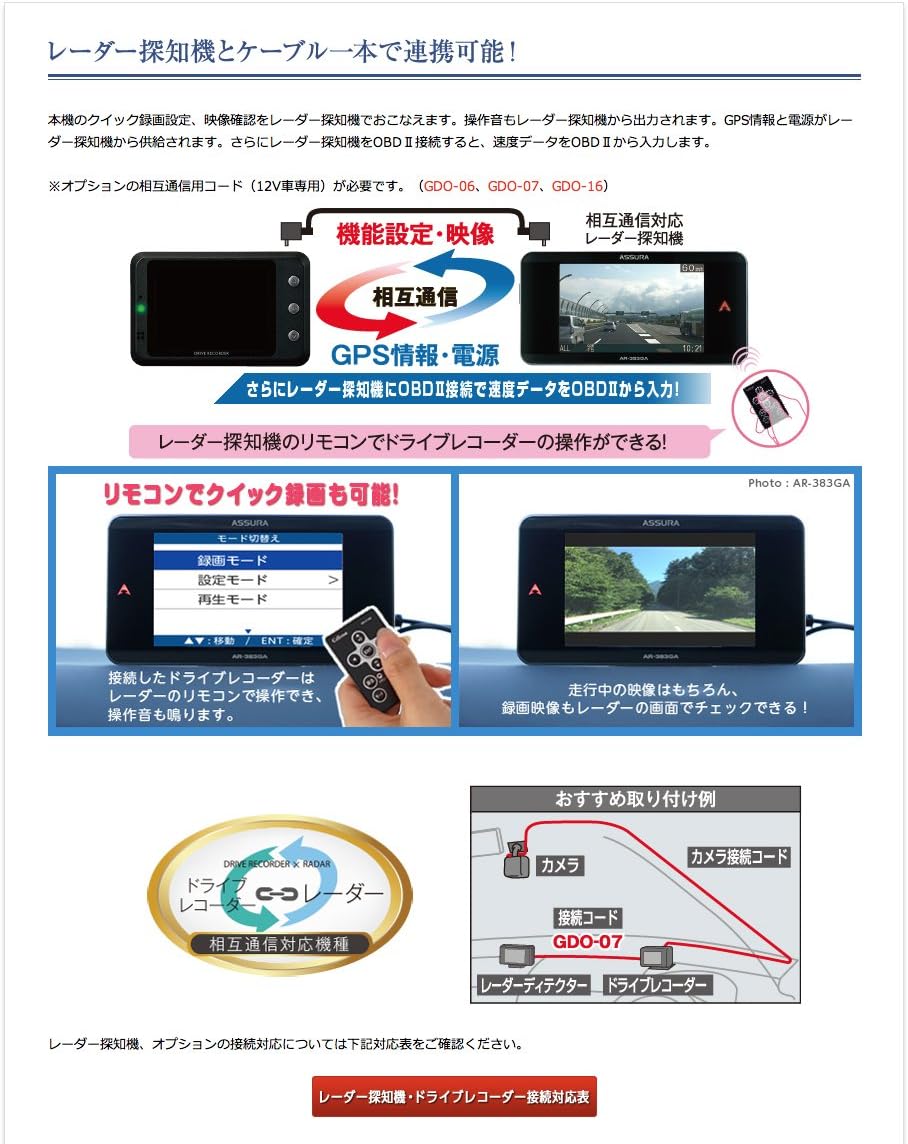
Figure 11: Radar detector intercommunication setup and remote control operation.
4. Maintenance
4.1 MicroSD Card Formatting
To ensure stable recording performance and prevent data corruption, it is recommended to regularly format the microSD card. The device will provide a notification if the microSD card has not been formatted for a certain period. Refer to the on-screen menu for formatting instructions.
4.2 Cleaning
Wipe the main unit and camera lens with a soft, dry cloth. Do not use abrasive cleaners or solvents, as they may damage the device. Ensure the lens is clean for optimal video quality.
5. Troubleshooting
If you encounter issues with your CSD-610FHR, please refer to the following common problems and solutions:
- "Camera not connected" error: This error often indicates an issue with the camera connection or the microSD card.
- Check that the camera connection cord is securely plugged into both the main unit and the camera.
- Try removing and reinserting the microSD card.
- If the issue persists, try using a different compatible microSD card.
- SD card write protection error: If the device displays an error related to SD card write protection, it may indicate a faulty microSD card.
- Ensure the write protection switch on the microSD card adapter (if used) is in the unlocked position.
- Format the microSD card using the device's menu or a computer.
- If the problem continues, replace the microSD card with a new, compatible one.
- Screen is dark or difficult to see:
- Adjust the brightness settings in the device menu.
- Ensure the camera lens is clean and free from obstructions.
- While HDR improves image quality, extreme low-light conditions may still result in less detailed recordings.
For further assistance, please contact CELLSTAR customer support or visit their official website.
6. Specifications
| Feature | Specification |
|---|---|
| Brand | CELLSTAR |
| Model Name | CSD-610FHR |
| Video Capture Resolution | 1080p (Full HD) |
| Screen Size | 2.4 inches |
| Display Type | LCD |
| Optical Sensor Technology | CMOS (SONY Exmor) |
| Mounting Type | Adhesive Mount |
| Item Weight | 66 grams |
| Power Voltage | 12V/24V compatible |
| Special Features | Parking Monitor, HDR, 3G Sensor, Radar Detector Intercommunication |
| Included Components | Camera connection cord (9.0m), Mount base, Double-sided tape (for glass), Ball joint (for dashboard), Ball joint (for main unit), Double-sided tape (for dashboard), DC cord (3-pole plug), Cord clips (5 pcs), 16GB microSD card (with case/adapter), Degreasing cleaner, Instruction manual |
| Battery Included | No |
7. Warranty and Support
7.1 Product Warranty
The CELLSTAR CSD-610FHR Drive Recorder comes with a 3-year manufacturer's warranty from the date of purchase. This warranty covers defects in materials and workmanship under normal use. Please retain your proof of purchase for warranty claims.
7.2 Customer Support
For technical support, troubleshooting assistance, or warranty inquiries, please visit the official CELLSTAR website or contact their customer service department. Detailed contact information can typically be found on the manufacturer's website or in the product packaging.
Official Website: https://www.cellstar.co.jp/