
Southwire B600
Southwire B600 Contractor Telephone Test Set
Model: B600
Introduction
The Southwire B600 Professional Telephone Test Set is a robust and reliable tool designed for telecommunications professionals. It features "Hi-Z" monitoring to prevent disruption of network traffic, high and low volume settings, a polarity LED, and tone & pulse modes. Equipped with ABN (Angled Bed of Nails) clips and rugged RJ45 and RJ11 plugs, this test set provides versatile connectivity for various testing scenarios.
Safety Information
WARNING:
- For use on analog phone circuits only. Do not connect to digital lines or power circuits.
- This product contains a chemical known to the State of California to cause cancer and birth defects or other reproductive harm. Wash hands after handling.
- Always ensure proper connection and disconnection procedures to avoid electrical shock or damage to equipment.
- Do not expose the unit to excessive moisture or extreme temperatures.
Product Overview
The Southwire B600 test set is designed for ease of use and durability, featuring a double-molded housing for comfortable handling and protection.

The Southwire B600 Contractor Telephone Test Set, showing the main unit with keypad, speaker, and microphone, connected to the ABN (Angled Bed of Nails) clips via RJ45 and RJ11 plugs.
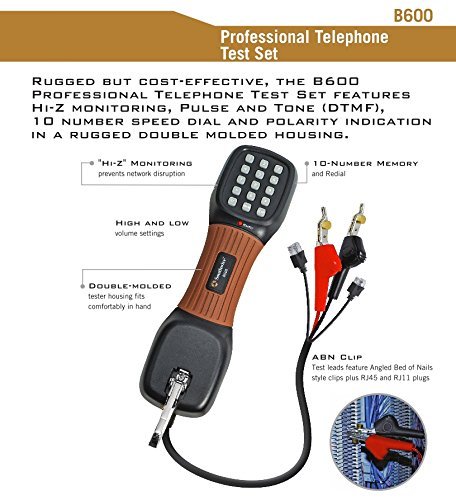
Diagram illustrating key features of the B600 test set, including 'Hi-Z' monitoring, 10-number memory and redial, high and low volume settings, double-molded housing, and ABN clips with RJ45 and RJ11 plugs.
Key Features:
- "Hi-Z" Monitoring: Prevents disruption of network traffic during line monitoring.
- Volume Settings: Adjustable high and low volume for comfortable listening.
- Polarity LED: Indicates line polarity for quick identification.
- Tone & Pulse Modes: Supports both dialing modes for compatibility with various systems.
- ABN Clips: Angled Bed of Nails clips provide secure and reliable connections to punch down blocks.
- Rugged Plugs: Includes durable RJ45 and RJ11 plugs for direct connection to jacks.
- Last Number Redial: Conveniently redials the last number dialed.
- 10 Number Memory: Stores up to 10 frequently used phone numbers for quick access.
- Double-Molded Housing: Provides enhanced durability and a comfortable grip.
Setup
Battery Installation
The Southwire B600 requires one (1) CR2 battery for operation. A battery is included with the unit. To install or replace the battery:
- Locate the battery compartment cover on the back of the unit.
- Open the cover.
- Insert the CR2 battery, ensuring correct polarity (+/-) as indicated inside the compartment.
- Close the battery compartment cover securely.
Connecting the Test Set
The B600 offers multiple connection options:
- RJ11 Plug: For direct connection to standard telephone wall jacks or patch panels.
- RJ45 Plug: For direct connection to Ethernet jacks, typically used for testing voice-over-IP (VoIP) lines or for continuity checks on data lines (ensure no active data traffic).
- ABN (Angled Bed of Nails) Clips: For connecting directly to punch down blocks or exposed wire pairs.

Close-up view of the Angled Bed of Nails (ABN) clips connected to a telecommunications punch down block, demonstrating their use for direct line access.
Operating Instructions
Basic Operation
The B600 features several switches on its back for mode selection and volume control.

Rear view of the Southwire B600 test set, showing the Pulse/Tone switch, Hi-Z/Talk/Monitor switch, and High/Low Volume switch.
- PULSE/TONE Switch: Selects between Pulse (rotary) dialing and Tone (DTMF) dialing. Ensure the correct mode is selected for the system you are testing.
- HI-Z/TALK/MONITOR Switch:
- HI-Z (High Impedance): For passive monitoring of a line without disrupting service.
- TALK: Activates the test set for active communication or dialing.
- MONITOR: Allows listening to line activity.
- H/L VOLUME Switch: Adjusts the listening volume to High or Low.
Making Calls
- Connect the test set to the desired telephone line using the appropriate plug (RJ11, RJ45, or ABN clips).
- Set the HI-Z/TALK/MONITOR switch to TALK.
- Select the appropriate dialing mode (PULSE or TONE) using the PULSE/TONE switch.
- Dial the desired number using the keypad.
- Adjust the volume using the H/L VOLUME switch as needed.
Monitoring Lines
- Connect the test set to the line.
- Set the HI-Z/TALK/MONITOR switch to HI-Z for non-disruptive monitoring or MONITOR for general listening.
- Listen for dial tone, busy signals, or voice traffic.
- Observe the Polarity LED for line polarity indication.
Using Memory and Redial
- Storing Numbers: Refer to the detailed instructions in the full manual for programming the 10-number memory.
- Redialing: Press the dedicated redial button (RD/P) to redial the last number dialed.
Maintenance
Cleaning
To clean the test set, wipe it with a soft, damp cloth. Do not use abrasive cleaners or solvents. Ensure the unit is dry before storage or next use.
Battery Replacement
Replace the CR2 battery when the unit's performance degrades or it fails to power on. Follow the battery installation steps outlined in the Setup section.
Troubleshooting
- No Dial Tone:
- Check all connections to ensure they are secure.
- Verify the line is active and not disconnected.
- Ensure the HI-Z/TALK/MONITOR switch is set to TALK.
- Poor Audio Quality:
- Adjust the H/L VOLUME switch.
- Check for loose connections.
- Replace the battery if it is low.
- Buttons Not Responding:
- Ensure the battery has sufficient charge.
- Verify the unit is in TALK mode for dialing functions.
Specifications
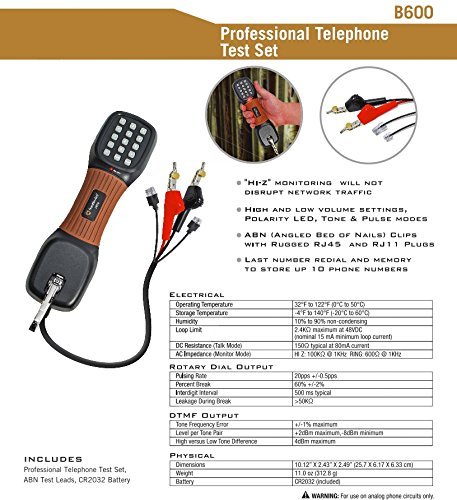
A detailed table outlining the electrical, rotary dial output, DTMF output, and physical specifications of the Southwire B600 Professional Telephone Test Set.
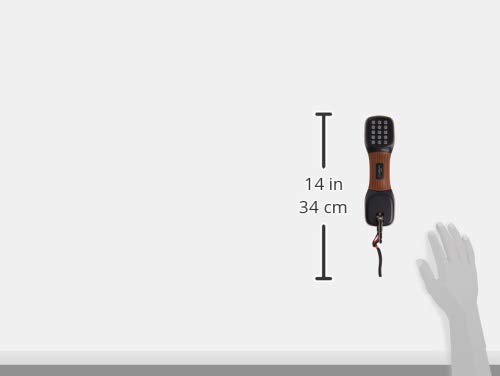
Visual representation of the Southwire B600 test set's dimensions, indicating a length of approximately 14 inches (34 cm).
| Specification | Detail |
|---|---|
| Model Number | B600 |
| Product Dimensions | 1 x 1 x 1 inches |
| Item Weight | 11 ounces |
| Batteries | 1 CR2 battery (included) |
| Manufacturer | Southwire |
| Country of Origin | USA |
| Date First Available | April 22, 2016 |
Warranty and Support
Warranty Information
The Southwire B600 Professional Telephone Test Set comes with a 5-year warranty. For detailed warranty terms and conditions, please visit the official Southwire Tools website.
Official Warranty Information: www.southwiretools.com
Customer Support
For technical assistance, troubleshooting, or product inquiries, please contact Southwire customer support through their official website or the contact information provided in your product packaging.
Related documentsB600


Ask a question about this manual
Ask about setup, troubleshooting, compatibility, parts, safety, or missing instructions. Manuals+ will review the question and use this page’s manual context to help answer it.