
Introduction
This manual provides comprehensive instructions for the installation, operation, and maintenance of your Basalte Eve Tablet Wall Mount for iPad Pro. Designed for seamless integration into your living or working space, this wall mount offers a secure and elegant solution for housing your Apple iPad Pro. Please read this manual thoroughly before installation and use to ensure proper functionality and safety.

Image: Front view of the Basalte Eve Tablet Wall Mount with an iPad Pro securely in place. The mount is designed to blend discreetly with the wall, providing a clean and integrated look for your tablet.
Product Features
- Complete article, consisting of a frame and a cover.
- Satin white color finish for a sleek aesthetic.
- Supports both vertical and horizontal mounting orientations.
- Designed for on-wall installation.
- Specifically compatible with Apple iPad Pro models.
Package Contents
The Basalte Eve Tablet Wall Mount package includes all necessary components for assembly and installation. Each package contains:
- 1x Wall Mount Frame
- 1x Front Cover
- Installation Hardware (screws, wall anchors, etc. - specific items may vary)
Setup and Installation
Before beginning installation, ensure you have the appropriate tools, including a drill, screwdriver, level, and measuring tape. It is recommended to consult a professional if you are unsure about wall mounting procedures.
Mounting Instructions
- Prepare the Mounting Location: Choose a suitable wall location, ensuring it is free from electrical wires or plumbing. Use a level to mark the desired position for the wall mount frame. Refer to the dimensions diagram for precise measurements.

Image: Technical diagram illustrating the precise dimensions of the Basalte Eve Tablet Wall Mount, including overall size and component measurements for accurate installation planning.
- Attach the Wall Mount Frame: Drill pilot holes at the marked locations. Insert appropriate wall anchors if necessary, then secure the wall mount frame to the wall using the provided screws. Ensure the frame is firmly attached and level.
- Insert the iPad Pro: Carefully slide your Apple iPad Pro into the wall mount frame. The design allows for easy insertion and removal while providing a secure fit.
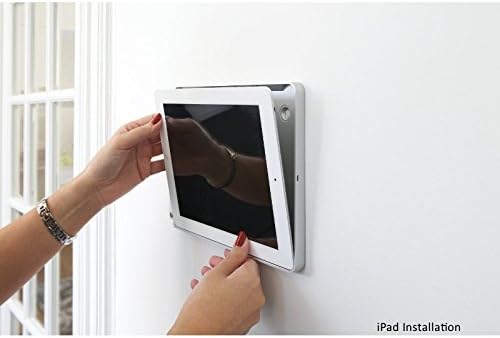
Image: A user's hands carefully guiding an iPad into the Basalte Eve Tablet Wall Mount, demonstrating the simple and secure insertion process.
- Secure the Tablet: Once the iPad is in place, use the small securing pin (if provided) to lock the tablet into the mount. This prevents accidental removal and adds an extra layer of security.

Image: A close-up view of hands inserting a small, L-shaped pin into a discreet opening on the Basalte Eve Tablet Wall Mount, securing the iPad within the frame.
- Attach the Front Cover: Snap the front cover onto the mounted frame. This cover provides a clean finish and conceals the mounting hardware.

Image: The Basalte Eve Tablet Wall Mount seamlessly integrated into a modern dining room, showcasing its discreet and elegant appearance when installed.
Operating Instructions
Once installed, the Basalte Eve Tablet Wall Mount functions as a fixed docking station for your iPad Pro. The iPad's screen remains fully accessible for touch interaction. To operate your iPad, simply use its touch interface as you normally would. The mount does not interfere with the iPad's functionality, Wi-Fi, or cellular signals.
- Charging: Ensure the iPad's charging port is accessible or use a compatible charging cable that can be routed through the mount if applicable (check specific model features).
- Orientation: The mount supports both portrait and landscape orientations. Ensure you install it in your preferred orientation, as changing it after installation requires re-mounting.
Maintenance
The Basalte Eve Tablet Wall Mount requires minimal maintenance to retain its appearance and functionality.
- Cleaning: Wipe the surface of the mount with a soft, damp cloth. Avoid using abrasive cleaners, solvents, or harsh chemicals, as these can damage the finish.
- Inspection: Periodically check the mounting screws to ensure they remain tight and secure. Do not overtighten.
- Tablet Removal: If you need to remove the iPad, carefully follow the reverse of the installation steps, ensuring the securing pin is removed first.
Troubleshooting
Common Issues and Solutions
- Issue: The mount feels loose on the wall.
Solution: Check the mounting screws. Gently tighten them if they are loose. If the issue persists, the wall anchors may need to be re-evaluated or replaced, or professional installation may be required.
- Issue: iPad does not fit correctly into the mount.
Solution: Ensure you have the correct Basalte Eve model for your specific iPad Pro generation. This mount is designed for Apple iPad Pro. Verify the iPad is inserted correctly and not obstructed by any foreign objects.
- Issue: Difficulty inserting or removing the securing pin.
Solution: Ensure the iPad is fully seated within the mount before attempting to insert the pin. Do not force the pin. If removal is difficult, ensure the pin is fully disengaged before attempting to slide out the iPad.
Specifications
| Attribute | Detail |
|---|---|
| Brand | Basalte |
| Model Number | BA46456218 |
| Series | Eve iPad Pro Wandhalter eckig, satinweiß |
| Color | White (satinweiß) |
| Product Dimensions | 33.2 x 22.4 x 1.1 cm |
| Item Weight | 1 Kilogram |
| Form Factor | Tablet Stand / Wall Mount |
| Compatible Devices | Apple iPad Pro |
| Mounting Type | Wall Mount |
Warranty and Support
For information regarding warranty coverage and technical support for your Basalte Eve Tablet Wall Mount, please refer to the official Basalte website or contact your authorized Basalte dealer. Keep your proof of purchase for warranty claims.
For further assistance, you may also contact the seller from whom you purchased the product.