
Fagor 4251188751352
Fagor CDC 7804DV Dishwasher Timer User Manual
Model: 4251188751352
Introduction
This manual provides essential information for the installation, operation, and maintenance of the Fagor CDC 7804DV Dishwasher Timer. This component is designed for specific Fagor and Mastro commercial dishwasher models to regulate wash and rinse cycles. Proper understanding and adherence to these instructions are crucial for the timer's optimal performance and longevity.
Product Overview
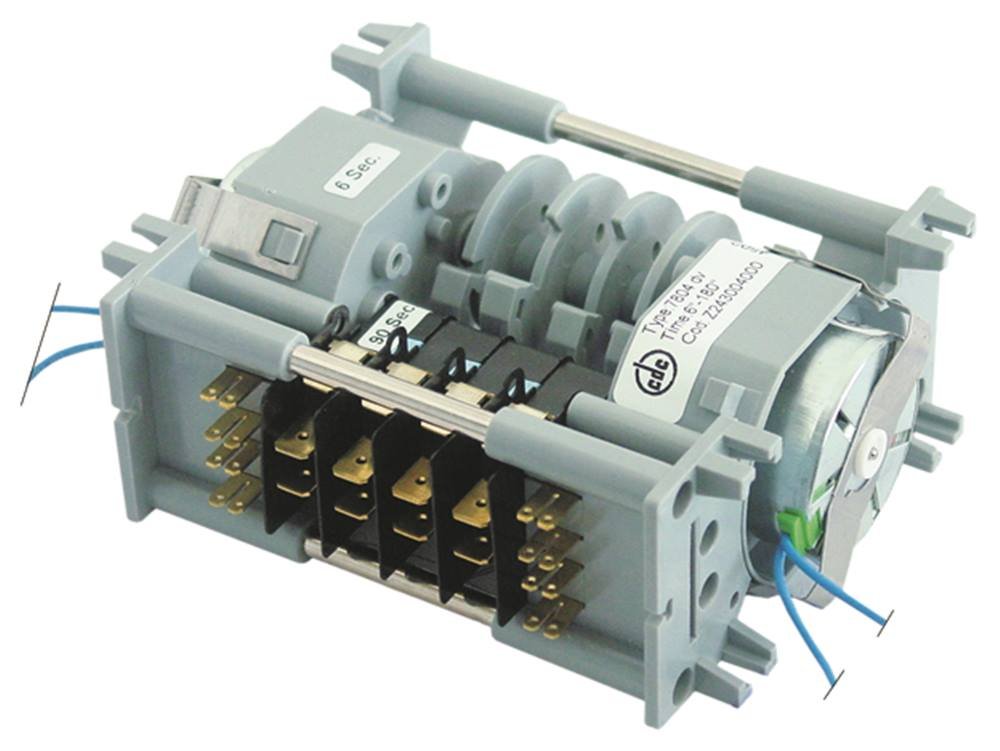
This image displays the Fagor CDC 7804DV dishwasher timer. It features a grey plastic housing, visible electrical contacts (brass-colored terminals), and internal gears and cams that control the timing cycles. Blue wires are visible, indicating electrical connections. Labels on the unit show '6 Sec.' and '90 Sec.', likely indicating specific timing intervals, and a label with 'Type 7804 dv' and 'Cod. 2243004000'.
The CDC 7804DV timer is a critical electromechanical component responsible for controlling the duration of various phases within a dishwasher's operational cycle, such as washing, rinsing, and draining. It ensures precise timing for efficient and effective dish cleaning.
Setup and Installation
Important Safety Notice: Installation of this component should only be performed by a qualified technician. Disconnect the dishwasher from the main power supply before attempting any installation or repair work. Failure to do so may result in electric shock, injury, or damage to the appliance.
- Power Disconnection: Ensure the dishwasher is completely unplugged from the electrical outlet or that its circuit breaker is switched off.
- Access Panel Removal: Locate and carefully remove the dishwasher's control panel or access panel to expose the existing timer unit. Refer to your dishwasher's specific service manual for exact instructions.
- Wiring Disconnection: Before disconnecting any wires, take clear photographs or make a detailed diagram of the existing wiring connections to the old timer. This will serve as a crucial reference for connecting the new timer. Carefully disconnect all wires from the old timer, noting their positions.
- Old Timer Removal: Unmount the old timer from its housing. This usually involves unscrewing it or releasing retaining clips.
- New Timer Installation: Position the new Fagor CDC 7804DV timer in the same location as the old one. Secure it using the original screws or clips.
- Wiring Connection: Connect the wires to the new timer precisely according to the photographs or diagram taken earlier. Ensure all connections are secure and properly seated.
- Panel Reinstallation: Carefully reattach the control panel or access panel.
- Power Reconnection: Reconnect the dishwasher to the main power supply.
- Test Operation: Run a short cycle to verify the timer's proper function and ensure all dishwasher operations are normal.
Operating Principles
The Fagor CDC 7804DV timer is an automatic electromechanical device. Once installed and the dishwasher cycle is initiated, the timer's internal motor rotates a series of cams. These cams actuate electrical switches at precise intervals, controlling various functions of the dishwasher, such as:
- Water intake and draining
- Activation of wash pump
- Activation of rinse aid dispenser
- Heating element control
- Cycle progression (e.g., wash, rinse, final rinse)
The timer is designed with specific cycle durations, including short intervals like 6 seconds and longer ones up to 3 minutes, depending on the specific phase of the wash cycle it controls. The timer automatically advances through these stages until the complete cycle is finished.
Maintenance
The Fagor CDC 7804DV timer is a sealed unit and generally requires no routine maintenance. However, to ensure its longevity and proper function:
- Keep Dry: Ensure the timer compartment remains dry and free from moisture, which can damage electrical components.
- Inspect Connections: Periodically, a qualified technician should inspect the electrical connections to ensure they remain secure and free from corrosion.
- Avoid Physical Damage: Protect the timer from physical impact or excessive vibration.
If the timer appears to be malfunctioning, do not attempt to repair it yourself. Contact a qualified service technician for diagnosis and replacement.
Troubleshooting
If you experience issues with your dishwasher's cycle, the timer may be a contributing factor. Here are some common symptoms and potential causes:
| Symptom | Possible Cause | Action |
|---|---|---|
| Dishwasher does not start. | No power to the timer, faulty timer motor, or faulty start switch. | Check power supply. If power is present, the timer may need replacement. Consult a technician. |
| Cycle gets stuck or does not advance. | Timer motor failure, worn out cams, or faulty internal contacts. | This indicates a likely internal timer fault. Replacement is usually required. |
| Dishwasher runs continuously. | Timer contacts are stuck in a closed position, preventing cycle completion. | Timer needs to be replaced. Disconnect power immediately. |
| Incorrect cycle times (too short/long). | Timer motor running at incorrect speed or internal mechanism wear. | Timer replacement is recommended for accurate cycle control. |
Note: Troubleshooting internal timer issues requires specialized knowledge and tools. It is strongly advised to seek professional assistance for diagnosis and replacement to avoid further damage or safety hazards.
Specifications
- Brand: Fagor
- Model: CDC 7804DV
- Part Number: 4251188751352
- Compatible Dishwasher Models: Fagor FI-64B, FI-64, FI-80, FI-72, FI-64D, Mastro OPT1012-CF, OPT1012-CFN
- Cycle Runtimes: Includes 6 seconds and 3 minutes intervals for specific cycle phases.
- ASIN: B01EJB1PWW
- First Available Date: May 26, 2016
Warranty and Support
Specific warranty terms for this replacement part may vary depending on the retailer or distributor from whom it was purchased. Please refer to your purchase documentation for detailed warranty information.
For technical support, installation assistance, or to inquire about replacement parts, please contact the seller or a certified Fagor service center. Always provide the model number (4251188751352) and ASIN (B01EJB1PWW) when seeking support.
Ask a question about this manual
Ask about setup, troubleshooting, compatibility, parts, safety, or missing instructions. Manuals+ will review the question and use this page’s manual context to help answer it.