
Frigidaire EFIC108-SILVER
Frigidaire EFIC108-Silver Compact Ice Maker User Manual
Model: EFIC108-SILVER
Introduction
Thank you for choosing the Frigidaire EFIC108-Silver Compact Ice Maker. This appliance is designed to provide convenient and efficient ice production for your home, office, or recreational use. Please read this manual thoroughly before operating your ice maker to ensure safe and optimal performance.

Figure 1: The Frigidaire EFIC108-Silver Compact Ice Maker, a sleek and compact unit.
Important Safety Information
Always follow basic safety precautions when using electrical appliances to reduce the risk of fire, electric shock, and injury to persons.
- Read all instructions before use.
- Do not immerse cord, plug, or any part of the appliance in water or other liquids.
- Close supervision is necessary when any appliance is used by or near children.
- Unplug from outlet when not in use and before cleaning. Allow to cool before putting on or taking off parts, and before cleaning the appliance.
- Do not operate any appliance with a damaged cord or plug, or after the appliance malfunctions or has been damaged in any manner.
- Use only attachments recommended or sold by the manufacturer.
- Do not use outdoors.
- Do not let cord hang over edge of table or counter, or touch hot surfaces.
- Do not place on or near a hot gas or electric burner, or in a heated oven.
- Do not use appliance for other than intended household use.
- This appliance is for indoor use only.
Setup and First Use
Unpacking
Carefully remove your ice maker from its packaging. Ensure all packing materials are removed. Verify that all components are present: ice maker unit, ice basket, and ice scoop.

Figure 2: The ice maker's stylish viewing window, drain plug, large ice basket, and ice scoop.
Placement
Place the ice maker on a stable, level surface away from direct sunlight and other heat sources. Ensure there is adequate ventilation around the unit.
Initial Cleaning
Before first use, clean the interior of the ice maker, including the water reservoir, ice basket, and ice scoop, with a mild detergent and warm water. Rinse thoroughly and wipe dry.
Adding Water
Open the lid and remove the ice basket. Fill the water reservoir with potable water up to the "MAX FILL" line. Do not overfill.
Note: No official seller videos were available for embedding in this section.
Operating Instructions
Powering On
Plug the ice maker into a grounded electrical outlet. Press the ON/OFF button to turn the unit on. The Power indicator light will illuminate.
Selecting Ice Size
The Frigidaire EFIC108-Silver offers two ice cube sizes: Small (S) and Large (L). Press the SELECT button to toggle between the two sizes. The corresponding indicator light will illuminate.

Figure 3: Intuitive digital LED control panel with indicators for Add Water, Ice Full, Power, and ice size selection (S/L).
Ice Production
The ice maker will begin producing ice within 6-9 minutes, depending on the selected size and ambient temperature. The unit can produce up to 26 lbs of ice per day.

Figure 4: Fast ice production, capable of producing up to 9 cubes every 9 minutes with two size options.
Ice Full Indicator
When the ice basket is full, the ICE FULL indicator light will illuminate, and the ice production cycle will pause. Remove ice from the basket to resume production.
Add Water Indicator
If the water level in the reservoir is too low, the ADD WATER indicator light will illuminate. Add more water to the reservoir to continue ice production.
Care and Maintenance
Regular Cleaning
To maintain the quality of your ice and the longevity of your machine, regular cleaning is recommended. Unplug the unit before cleaning.
- Wipe the exterior with a soft, damp cloth.
- Remove the ice basket and clean it with mild soap and water.
- Drain any remaining water from the reservoir using the drain plug located at the bottom of the unit.
- Clean the interior water reservoir and ice-making components with a solution of water and vinegar (10:1 ratio) or a mild food-grade sanitizer. Rinse thoroughly with clean water.
- Ensure all parts are completely dry before reassembling and storing or resuming operation.
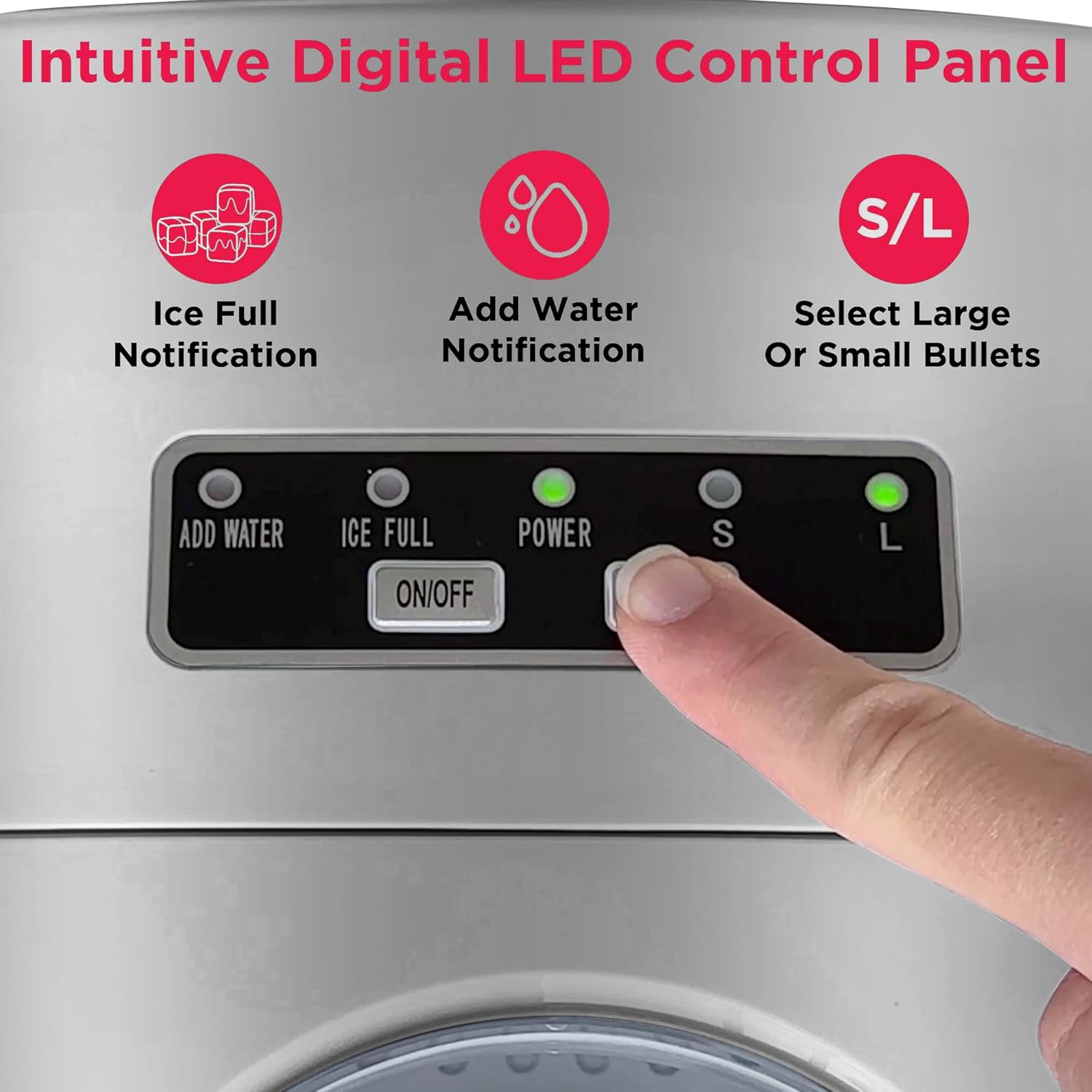
Figure 5: The convenient drain plug for easy cleaning and water removal.
Storage
If the ice maker will not be used for an extended period, drain all water, clean the unit, and store it in a cool, dry place.
Troubleshooting Guide
If you experience issues with your ice maker, please refer to the following common problems and solutions:
| Problem | Possible Cause | Solution |
|---|---|---|
| Ice maker not working | Not plugged in; Power outage; Unit is off. | Ensure unit is plugged in; Check power supply; Press ON/OFF button. |
| "ADD WATER" indicator is on | Water reservoir is empty or low. | Add water to the reservoir up to the MAX FILL line. |
| "ICE FULL" indicator is on | Ice basket is full. | Remove ice from the basket. |
| Ice cubes are too small or not forming | Water temperature too high; Ambient temperature too high; Insufficient water. | Use colder water; Place unit in a cooler environment; Ensure sufficient water in reservoir. |
Product Specifications
- Brand: Frigidaire
- Model Name: EFIC108-SILVER
- Product Dimensions: 13"D x 9"W x 12"H
- Capacity: 26 Pounds (ice production per day)
- Wattage: 1000 watts
- Manufacturer: Curtis
- First Available Date: March 25, 2016

Figure 6: Product dimensions for easy placement on countertops.
Warranty and Support
For warranty information and customer support, please refer to the documentation included with your product or visit the official Frigidaire website. You may also find additional support resources and FAQs on the product's Amazon listing page.
A PDF version of the user manual is available for download: Download User Manual (PDF)
Protection plans are available for purchase to extend coverage beyond the standard warranty:
- 2-Year Protection Plan
- 3-Year Protection Plan
- Complete Protect: One plan covers all eligible past and future purchases
Related documentsEFIC108-SILVER


Ask a question about this manual
Ask about setup, troubleshooting, compatibility, parts, safety, or missing instructions. Manuals+ will review the question and use this page’s manual context to help answer it.