
Introduction
The DTECH DT-9011 RS232 Serial Port Isolator is designed to protect your PC and RS232 devices from electrical damage. This optic electric adapter inhibits static and surge, prevents ground loops, and safeguards against damage caused by faulty wiring or lightning. It creates an isolated communication link, ensuring reliable data transfer while protecting sensitive equipment.
Product Features
- DB9 Male to Female Serial Converter: Facilitates direct connection between RS232 devices.
- Optic Electric Isolation: Provides a robust isolated communication link for RS232C systems.
- Device Protection: Suitable for safeguarding electric terminal devices such as modems, routers, RFID readers, radios, multi-user systems, satellite receivers, and computers.
- Surge and Static Protection: Protects against electrostatic discharge, power surges, ground loops, faulty wiring, and lightning.
- Bus-Powered Operation: Operates without external power supply, drawing power directly from the RS232 line (TXD, DTR, or RTS).
- Asynchronous Communication: Supports standard RS-232 asynchronous communication.
- Reversible Genders: DB-9 male/female genders are reversible with included thumbscrews for flexible connection.
Setup and Installation
The DTECH DT-9011 RS232 Serial Port Isolator is designed for straightforward installation. It connects directly in-line with your existing RS232 serial cable setup.

Figure 1: DTECH DT-9011 RS232 Serial Port Isolator, showing both male and female DB9 connectors.

Figure 2: Close-up view of the male DB9 connector on the DTECH RS232 Isolator.
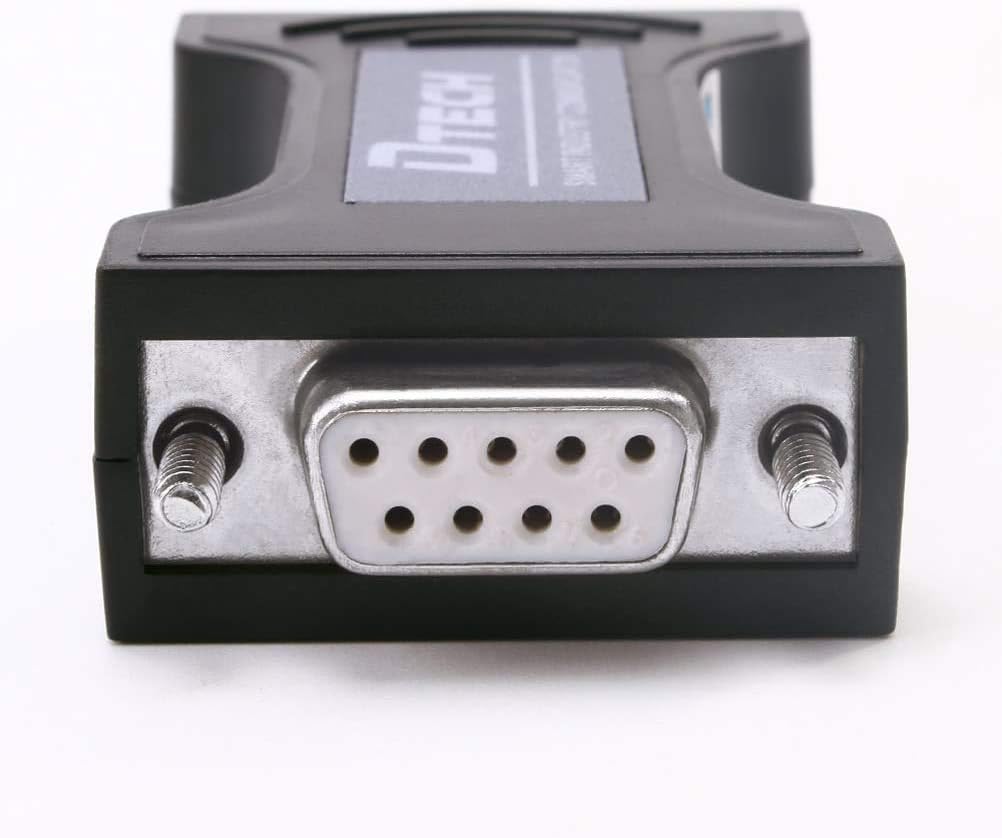
Figure 3: Close-up view of the female DB9 connector on the DTECH RS232 Isolator.
Installation Steps:
- Identify Ports: Determine the RS232 serial port on your host device (e.g., PC) and the peripheral device you wish to protect.
- Connect to Host: Plug the appropriate end of the DT-9011 isolator into the RS232 serial port of your host device.
- Connect to Peripheral: Plug the other end of the DT-9011 isolator into the RS232 serial port of your peripheral device.
- Secure Connection: Ensure the thumbscrews on both connectors are tightened to establish a secure and stable connection.
- Power: The device is self-powered, drawing necessary operating power from the RS232 data lines (TXD, DTR, or RTS). No external power adapter is required.
Operating Instructions
Once installed, the DTECH DT-9011 RS232 Serial Port Isolator operates transparently, requiring no user configuration. It functions as a passive in-line device, providing electrical isolation for your RS232 communication link.
- Data Transmission: The isolator supports RS232 asynchronous communication at transmission rates from 300 bps up to 57600 bps.
- Self-Powered Operation: The device draws its power directly from the RS232 signal lines, eliminating the need for an external power source. This ensures continuous protection as long as the RS232 connection is active.
Maintenance
The DTECH DT-9011 RS232 Serial Port Isolator is a low-maintenance device. Follow these guidelines to ensure its longevity and optimal performance:
- Cleaning: Keep the device clean and free from dust. Use a soft, dry cloth for cleaning. Avoid liquid cleaners.
- Environment: Store and operate the device in a dry environment, away from extreme temperatures and direct sunlight.
- No User Serviceable Parts: The device contains no user-serviceable parts. Do not attempt to open or repair the unit, as this will void any potential warranty and may cause damage.
Troubleshooting
If you encounter issues with your DTECH DT-9011 RS232 Serial Port Isolator, refer to the following troubleshooting steps:
- No Communication:
- Verify that all connections are secure and the thumbscrews are tightened.
- Ensure both the host PC/device and the peripheral device are powered on and functioning correctly.
- Test the RS232 ports on both ends without the isolator to confirm they are operational.
- Data Corruption or Instability:
- Baud Rate: The isolator performs optimally at 57600 bps or lower. If you are experiencing data corruption, try reducing the baud rate of your communication. Higher baud rates may lead to unstable data transfer.
- RS232 Adapter Voltage: If using a USB to RS232 adapter, ensure it provides standard RS232 voltage levels (typically +/- 5V to +/- 15V). Some adapters that output TTL (0-5V) levels may not provide sufficient power or signal integrity for the isolator to function correctly.
- Device Not Powering On (Rare):
- Although self-powered, confirm that the connected RS232 port (specifically the TXD, DTR, or RTS pins) is providing sufficient power. Some older or low-power ports might not supply enough current. Consult the connected device's manual for RS232 pin power output specifications.
- Incompatibility with Specific Devices:
- While designed for general RS232 applications, some specific devices may have unique or non-standard RS232 implementations. If issues persist, consult the documentation for your specific peripheral device.
Specifications
| Specification | Value |
|---|---|
| Model Number | DT-9011 |
| Product Dimensions (L x W x H) | 2.6 x 1.3 x 0.7 inches |
| Item Weight | 1.12 ounces |
| Optic Electric Isolation Voltage | Instant 2.5KV rms; Continuous 500VDC |
| Transmission Rate | 300 bps – 57600 bps |
| Power Source | Self-powered from RS232 (TXD / DTR / RTS) |
| Connector Type | DB9 Male to Female |
| Color | Black |
| Compatible Devices | PC, Modems, Routers, RFID readers, etc. |
Warranty and Support
No specific warranty information is provided within this manual. For details regarding product warranty, returns, or technical support, please refer to the product packaging, the DTECH official website, or contact DTECH customer service directly. Please have your product model number (DT-9011) and purchase information available when seeking support.