
RCA LED40HG45R
RCA LED40HG45R TV Main Board Installation and User Manual
Model: LED40HG45R | Part Number: 395GE0010366-A1
Introduction
This manual provides essential information for the installation, operation, and maintenance of the RCA LED40HG45R TV Main Board, part number 395GE0010366-A1. This component is a direct replacement part designed to restore functionality to compatible RCA LED40HG45R television models. Please read all instructions carefully before proceeding with installation.
Product Overview
The main board is the central processing unit of your television, responsible for managing all input signals, video processing, audio output, and overall system control. This specific board, identified by part number 395GE0010366-A1, is compatible with the RCA LED40HG45R TV model.
Key Identification Numbers:
- Main Part Number: 395GE0010366-A1
- Additional Board Number: TP.MS3393.PB801
- Other Identifier: B13094933
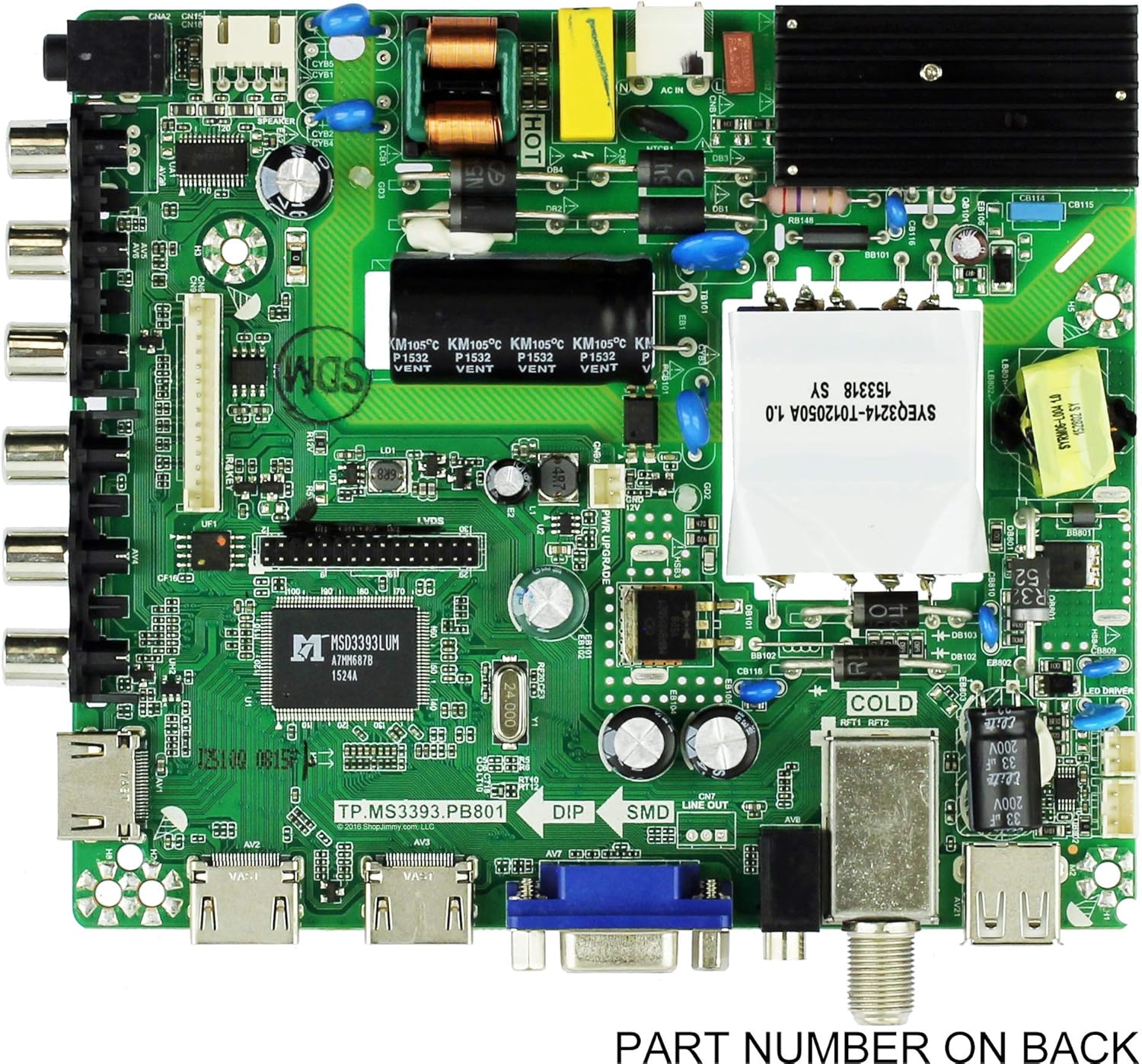
Figure 1: Front view of the RCA LED40HG45R TV Main Board (P/N 395GE0010366-A1). This image displays the various integrated circuits, capacitors, and input/output ports on the component side of the board.

Figure 2: Back view of the RCA LED40HG45R TV Main Board. This view clearly shows the part number sticker, 395GE0010366-A1, which is crucial for verifying compatibility and ensuring the correct replacement part is used.
Setup and Installation
Warning: Television repair should only be performed by qualified technicians. High voltages are present inside televisions, which can cause serious injury or death. Always unplug the TV from the power outlet and allow capacitors to discharge before beginning any work.
Required Tools:
- Phillips head screwdriver
- Flathead screwdriver (optional, for prying)
- Anti-static wrist strap (recommended)
- Clean, soft cloth
Installation Steps:
- Safety First: Disconnect the television from all power sources and external devices. Place the TV face down on a soft, clean surface to protect the screen.
- Remove Back Cover: Unscrew and carefully remove the back cover of the television. Keep track of all screws.
- Locate Main Board: Identify the existing main board. It is typically the largest circuit board with numerous input/output ports.
- Disconnect Cables: Carefully disconnect all cables and connectors attached to the main board. Take photos or make notes of cable placements to aid reassembly. Be gentle to avoid damaging connectors.
- Remove Old Board: Unscrew the main board from the TV chassis. Lift it out carefully.
- Install New Board: Position the new RCA LED40HG45R TV Main Board (P/N 395GE0010366-A1) into place, ensuring all mounting holes align. Secure it with the screws removed earlier.
- Reconnect Cables: Reconnect all cables and connectors to their correct positions on the new board. Double-check each connection for proper seating.
- Test Functionality: Before replacing the back cover, temporarily connect the TV to power and an input source (e.g., antenna, HDMI device). Power on the TV and verify that it functions correctly (picture, sound, input switching).
- Final Assembly: If the TV functions correctly, disconnect power, then reattach the back cover and secure all screws.
Operating Principles
The RCA LED40HG45R TV Main Board is an internal component that enables the overall operation of your television. Once correctly installed, the TV will function as designed, allowing you to access various inputs, adjust settings, and display content. There are no direct operating controls on the main board itself; all operations are performed via the television's remote control or integrated buttons.
Maintenance
The main board itself requires no routine maintenance. To ensure its longevity and proper function:
- Keep Clean: Ensure the television's ventilation openings are clear of dust and debris to prevent overheating.
- Avoid Spills: Prevent liquids from entering the television chassis.
- Proper Handling: When handling the board, always use anti-static precautions to prevent damage from electrostatic discharge (ESD).
- Stable Power: Connect the TV to a stable power source, preferably with surge protection, to prevent damage from power fluctuations.
Troubleshooting
If your television experiences issues after main board replacement, consider the following common troubleshooting steps:
| Symptom | Possible Cause | Solution |
|---|---|---|
| No Power / TV does not turn on | Loose power cable, faulty power supply, incorrect board installation. | Check power cable connection. Verify all internal cables are securely connected to the main board. Ensure the power supply board is functional. |
| No Picture / Black Screen | Loose LVDS cable, faulty T-Con board, incorrect input selection. | Ensure the LVDS cable (connecting main board to T-Con/panel) is securely seated. Check input source. |
| No Sound | Loose speaker cables, incorrect audio settings, faulty audio amplifier on main board. | Verify speaker connections. Check TV audio settings. |
| Input Not Detected | Loose HDMI/AV cable, damaged input port. | Ensure external device cables are securely connected to the correct input port on the TV. Try a different input port or cable. |
| TV Freezes or Restarts | Software issue, overheating, faulty main board component. | Ensure adequate ventilation. If issues persist, professional diagnosis may be required. |
If these steps do not resolve the issue, it is recommended to consult a qualified television repair technician.
Specifications
| Feature | Detail |
|---|---|
| Manufacturer | RCA |
| Compatible TV Model | RCA LED40HG45R |
| Part Number | 395GE0010366-A1 |
| Other Board Numbers | TP.MS3393.PB801, B13094933 |
| Compatible Devices | Television |
| Date First Available | April 14, 2016 |
| UPC | 640746699399 |
Warranty Information
Warranty coverage for this replacement main board is typically provided by the seller at the time of purchase. Please refer to your purchase documentation or contact the seller directly for specific details regarding warranty terms, duration, and claim procedures. Keep your proof of purchase for any warranty claims.
Support
For technical assistance or further inquiries regarding the RCA LED40HG45R TV Main Board, please contact the retailer or seller from whom you purchased the product. If you are unsure about any installation steps or troubleshooting procedures, it is highly recommended to seek assistance from a certified television repair professional.
Related documentsLED40HG45R

Ask a question about this manual
Ask about setup, troubleshooting, compatibility, parts, safety, or missing instructions. Manuals+ will review the question and use this page’s manual context to help answer it.