
1. Introduction
This manual provides instructions for the proper installation and maintenance of the LUVERNE 570121 Step Board Accessory Bracket Kit. This kit is designed to facilitate the mounting of compatible running boards or side steps on specific Ford E-150, E-250, E-350, and E-450 van models. Please verify vehicle compatibility before proceeding with installation.
Important Note: Running boards or side steps are NOT included with this accessory bracket kit and must be purchased separately.
2. Safety Information
- Always wear appropriate personal protective equipment, including safety glasses and gloves, during installation.
- Ensure the vehicle is parked on a level surface and the parking brake is engaged. For under-vehicle work, use jack stands to securely support the vehicle.
- Do not overtighten fasteners, as this can cause damage to the brackets or vehicle. Refer to torque specifications if available.
- Regularly inspect all installed components for tightness, wear, and damage. Loose or damaged parts can lead to product failure and potential injury.
- If you are unsure about any step of the installation process, consult a qualified professional or contact LUVERNE customer support.
3. Setup and Installation
The LUVERNE 570121 kit includes four accessory brackets designed for specific mounting points on your Ford E-series van. These brackets provide the necessary support structure for attaching compatible running boards or side steps.
3.1. Components Overview
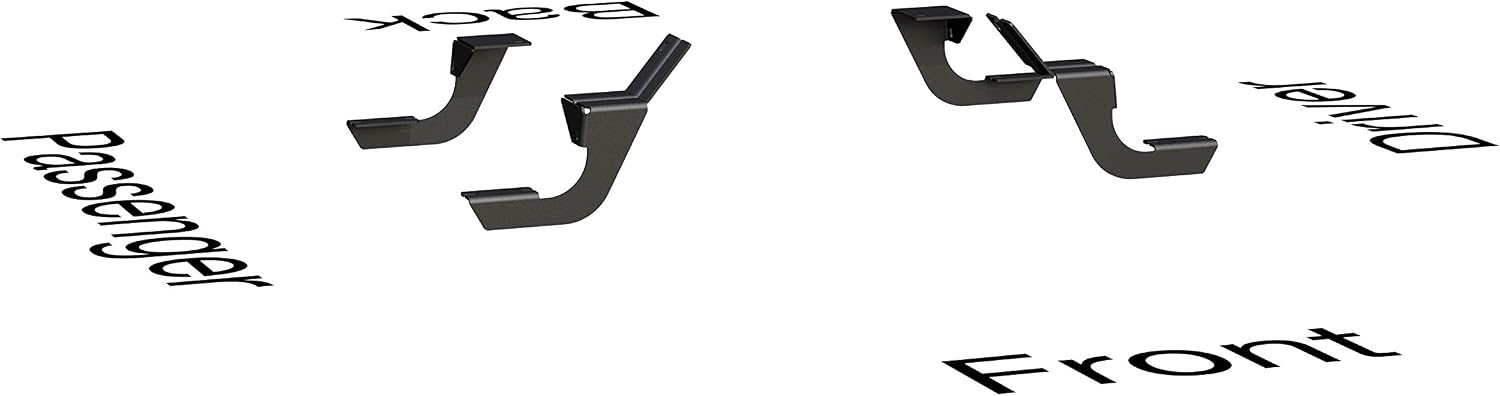
Figure 1: Overview of the four accessory brackets, indicating their general placement on the vehicle (Front, Back, Driver, Passenger).

Figure 2: Detailed view of two types of brackets included in the kit, highlighting their design for specific vehicle mounting points.
3.2. General Installation Steps
- Identify Mounting Locations: Consult your vehicle's owner's manual or a vehicle-specific installation guide for the precise mounting points on the frame or rocker panel of your Ford E-series van. The brackets are designed for a vehicle-specific fit.
- Prepare Mounting Surfaces: Clean any dirt, debris, or rust from the vehicle's mounting surfaces to ensure a secure fit.
- Attach Brackets: Secure each bracket to its designated mounting point using the provided hardware. Ensure the brackets are oriented correctly (refer to Figure 1 for general placement). Hand-tighten fasteners initially.
- Install Running Boards (Sold Separately): Once all brackets are securely attached, position your compatible running boards or side steps onto the brackets. Align the mounting holes and secure them using the hardware provided with your running boards.
- Final Tightening: Once all components are in place and aligned, fully tighten all fasteners according to the recommended torque specifications (if available). Double-check all connections for security.
4. Operating Instructions
Once installed, the LUVERNE 570121 accessory bracket kit provides a stable foundation for your running boards or side steps. These steps are intended to assist with safe entry and exit from your vehicle.
- Use the running boards as a stable step when entering or exiting the vehicle.
- Avoid standing or placing excessive weight on the running boards while the vehicle is in motion.
- Do not exceed the weight capacity specified by the manufacturer of your running boards.
5. Maintenance
Regular maintenance will ensure the longevity and safe operation of your LUVERNE accessory bracket kit.
- Periodic Inspection: At least once a month, or after off-road use, inspect all brackets, fasteners, and mounting points. Check for any signs of looseness, corrosion, cracks, or damage.
- Tighten Fasteners: If any fasteners are loose, tighten them immediately to prevent product failure.
- Cleaning: Clean the brackets regularly with mild automotive soap and water. Avoid harsh chemicals or abrasive cleaners that could damage the finish. Rinse thoroughly and dry.
- Corrosion Protection: If any surface scratches or chips occur, touch up the finish with appropriate paint to prevent rust and corrosion.
6. Troubleshooting
- Brackets Feel Loose: Re-check all fasteners for proper torque. Ensure the brackets are correctly seated against the vehicle's frame or rocker panel.
- Difficulty Aligning Running Boards: Verify that the correct brackets are installed in the correct positions (Front/Back, Driver/Passenger). Ensure the running boards themselves are compatible with the LUVERNE 570121 kit and your vehicle.
- Unusual Noises: Inspect for any contact between the brackets, running boards, or vehicle components. Tighten any loose fasteners.
- Corrosion Appears: Clean the affected area thoroughly and apply a rust-inhibiting primer and paint to prevent further spread.
7. Specifications
| Feature | Specification |
|---|---|
| Model Number | 570121 |
| Brand | LUVERNE |
| Material | Carbon Steel |
| Color | Black |
| Item Weight | 2 pounds |
| Item Dimensions (L x W x H) | 16 x 11 x 5 inches |
| Compatible Vehicle Type | Van (Ford E-series) |
| Included Components | Luverne 570121 01-14 Frd Van Brk Pkg Cab Only |
| UPC | 040236412437 |
8. Warranty Information
This LUVERNE product is covered by a Limited Lifetime Warranty. Specific details regarding the warranty, including coverage for finish and other components, can be found on the official LUVERNE website or by contacting customer support. Please retain your proof of purchase for warranty claims.
9. Support
For technical assistance, missing parts, or any questions regarding the LUVERNE 570121 Step Board Accessory Bracket Kit, please contact LUVERNE customer support. Refer to the official LUVERNE website for current contact information, FAQs, and additional resources.
Manufacturer: Luverne Truck Equipment
Website: Visit the LUVERNE Store on Amazon (for general brand information)
