
Runleader RL-HM032R
Runleader RL-HM032R Inductive Tachometer with Hour Meter
User Manual
This manual provides detailed instructions for the installation, operation, maintenance, and troubleshooting of your Runleader RL-HM032R Inductive Tachometer with Hour Meter. Please read this manual thoroughly before using the device to ensure proper function and longevity.
Product Overview
The Runleader RL-HM032R is a versatile inductive tachometer and hour meter designed for 2-stroke and 4-stroke gasoline-powered engines. It accurately tracks engine hours and RPMs, providing essential data for engine maintenance and performance monitoring. The device features a backlit LCD display for clear visibility in various lighting conditions and is built to be waterproof for reliable outdoor use.
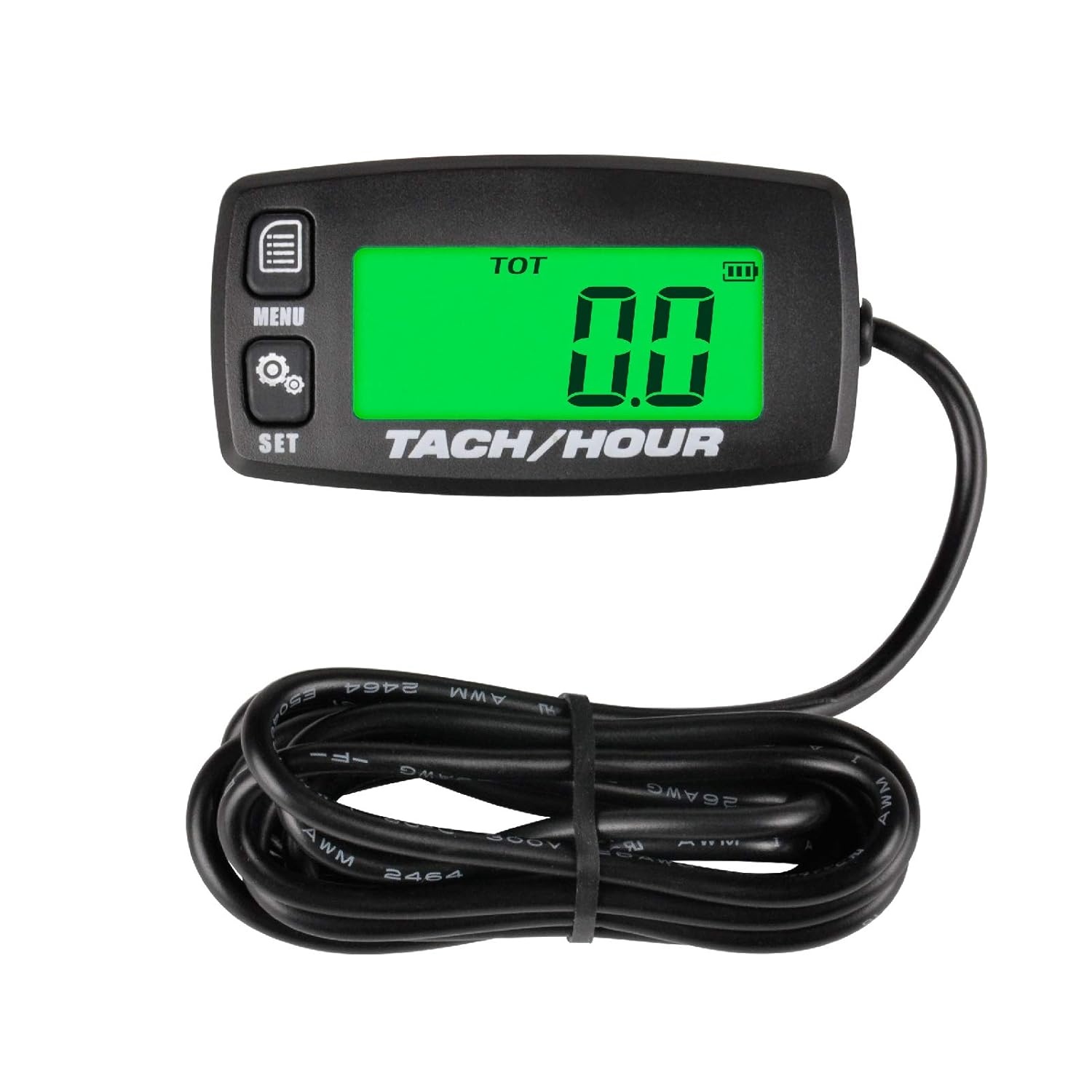
Figure 1: Front view of the Runleader RL-HM032R Inductive Tachometer with Hour Meter, showing the display and control buttons.
Key Features
- Inductive Operation: Measures RPM and hours by sensing the spark plug signal, eliminating the need for direct electrical connections.
- Timing System:
- Total Running Hours (TOT): Accumulates total engine operating time, non-resettable.
- Partial Running Time (JOB): Records time for specific tasks, resettable.
- Maintenance Timer (SVC): User-settable reminder from 0-200 hours for scheduled maintenance.
- RPM Measuring System:
- Measures current engine RPM.
- Records and recalls maximum RPM (MAX RPM).
- Adjustable overspeed warning function (ALERT RPM).
- Backlit LCD Display: Green backlight for improved readability, with adjustable modes (Automatic, Always On, Off).
- Waterproof Design: IP65 rated for protection against dust and water splashes.
- Replaceable Battery: Uses a standard CR2032 battery, with data retention upon battery replacement.
- Wide Application: Suitable for various gasoline engines including ATVs, UTVs, dirt bikes, motorcycles, outboards, snowmobiles, generators, and more.
Setup and Installation
1. Mounting the Device
Select a suitable flat surface on your equipment for mounting the tachometer. Ensure the location is easily visible and accessible, and away from excessive heat or vibration. Use screws or double-sided adhesive (not included) to securely attach the unit.
2. Connecting the Inductive Wire
The RL-HM032R operates by sensing the electromagnetic field generated by the spark plug wire. Follow these steps for proper connection:
- Locate the spark plug wire of your engine.
- Wrap the insulated inductive wire (approximately 5 feet long) from the tachometer around the spark plug wire for about 5 turns. Ensure the wraps are neat and close together.
- Secure the wrapped wire with electrical tape or zip ties to prevent it from unwinding or coming loose due to vibration.
- Route the remaining wire safely away from moving parts or hot engine components.

Figure 2: Illustration of connecting the inductive wire to the spark plug wire. Wrap the signal wire onto the engine spark plug wire for 5 turns.
3. Engine Firing Pattern Setting
For accurate RPM readings, you must set the correct engine firing pattern. This device supports various 2-stroke and 4-stroke engine configurations. Refer to the table below and the operating instructions to select the appropriate setting.
| Engine Firing Pattern | Engine Type |
|---|---|
| 1P1R | 4 stroke 2 cylinder |
| 1P2R | 2 stroke 1 cylinder |
| 1P2R | 4 stroke 1 cylinder |
| 2P1R | 4 stroke 4 cylinder |
| 2P1R | 2 stroke 2 cylinder |
| 3P1R | 4 stroke 6 cylinder |
| 3P2R | 2 stroke 3 cylinder |
| 4P1R | 4 stroke 8 cylinder |
| 4P2R | 2 stroke 4 cylinder |
| 5P1R | 4 stroke 5 cylinder |
| 6P1R | 2 stroke 6 cylinder |
Operating Instructions
The RL-HM032R features two control buttons: MENU and SET. These buttons are used to navigate through different display modes and adjust settings.
1. Display Modes
Press the MENU button repeatedly to cycle through the following display modes:
- TOT (Total Hours): Displays the total accumulated engine running hours. This value is non-resettable.
- RPM (Revolutions Per Minute): Displays the real-time engine RPM when the engine is running.
- JOB (Partial Running Time): Displays the partial running time, which can be reset for individual tasks.
- SVC (Maintenance Timer): Displays the countdown for the maintenance reminder.
- MAX RPM (Maximum RPM): Displays the highest RPM recorded during operation.
- ALERT RPM (Overspeed Warning): Allows setting an RPM threshold for an overspeed warning.
- L-Aut/L-Off/L-On (Backlight Modes): Allows selection of backlight behavior.

Figure 3: Display showing TOT Hours (top) and real-time RPM (bottom).

Figure 4: Display showing JOB Timer, which can be reset for specific tasks like oil changes.

Figure 5: Display showing SVC Timer, used for maintenance reminders like air filter replacement.

Figure 6: Display showing MAX RPM (top) and ALERT RPM (bottom). The display turns red when the ALERT RPM is triggered.
2. Setting Parameters
To adjust settings (e.g., SVC timer, ALERT RPM, backlight mode, engine firing pattern), follow these general steps:
- Press the MENU button repeatedly until you reach the desired setting mode (e.g., SVC, ALERT RPM, L-Aut).
- Once in the setting mode, press and hold the SET button for approximately 3 seconds until the display starts flashing, indicating it's ready for adjustment.
- Use the MENU button to increase the value or cycle through options.
- Use the SET button to confirm the current digit/option and move to the next, or to save the setting if it's the last digit/option.
- To exit the setting mode, stop pressing buttons for a few seconds, and the device will automatically save the changes and return to normal display.
Specific Settings:
- Resetting JOB Timer: While in JOB mode, press and hold the SET button until the display resets to 0.0.
- Setting SVC Timer: Navigate to SVC mode. Press and hold SET. Adjust the desired maintenance interval (0-200 hours) using MENU and SET.
- Setting ALERT RPM: Navigate to ALERT RPM mode. Press and hold SET. Adjust the desired RPM threshold (1000-20000 RPM) using MENU and SET.
- Changing Backlight Mode: Navigate to the backlight mode (L-Aut, L-Off, L-On). Press and hold SET. Use MENU to cycle through "L-Aut" (Automatic), "L-Off" (Always Off), and "L-On" (Always On). Press SET to confirm.

Figure 7: Display showing the three backlight modes: L-Aut (Automatic), L-Off (Turn Off), and L-On (Always On).
- Setting Engine Firing Pattern: This setting is usually accessed during initial setup or by a specific sequence (often holding both buttons or a long press on SET from a specific mode). Refer to the "Setup and Installation" section and the table for correct pattern selection.
Maintenance
1. Battery Replacement
The RL-HM032R uses a replaceable CR2032 lithium coin cell battery. When the battery icon on the display indicates low power, it's time to replace it.
- Locate the battery compartment on the back of the unit.
- Carefully open the battery cover, usually by twisting or prying with a small flat-head screwdriver.
- Remove the old CR2032 battery.
- Insert a new CR2032 battery with the positive (+) side facing up.
- Close the battery cover securely, ensuring the waterproof seal is properly seated.
Note: The device is designed to retain all recorded data (TOT hours, MAX RPM, settings) even when the battery is removed or replaced.

Figure 8: Illustration of the CR2032 battery and the device's IP65 waterproof rating.
2. Using the SVC Timer
The SVC timer is a useful feature for scheduling routine maintenance. Once set, it will count down the specified hours. When the countdown reaches zero, the display will flash or show a reminder to indicate that maintenance is due. After performing maintenance, reset the SVC timer as described in the "Operating Instructions" section.
3. Cleaning
Due to its IP65 waterproof rating, the device can be wiped clean with a damp cloth. Avoid using harsh chemicals or abrasive cleaners that could damage the display or housing.
Troubleshooting
If you encounter issues with your Runleader RL-HM032R, please refer to the following common problems and solutions:
- No Display / Blank Screen:
- Check the battery level. Replace the CR2032 battery if it is low or depleted.
- Ensure the battery is inserted correctly with the positive (+) side facing up.
- Inaccurate RPM Reading / No RPM Reading:
- Verify that the inductive wire is securely wrapped around the spark plug wire for at least 5 turns.
- Ensure the inductive wire is not damaged or cut.
- Check that the correct engine firing pattern is selected in the device settings. An incorrect setting will lead to inaccurate RPM.
- Ensure the spark plug and ignition system are functioning correctly.
- Display Not Responding to Buttons:
- The battery might be too low to register button presses reliably. Replace the battery.
- Ensure buttons are not stuck or obstructed.
- Backlight Not Working:
- Check the backlight mode setting (L-Aut, L-Off, L-On). If set to L-Off, the backlight will not activate.
- Low battery can affect backlight performance. Replace the battery.
If the problem persists after trying these solutions, please contact Runleader customer support for further assistance.
Specifications
Detailed technical specifications for the Runleader RL-HM032R:
| Feature | Specification |
|---|---|
| Model | RL-HM032R |
| Waterproof Rate | IP65 |
| Induction Wire Length | 1.5M (approx. 5 ft) |
| Product Size (L x W x H) | 67.1 x 35 x 17.6 mm (2.64 x 1.38 x 0.69 inches) |
| Display Screen | LCD with Green Backlight |
| Screen Size | 40.9 x 16.9 mm |
| Induction Wire Type | UL2464 26AWG/2C |
| Refresh Rate | 0.5S / 1S (selectable) |
| Hours Range | 0-99999.9 Hours (0.1H accuracy) |
| RPM Range | 0-20000 RPM (10 RPM accuracy) |
| RPM Alert Setting Range | 1000-20000 RPM |
| Housing Material | ABS (Acrylonitrile Butadiene Styrene) |
| Battery Type | CR2032 (replaceable) |
| Applicable Engine Types | 2 Stroke Gasoline Engine (1, 2, 3 Cylinders) 4 Stroke Gasoline Engine (1, 2, 3, 4, 5, 6, 8, 12 Cylinders) |

Figure 9: Product dimensions and visual representation of common applications such as lawn mowers, generators, ATVs, motorcycles, and chainsaws.
Warranty and Support
For warranty information, product registration, or technical support, please refer to the official Runleader website or contact their customer service department. Keep your purchase receipt as proof of purchase for any warranty claims.
Manufacturer: Ningbo Jiangbei Run Leader Electronics Co., Ltd
Ask a question about this manual
Ask about setup, troubleshooting, compatibility, parts, safety, or missing instructions. Manuals+ will review the question and use this page’s manual context to help answer it.