
1. Introduction
Thank you for choosing the EBL C9042W Upgraded Battery Charger. This smart charger is designed to efficiently and safely charge 1-8 pieces of AA/AAA Ni-MH/Ni-CD rechargeable batteries individually. Featuring multiple protection mechanisms and intelligent LED indicators, it ensures optimal charging performance and extends battery life. Please read this manual thoroughly before use to ensure proper operation and safety.

Figure 1: EBL C9042W 8-slot battery charger and its power cable.
2. Safety Instructions
To prevent personal injury and property damage, please observe the following safety precautions:
- Only charge Ni-MH and Ni-CD rechargeable batteries. Do not attempt to charge alkaline, carbon-zinc, lithium, or any other non-rechargeable batteries, as this may lead to leakage, rupture, or explosion.
- Do not disassemble or modify the charger. Unauthorized modifications may cause electric shock, fire, or damage to the charger.
- Avoid exposing the charger to rain, moisture, or extreme temperatures. Use it in a dry, well-ventilated area.
- Keep the charger away from children and pets.
- Unplug the charger from the power outlet when not in use or before cleaning.
- Ensure proper polarity when inserting batteries. Incorrect insertion can cause damage to the batteries and charger.
- The charger is equipped with multiple protection features including short circuit, over temperature, over current, over charge, over voltage, and reverse polarity protection to ensure safe operation.

Figure 2: The charger incorporates multiple safety protections for reliable use.
3. Product Overview
The EBL C9042W charger features 8 independent charging slots and smart LED indicators for each slot, allowing for individual charging of batteries.

Figure 3: The C9042W charger supports individual charging for each battery slot.
Components:
- 8 x AA/AAA Ni-MH/Ni-CD Battery Charging Slots
- 8 x Smart LED Indicators (one for each slot)
- AC Power Port
- AC Adapter

Figure 4: Detailed view of the charger's features, including LED indicators and battery contacts.
4. Setup
- Unpack the EBL C9042W charger and AC adapter from its packaging.
- Connect the AC adapter to the AC power port on the back of the charger.
- Plug the AC adapter into a standard AC 100-240V 50/60Hz wall outlet.
- The charger is now ready for use.
5. Operating Instructions
Charging Batteries:
- Insert 1 to 8 AA or AAA Ni-MH/Ni-CD rechargeable batteries into the charging slots. Ensure correct polarity (+ and -) as indicated on the charger.
- Each battery slot has an independent LED indicator. When a battery is properly inserted and charging begins, the corresponding LED will illuminate RED.
- The charger will automatically detect the battery type and begin charging.
- Once a battery is fully charged, its corresponding LED indicator will turn GREEN. The charger will automatically stop charging to prevent overcharge.
- If a non-rechargeable or defective battery is inserted, the LED indicator for that slot will flash RED. Remove such batteries immediately.
- Remove batteries from the charger once charging is complete.
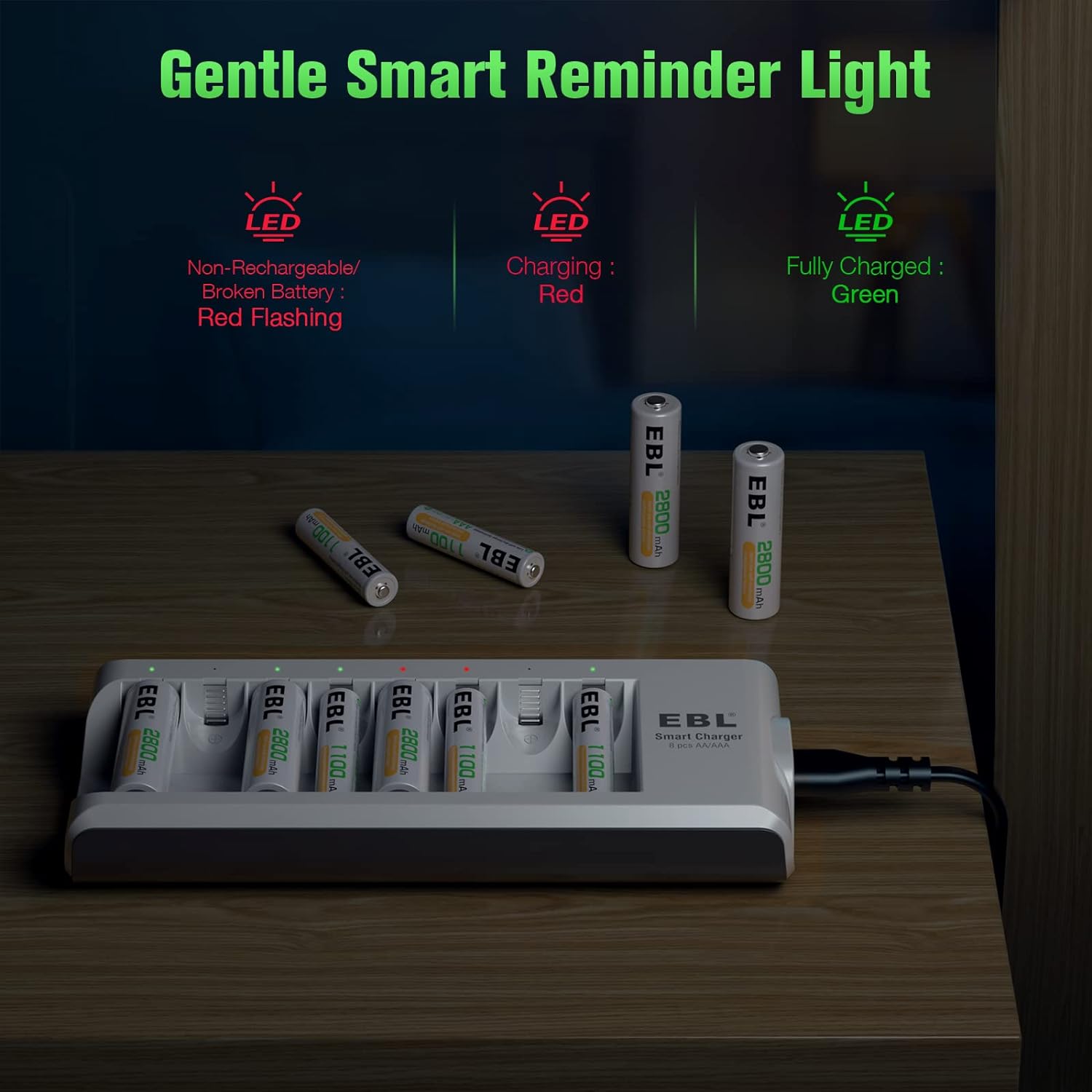
Figure 5: Understanding the LED indicator lights for charging status.

Figure 6: The charger automatically stops charging when batteries are full, indicated by green LEDs.
6. Maintenance
- Always unplug the charger from the power outlet before cleaning.
- Use a soft, dry cloth to wipe the surface of the charger. Do not use abrasive cleaners or solvents.
- Keep the charging slots free from dust and debris to ensure proper contact with batteries.
- Store the charger in a cool, dry place when not in use.
7. Troubleshooting
| Problem | Possible Cause | Solution |
|---|---|---|
| LED does not light up when battery is inserted. |
|
|
| LED flashes RED. |
|
|
| Batteries do not charge fully. |
|
|
8. Specifications
- Model: C9042W
- Input: AC 100-240V 50/60Hz
- Output: DC 1.2V
- Compatible Batteries: AA/AAA Ni-MH/Ni-CD rechargeable batteries
- Charging Channels: 8 independent slots
- Protection Features: Short Circuit Protection, Over Temperature Protection, Over Current Protection, Over Charge Protection, Over Voltage Protection, Reverse Polarity Protection
- Approximate Charging Time: 3 Hours (depending on battery capacity)
- Product Dimensions: 19 x 8.3 x 4.4 cm; 240 g
9. Warranty and Support
EBL products come with a standard warranty. For specific warranty terms and conditions, please refer to the warranty card included with your product or visit the official EBL website. If you encounter any issues or have questions regarding your EBL C9042W charger, please contact EBL customer support through their official channels or the retailer where you purchased the product.
For more information and support, you can visit the EBL Store: EBL Official Store


