
1. Introduction
This manual provides instructions for the installation, operation, and maintenance of the Packard PF40224_107 Transformer. This unit is designed as a replacement for Goodman 240V to 24V transformers, converting higher voltage AC power to a lower voltage suitable for control circuits in HVAC systems and other applications. Please read this manual thoroughly before installation and operation to ensure safe and correct usage.
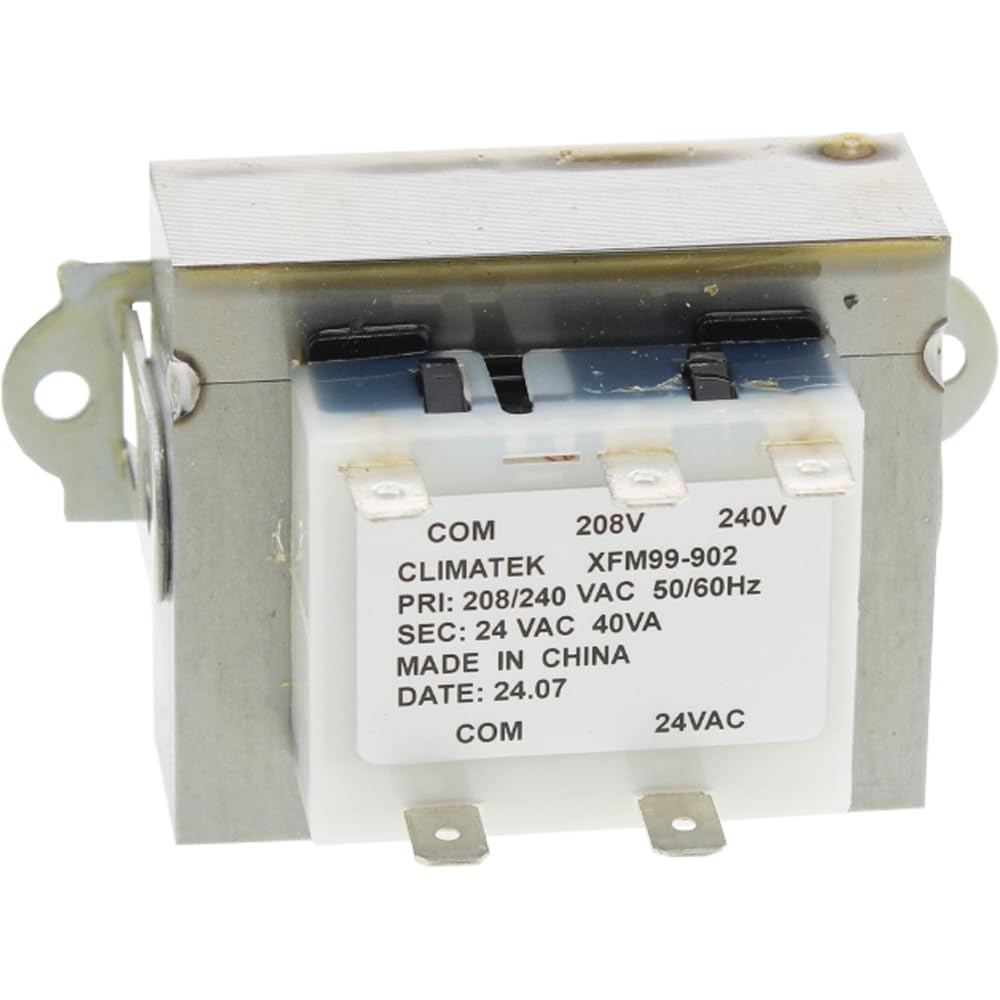
Figure 1: Packard PF40224_107 Transformer. This image shows the compact design of the transformer with its various terminals for electrical connections.
2. Safety Information
WARNING: Electrical shock hazard. Improper installation or maintenance can result in serious injury or death. Always disconnect power before installing, servicing, or removing this transformer.
- Installation should only be performed by a qualified electrician or HVAC technician.
- Ensure all local and national electrical codes are followed.
- Verify the input and output voltage requirements of your system match the transformer's specifications before connection.
- Do not operate the transformer if it appears damaged.
- Keep children and unauthorized personnel away from electrical installations.
3. Package Contents
Carefully unpack the box and ensure all items are present and undamaged. If any items are missing or damaged, contact your supplier immediately.
- Packard PF40224_107 Transformer (1 unit)
4. Setup and Installation
Follow these steps for safe and proper installation of the transformer. Refer to the wiring diagram on the transformer label for specific connection points.
- Disconnect Power: Before beginning any electrical work, ensure that the main power supply to the HVAC system or appliance where the transformer will be installed is completely disconnected at the circuit breaker or fuse box. Verify with a voltage tester.
- Identify Wiring: Carefully identify the existing input (primary) and output (secondary) wiring. The Packard PF40224_107 is designed for a 240V AC input and provides a 24V AC output.
- Mount the Transformer: Securely mount the new transformer in the desired location using appropriate fasteners. Ensure it is stable and not subject to excessive vibration. The mounting type is Chassis Mount.
- Connect Primary (Input) Wires: Connect the 240V AC input wires to the primary terminals of the transformer. Refer to the transformer's label for correct terminal identification. Ensure connections are tight and secure.
- Connect Secondary (Output) Wires: Connect the 24V AC output wires to the secondary terminals of the transformer. These wires typically connect to the control circuit of your HVAC system. Double-check all connections against the system's wiring diagram.
- Verify Connections: Before restoring power, visually inspect all connections to ensure they are correct, secure, and free from any loose strands or potential shorts.
- Restore Power: Once all connections are verified and secure, restore power to the system at the circuit breaker or fuse box.
- Test Operation: Test the system to ensure the transformer is providing the correct 24V output and that the connected control circuits are functioning as expected.
5. Operating Instructions
The Packard PF40224_107 transformer operates automatically once installed and powered. Its function is to continuously convert 240V AC input to 24V AC output for the connected control circuits.
- Ensure the input power supply remains stable within the specified voltage range.
- Avoid overloading the transformer by connecting devices that exceed its rated output capacity.
- Monitor the connected system for proper function after installation.
6. Maintenance
The Packard PF40224_107 transformer is designed for reliable, low-maintenance operation. Regular checks can help ensure its longevity and proper function.
- Annual Inspection: Annually, or as part of routine HVAC system maintenance, inspect the transformer for any signs of physical damage, corrosion, or loose connections.
- Cleaning: If dust or debris accumulates, disconnect power and gently clean the exterior of the transformer with a dry, soft cloth. Do not use liquids or abrasive cleaners.
- Connection Check: Periodically, with power disconnected, check that all electrical connections remain tight and secure.
7. Troubleshooting
If you experience issues with your transformer, refer to the following troubleshooting guide. Always disconnect power before performing any inspection or repair.
| Problem | Possible Cause | Solution |
|---|---|---|
| No 24V output | No input power (240V) Blown fuse or tripped breaker Faulty wiring connection Internal transformer failure | Check main power supply. Inspect and replace fuse or reset breaker. Verify all primary and secondary connections. Replace transformer if internal failure is confirmed. |
| Incorrect 24V output | Incorrect input voltage Overload on secondary side Faulty transformer | Verify input voltage is 240V AC. Reduce load on the 24V circuit. Replace transformer. |
| Transformer humming loudly or overheating | Overload Loose laminations Internal short | Reduce load on the 24V circuit. This usually indicates internal damage; replace transformer immediately. Replace transformer immediately. |
If troubleshooting steps do not resolve the issue, contact a qualified technician for assistance.
8. Specifications
| Feature | Detail |
|---|---|
| Brand | Packard |
| Model Number | PF40224_107 |
| Input Voltage | 240V AC |
| Output Voltage | 24V AC |
| Power Source | Corded Electric |
| Mounting Type | Chassis Mount |
| Part Number | PF40224_107 |
| ASIN | B01DZ61X10 |
9. Warranty and Support
For warranty information and technical support, please refer to the documentation provided with your purchase or contact Packard customer service. Keep your purchase receipt as proof of purchase for warranty claims.
Customer Service: Refer to the contact information provided by your retailer or on the official Packard website.