
Product Overview
The First Alert PRC710 PC1210 is a 10-year sealed battery combination smoke and carbon monoxide alarm. This device integrates a photoelectric sensor for detecting slow smoldering fires and carbon monoxide, while minimizing nuisance alarms. Its design ensures a decade of uninterrupted operation without battery replacement, offering enhanced safety and convenience.
- Dual Sensor Technology: Detects both smoke (photoelectric) and carbon monoxide.
- 10-Year Sealed Battery: Provides continuous power for ten years, eliminating the need for battery changes.
- Precision Detection: Reduces cooking nuisance alarms and delivers advanced protection.
- Slim Profile Design: Half the depth of a standard alarm for a less obtrusive appearance.
- End-of-Life Warning: Alerts users when the unit needs to be replaced.
Setup and Installation
Proper placement and installation are crucial for the effective operation of your First Alert combination alarm. This unit is designed for easy installation with an included mounting bracket.
Recommended Placement
For optimal protection, install smoke alarms on every level of your home, including the basement, and in every bedroom. Carbon monoxide alarms should also be installed on every level and in every bedroom. Avoid placing alarms near cooking appliances, heating vents, or in excessively dusty or humid areas to prevent false alarms.
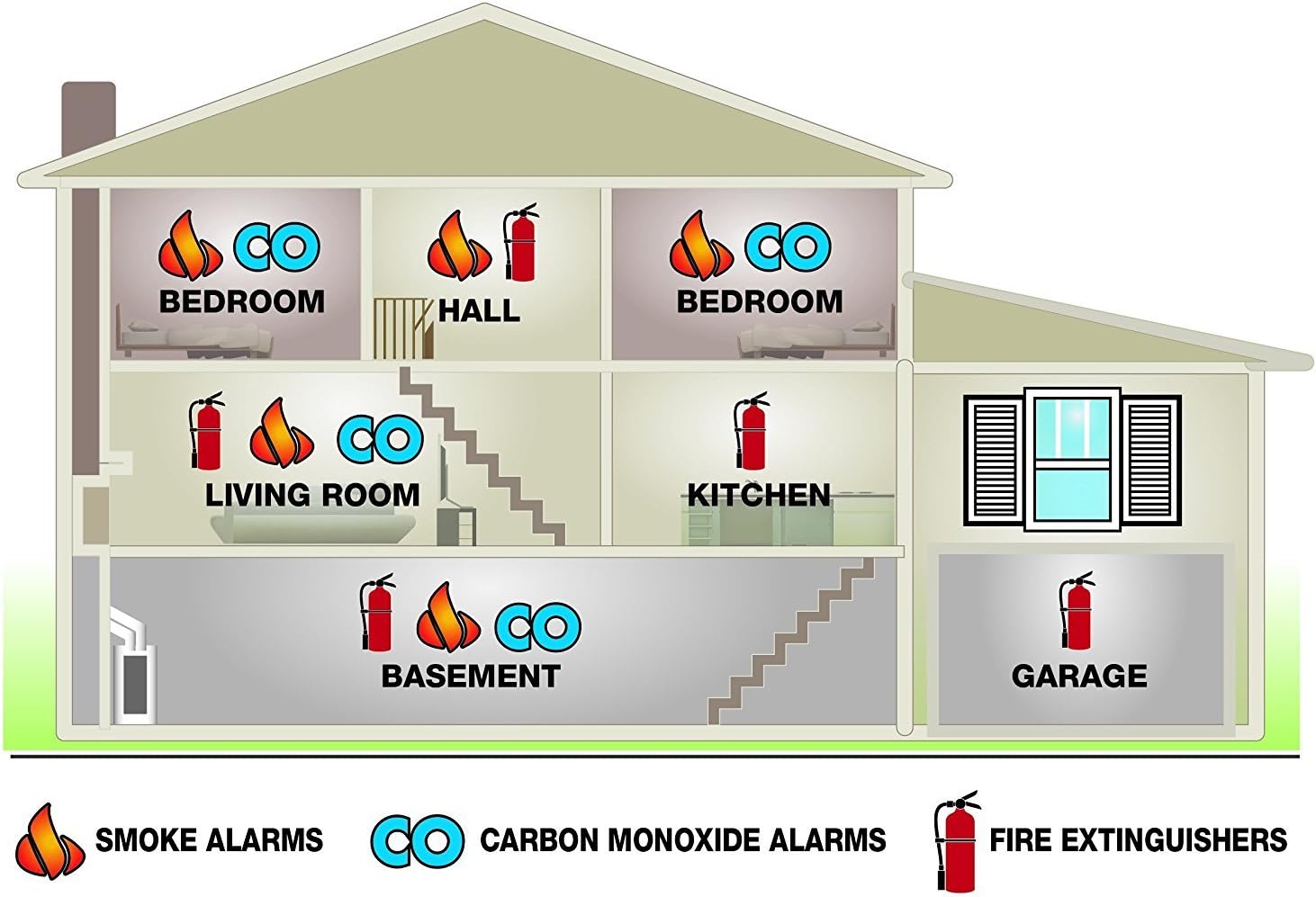
Installation Steps
- Select Location: Choose a location on the ceiling or wall according to the recommended placement guidelines.
- Mounting Bracket: Secure the mounting bracket to the ceiling or wall using the provided screws.
- Activate Battery: The 10-year sealed battery is activated automatically when the alarm is twisted onto the mounting bracket.
- Attach Alarm: Align the alarm with the mounting bracket and twist clockwise until it locks into place.
- Test Alarm: Press and hold the Test/Silence button for a few seconds until the alarm sounds. This confirms proper operation.


Operating Instructions
Once installed, your First Alert combination alarm operates continuously. Familiarize yourself with its indicators and functions.
Testing the Alarm
Test the alarm weekly by pressing and holding the Test/Silence button until the alarm sounds. The alarm will emit a series of beeps and flashes, indicating that the smoke and CO sensing functions are working correctly. Release the button to stop the test.
Silence Feature
In case of a nuisance alarm (e.g., from cooking smoke), press the Test/Silence button to temporarily silence the alarm for several minutes. The alarm will automatically reset after the silence period if the smoke or CO concentration has cleared. If the condition persists, the alarm will reactivate.
LED Indicator
The alarm features an LED indicator that provides visual status updates:
- Green Flash: Normal operation.
- Red Flash & Beep: Smoke or CO detected.
- Yellow Flash & Chirp: Malfunction or end-of-life warning.
Maintenance
Regular maintenance ensures your alarm functions correctly and provides reliable protection.
Cleaning
Clean your alarm at least once a month. Use a soft brush or vacuum cleaner with a soft brush attachment to remove dust and debris from the alarm's vents. Do not use cleaning solvents or spray directly onto the alarm.
Battery Information
This alarm is equipped with a sealed 10-year lithium battery. The battery is designed to power the unit for its entire lifespan, eliminating the need for replacement. Do not attempt to replace the battery.
Troubleshooting
If your alarm is not functioning as expected, refer to the following common issues and solutions:
| Problem | Possible Cause | Solution |
|---|---|---|
| Alarm chirps periodically | End-of-life warning or malfunction. | If the alarm is chirping and the LED is yellow, the unit has reached its end-of-life and needs to be replaced. If it's not end-of-life, ensure the unit is clean and properly mounted. |
| False alarms (e.g., from cooking) | Alarm too close to cooking area or excessive steam/humidity. | Press the Test/Silence button to temporarily silence. Relocate the alarm if false alarms are frequent due to placement. Ensure proper ventilation during cooking. |
| Alarm does not sound during test | Unit not activated or malfunction. | Ensure the alarm is properly twisted onto the mounting bracket to activate the battery. If it still doesn't work, the unit may be faulty and require replacement. |
Specifications
| Feature | Detail |
|---|---|
| Model Number | PC1210 |
| Part Number | PRC710 |
| Power Source | 10-Year Sealed Lithium Metal Battery (included) |
| Sensor Type | Photoelectric (Smoke), Electrochemical (CO) |
| Alarm Type | Audible (85 dB at 10 feet) |
| Item Weight | 6.4 ounces |
| Product Dimensions | 3.13 x 9 x 6 inches |
| UPC | 029054016027 |
| Compliance | Meets UL standards & complies with legislative requirements for 10-year battery operated smoke alarms. |
Warranty and Support
The First Alert PRC710 PC1210 combination alarm comes with a 10-year limited warranty, covering defects in materials and workmanship under normal use and service. For detailed warranty information or technical support, please refer to the documentation included with your product or visit the official First Alert website.


