
1. Introduction
Thank you for choosing the Redi-Remote Replacement Remote Control. This remote is specifically designed as a direct replacement for various NAXA television models, including NT52, NT-52, RTNT52, NT-53, and NT53. It is engineered to function immediately without any programming required, providing seamless control over your compatible NAXA unit.
This manual provides essential information on setting up, operating, and maintaining your new remote control to ensure optimal performance and longevity.
2. Setup
2.1 Battery Installation
Your Redi-Remote requires 4 AAA batteries (included) for operation. Follow these steps to install them:
- Locate the battery compartment cover on the back of the remote control.
- Slide the cover downwards or press the latch and lift to open the compartment.
- Insert 4 AAA batteries, ensuring the positive (+) and negative (-) terminals align correctly with the markings inside the compartment.
- Replace the battery compartment cover by sliding it back into place until it clicks securely.
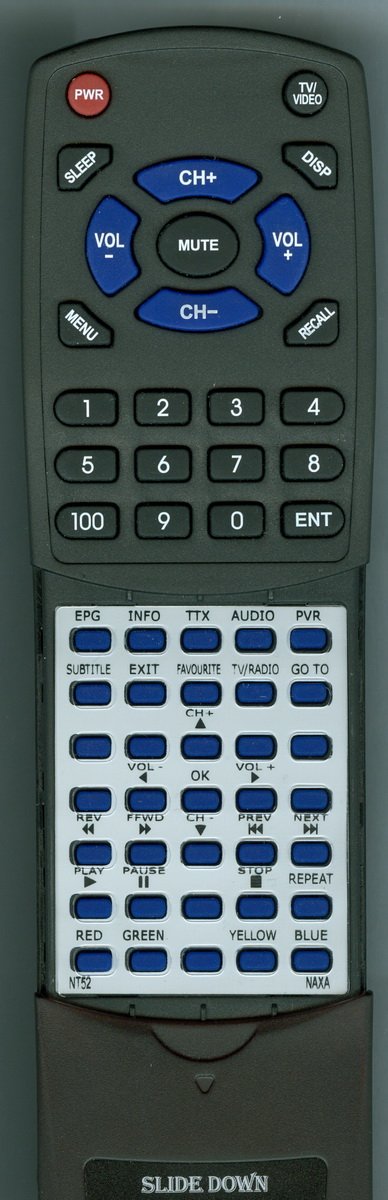
Figure 1: Front view of the Redi-Remote Replacement Remote Control. The battery compartment is located on the back of the device.
Important: Always replace all batteries at the same time. Do not mix old and new batteries, or different types of batteries. Remove batteries if the remote will not be used for an extended period.
3. Operating Instructions
This Redi-Remote is designed to replicate the functions of your original NAXA remote control. No programming is required; simply point the remote at your NAXA unit and press the desired button.
3.1 Basic Functions
- POWER: Turns the NAXA unit on or off.
- VOL +/-: Adjusts the volume level up or down.
- CH +/-: Changes the channel up or down.
- MUTE: Silences or restores the audio.
- INPUT/SOURCE: Cycles through available input sources (e.g., HDMI, AV).
- MENU: Accesses the main menu of the NAXA unit.
- NAVIGATION (Arrow Buttons): Moves the cursor within menus.
- OK/ENTER: Confirms a selection in menus.
- NUMBER PAD (0-9): Directly enters channel numbers.
3.2 Advanced Functions (Sliding Cover)
The remote control features a sliding cover over its lower half. This cover conceals additional buttons for advanced functions. To access these buttons:
- Gently slide the cover downwards from the main body of the remote.
- This will reveal buttons for functions such as SETUP, DISPLAY, GUIDE, INFO, and other specific controls depending on your NAXA model.
- After use, you can slide the cover back up to protect these buttons and maintain a compact form factor.
Refer to your NAXA unit's original manual for specific functions of these advanced buttons.
4. Maintenance
- Cleaning: Use a soft, dry cloth to clean the remote control. Do not use liquid cleaners or abrasive materials, as they may damage the surface or internal components.
- Storage: Store the remote in a cool, dry place away from direct sunlight and extreme temperatures.
- Battery Care: If the remote will not be used for an extended period (e.g., one month or more), remove the batteries to prevent leakage and potential damage to the remote.
- Avoid Drops: Protect the remote from drops and impacts, which can cause internal damage.
5. Troubleshooting
| Issue | Possible Cause | Solution |
|---|---|---|
| Remote not responding. | Dead or incorrectly inserted batteries. | Replace batteries with fresh ones, ensuring correct polarity (+/-). |
| Remote has short range or intermittent response. | Weak batteries; Obstruction between remote and NAXA unit; Infrared sensor on NAXA unit is blocked. | Replace batteries. Ensure a clear line of sight to the NAXA unit. Remove any obstructions. |
| Specific buttons not working. | Button stuck or damaged; Remote not compatible with that specific function on your NAXA model. | Gently press the button multiple times. If the issue persists, contact support. Verify the function exists on your NAXA unit. |
| Remote does not control the NAXA unit at all. | Incorrect remote model for your NAXA unit; NAXA unit's IR receiver is faulty. | Double-check the compatibility list (NT52, NT-52, RTNT52, NT-53, NT53). If compatible, test the remote with a camera (most smartphone cameras can see IR light). If the remote emits IR, the issue might be with the NAXA unit. |
6. Specifications
| Feature | Detail |
|---|---|
| Brand | Redi-Remote |
| Model Number | RTNT52 |
| Compatible Devices | NAXA NT52, NT-52, RTNT52, NT-53, NT53 |
| Connectivity Technology | Infrared (IR) |
| Special Feature | No Programming Required |
| Max Number of Supported Devices | 1 (Direct Replacement) |
| Batteries Required | 4 AAA batteries (included) |
| Product Dimensions | 7 x 3 x 1 inches |
| Item Weight | 1 pound |
7. Warranty and Support
As a replacement remote control, specific warranty details may vary. For any concerns with the remote after purchase, including operational issues or compatibility questions, please contact the seller directly through your purchase platform. They will be able to provide assistance and support regarding your Redi-Remote product.