
Utilitech #MQTL-B301 #0519041
Utilitech Wall Wash Trim Instruction Manual
Model: #MQTL-B301 #0519041
1. Product Overview
The Utilitech Wall Wash Trim is designed to provide a focused light distribution, creating a "wall wash" effect for recessed lighting fixtures. This trim is specifically designed to fit 4-inch recessed lighting housings and features a white finish with magnetic attachment for ease of installation. It is made from copper material, ensuring durability and efficient light reflection.
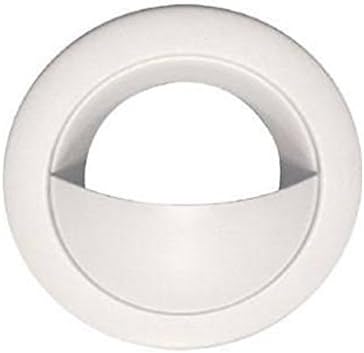
Figure 1: Utilitech Wall Wash Trim, front view. This image shows the white finish and the curved design of the trim, which helps direct light.
2. Safety Information
Please read all instructions carefully before installation. Failure to follow these instructions may result in electric shock, fire, or other hazards that could cause personal injury or property damage.
- Always disconnect power at the circuit breaker before installing or servicing the fixture.
- Consult a qualified electrician if you are unsure about the installation process.
- Ensure all electrical connections comply with local codes and ordinances.
- Do not install in wet locations unless the housing is rated for such use.
- Handle with care to avoid damage to the trim or housing.
3. Package Contents
Verify that all components are present before beginning installation.
- 1 x Utilitech Wall Wash Trim (White Finish)
- Installation Guide (this document)
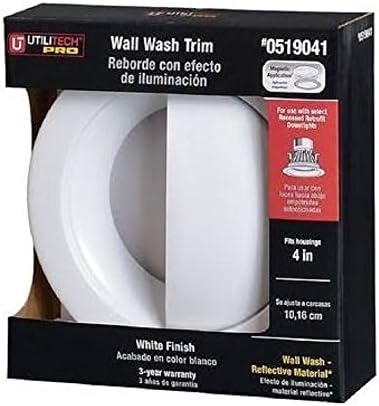
Figure 2: Utilitech Wall Wash Trim as packaged. The packaging indicates it is a 4-inch trim with a white finish and wall wash reflective material.
4. Setup and Installation
This trim is designed for easy installation into compatible 4-inch recessed lighting housings. Ensure the housing is properly installed and wired according to its own instructions and local electrical codes.
- Prepare the Housing: Ensure the recessed lighting housing is securely mounted in the ceiling and all electrical connections are complete and safe. The power to the circuit should be OFF at the breaker.
- Remove Existing Trim (if applicable): If replacing an old trim, gently pull it down from the housing. Disconnect any springs or clips holding it in place.
- Align the Trim: Position the Utilitech Wall Wash Trim so that the wall wash opening faces the wall you wish to illuminate. The trim is designed with magnetic attachment points that will align with the housing.
- Secure the Trim: Gently push the trim upwards into the recessed housing. The magnetic points will secure the trim firmly in place. Ensure it sits flush with the ceiling surface.
- Restore Power: Once the trim is securely installed, turn the power back ON at the circuit breaker. Test the light fixture to ensure proper operation.
Note: This trim is compatible with select recessed downlight housings. Refer to your housing's manual for compatibility details.
5. Operation
The Utilitech Wall Wash Trim itself does not have operational controls. Its function is passive, directing light from the installed bulb within the recessed housing. Once installed, the light will operate according to the switch connected to the recessed fixture.
- Light Direction: The unique design of the wall wash trim directs light towards a specific wall, creating an accent lighting effect.
- Bulb Compatibility: Ensure the bulb used in the recessed housing is compatible with the housing and provides the desired light output for the wall wash effect.
6. Maintenance
The Utilitech Wall Wash Trim requires minimal maintenance to retain its appearance and functionality.
- Cleaning: To clean the trim, ensure the power to the fixture is OFF. Use a soft, dry, or slightly damp cloth to wipe the surface. Do not use abrasive cleaners, solvents, or polishes, as these may damage the finish.
- Inspection: Periodically inspect the trim for any signs of damage or loosening. If the trim appears loose, gently push it back into place until the magnets secure it.
- Bulb Replacement: When replacing the bulb in the recessed housing, gently pull down the trim to access the bulb. Reinstall the trim after bulb replacement.
7. Troubleshooting
If you encounter issues with your Utilitech Wall Wash Trim, consider the following common solutions:
| Problem | Possible Cause | Solution |
|---|---|---|
| Trim does not sit flush with ceiling. | Not properly aligned or housing obstruction. | Ensure the trim is correctly aligned with the housing. Check for any wires or insulation obstructing the trim's path. |
| Trim falls out of housing. | Magnetic attachment not engaged or incompatible housing. | Push the trim firmly until the magnets engage. Verify that your recessed housing is compatible with magnetic trims. |
| Light output is not as expected. | Incorrect bulb type or wattage. | Ensure the correct bulb type and wattage are used for the desired wall wash effect. Check the bulb's lumen output and beam spread. |
8. Specifications
| Feature | Detail |
|---|---|
| Brand | Utilitech |
| Model Number | #MQTL-B301 #0519041 |
| UPC | 822985510745 |
| Finish | White |
| Housing Compatibility | 4-inch recessed housings |
| Attachment Type | Magnetic |
| Material | Copper |
| Item Weight | 3.99 ounces (approx. 113 grams) |
| Package Dimensions | 5.4 x 5.4 x 1.5 inches (approx. 13.7 x 13.7 x 3.8 cm) |
| Style | Modern |
| Manufacturer | L G Sourcing Inc. |
9. Warranty and Support
This Utilitech product comes with a 3-year warranty as indicated on the product packaging. For specific warranty terms and conditions, please refer to the documentation provided at the time of purchase or contact Utilitech customer support.
For technical assistance or further inquiries, please contact Utilitech customer service. Contact information can typically be found on the product packaging or the official Utilitech website.
Please retain your proof of purchase for warranty claims.
Ask a question about this manual
Ask about setup, troubleshooting, compatibility, parts, safety, or missing instructions. Manuals+ will review the question and use this page’s manual context to help answer it.