
1. Introduction
This manual provides detailed instructions for the setup, operation, and maintenance of your Enover TS18 7-Day Programmable Digital Timer. This device is designed to automate the control of electrical appliances by setting specific ON/OFF times throughout the week, offering convenience and energy management.
2. Product Features
- Flexible Scheduling: Program up to 10 distinct ON/OFF cycles within a 7-day period. Each program repeats weekly.
- Energy Management: Automatically controls lamps, holiday lights, humidifiers, and other electrical devices. Includes a feature to protect devices from overcharge.
- Security Function: Features a random ON/OFF option to vary lighting times, simulating occupancy when away from home.
- User-Friendly Interface: Equipped with a large LCD display for clear visibility and a manual override switch for immediate control adjustments.
- Battery Backup: An integrated battery retains programmed settings during power outages, eliminating the need for reprogramming.

Image: Enover TS18 Digital Timer highlighting key features for easy home automation.
3. Package Contents
The package includes the following items:
- 1 x Enover Digital Timer Switch (Model TS18)
- 1 x User Manual

Image: Contents of the Enover TS18 Digital Timer package, including the timer and manual.
4. Product Overview
The Enover TS18 Digital Timer features a clear LCD display and intuitive buttons for easy programming. It plugs directly into a standard electrical outlet.

Image: Front view of the Enover TS18 Digital Timer, displaying the time and control buttons.
Button Functions:
- WEEK: Sets the day(s) for programs.
- HOUR: Adjusts the hour for time and program settings.
- MINUTE: Adjusts the minute for time and program settings.
- RES/RCL: Resets or recalls settings.
- CLOCK: Enters or exits clock setting mode.
- TIMER: Cycles through program settings (P1 ON, P1 OFF, P2 ON, etc.).
- ON/AUTO/OFF: Selects operating mode (Always ON, Automatic, Always OFF).
- RANDOM: Activates or deactivates the random ON/OFF function.
- RESET: Small button (requires a pointed object) to clear all settings and reset the device.
Video: A brief demonstration of the Enover Digital Timer's basic functions and display.
5. Setup
5.1 Initial Charge
Before first use, plug the timer into an electrical outlet for approximately 5-10 minutes to charge the internal battery. This ensures the display is active and settings can be retained.
5.2 Setting Current Time and Day
- Press and hold the CLOCK button.
- While holding CLOCK, press the WEEK button repeatedly to set the current day of the week.
- While holding CLOCK, press the HOUR button repeatedly to set the current hour (AM/PM will display).
- While holding CLOCK, press the MINUTE button repeatedly to set the current minute.
- Release the CLOCK button to save the settings.
6. Operating Instructions
6.1 Programming ON/OFF Cycles
The timer allows for up to 10 ON/OFF programs. Follow these steps to set a program:
- Press the TIMER button once. The display will show "1 ON".
- Press WEEK to select the day(s) for this program (e.g., MO, TU, WE, TH, FR, SA, SU, MO TU WE TH FR, SA SU, MO TU WE TH FR SA SU, etc.).
- Press HOUR to set the desired ON hour.
- Press MINUTE to set the desired ON minute.
- Press the TIMER button again. The display will show "1 OFF".
- Repeat steps 2-4 to set the desired OFF time for Program 1. Ensure the correct day(s) are selected for the OFF time.
- Continue pressing TIMER to cycle through and set additional programs (2 ON, 2 OFF, up to 10 ON, 10 OFF).
- After setting all desired programs, press the CLOCK button to return to the current time display.
- Ensure the timer is in AUTO mode for programs to execute. Press ON/AUTO/OFF to cycle to AUTO.
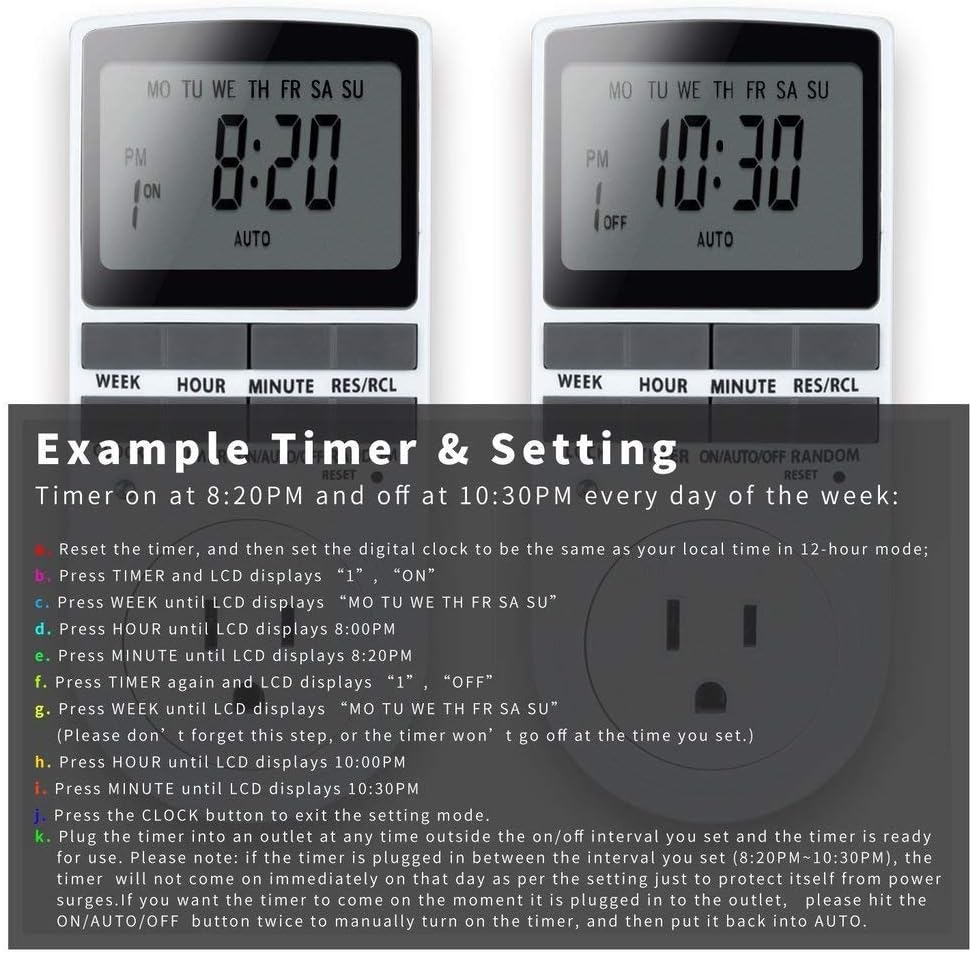
Image: Visual guide for setting an example timer program (ON at 8:20 PM, OFF at 10:30 PM daily).
6.2 Random Function (Anti-theft)
To activate the random ON/OFF feature:
- Press the RANDOM button. The word "RANDOM" will appear on the display.
- In random mode, the timer will turn ON and OFF at varying times within a set period, typically around the programmed ON/OFF times, to simulate occupancy.
- To deactivate, press the RANDOM button again.

Image: The anti-theft random feature of the Enover TS18 Digital Timer, designed to deter intruders.
6.3 Manual Override
To manually switch the timer's output without affecting programmed settings:
- Press the ON/AUTO/OFF button to cycle through the modes: ON (always on), AUTO (follows programs), OFF (always off).
- Select the desired temporary mode. The timer will revert to AUTO mode at the next programmed ON/OFF event.
Video: A detailed demonstration of setting programs and using the manual override function on the Enover Digital Timer.
7. Applications
The Enover TS18 Digital Timer can be used to automate various household devices, enhancing convenience and energy efficiency.
- Coffee Makers: Program your coffee maker to start brewing before you wake up.
- Aquarium Lights/Pumps: Automate the lighting and filtration cycles for your aquarium.
- Indoor Grow Lights: Maintain consistent light schedules for plants.
- Holiday Decorations: Set festive lights to turn on and off automatically.
- Fans/Humidifiers: Control environmental devices to operate only when needed.

Image: Examples of automating daily routines with the Enover TS18 Digital Timer, such as a coffee maker and aquarium.
8. Specifications
| Model Number | TS18 |
| Brand | Enover |
| Color | White |
| Material | Plastic |
| Number of Settings | 10 (ON/OFF programs) |
| Voltage | 120 Volts |
| Wattage | 1800 watts |
| Amperage Capacity | 15 Amps |
| Installation Method | Plug-in |
| Mounting Type | Plug In Mount |
| Plug Format | B - US style with ground plug |
| Special Features | 3-wire grounded plug and 3-prong grounded outlet |
| Usage | Indoor use only |
| Item Weight | 6.4 ounces |
| Package Dimensions | 5.67 x 3.31 x 2.6 inches |
| Battery Cell Type | NiMH |
| Battery Life | 100 days (backup) |
9. Troubleshooting
- Timer not turning ON/OFF as programmed:
- Ensure the timer is in AUTO mode.
- Verify that the current time and day are set correctly.
- Check that the ON and OFF times for the specific program are correctly entered and assigned to the desired days.
- Confirm the appliance connected to the timer is switched ON.
- Display is blank or dim:
- Plug the timer into an active electrical outlet for 5-10 minutes to charge the internal battery.
- All settings lost after power outage:
- The internal battery may not be sufficiently charged. Ensure the timer is regularly plugged in to maintain battery charge.
- To clear all settings:
- Use a pointed object (like a pen tip) to press the RESET button. This will clear all programs and reset the clock. You will need to re-enter all settings.
10. Warranty and Support
For warranty information or technical support, please refer to the contact details provided on the product packaging or the official Enover website. Keep your purchase receipt for warranty claims.

