
Pyramid PB717X
Pyramid PB717X Arctic Series 2-Channel Bridgeable MOSFET Amplifier User Manual
Model: PB717X
Introduction
This user manual provides comprehensive instructions for the installation, operation, and maintenance of your Pyramid PB717X Arctic Series 2-Channel Bridgeable MOSFET Amplifier. Please read this manual thoroughly before attempting to install or operate the amplifier to ensure proper function and safety. Retain this manual for future reference.
Safety Information
Always observe the following safety precautions:
- Ensure the vehicle's battery is disconnected before any installation work to prevent electrical shorts.
- Install the amplifier in a well-ventilated area, away from direct sunlight, heat sources, and moisture.
- Use appropriate gauge wiring for power, ground, and speaker connections as specified in the installation section.
- Securely mount the amplifier to prevent movement during vehicle operation.
- Do not attempt to open or repair the amplifier. Refer all servicing to qualified personnel.
- Protect all wiring from sharp edges and moving parts.
Package Contents
Upon opening the package, verify that all items are present and in good condition:
- Pyramid PB717X Arctic Series Amplifier
- Mounting Hardware (screws)
- User Manual (this document)
Note: Additional wiring (power, ground, RCA, speaker wire) is typically sold separately and is required for installation.
Product Features
The Pyramid PB717X Arctic Series Amplifier is designed to deliver powerful and clear audio performance in your vehicle. Key features include:
- 1000 Watts Peak Power Output
- 2-Channel Configuration
- Bridgeable Design for Mono Operation
- MOSFET Power Supply
- Variable Gain Control
- Thermal, Overload, and Short Circuit Protection
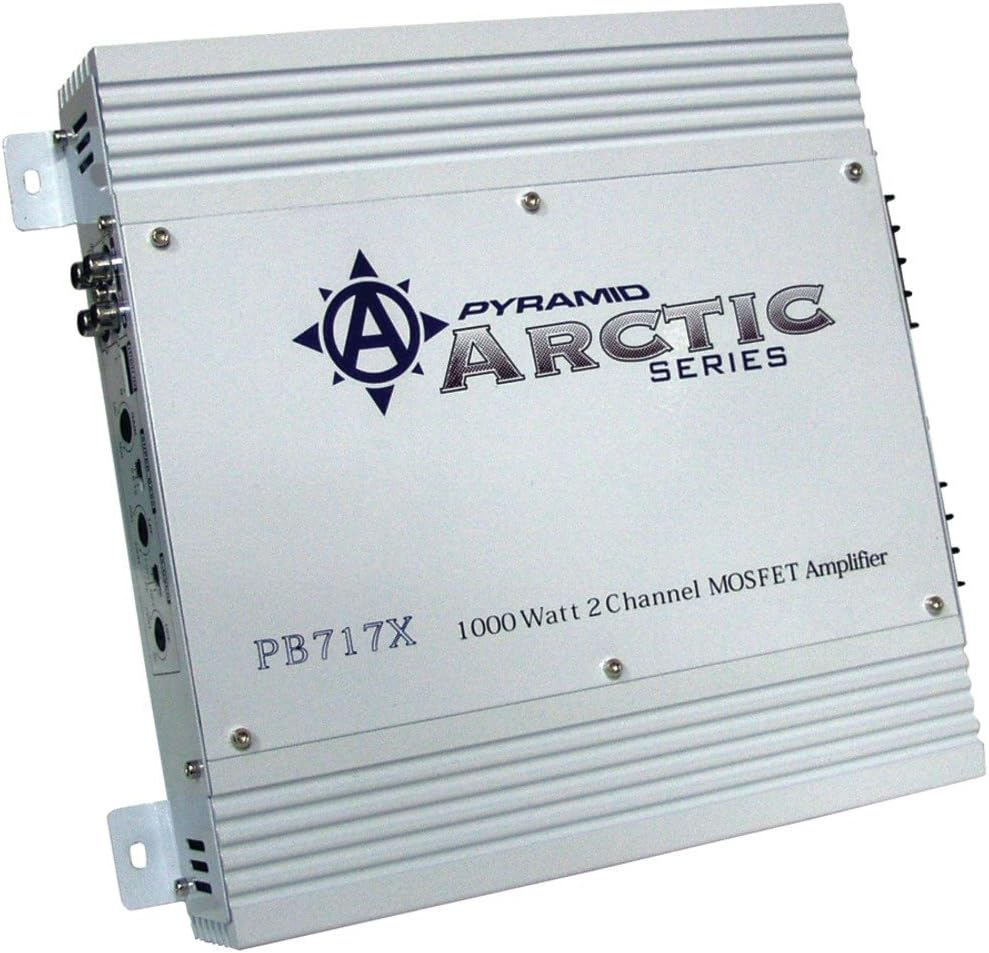
Image: Front view of the Pyramid PB717X Arctic Series Amplifier, showcasing its silver finish, "PYRAMID ARCTIC SERIES" branding, model number PB717X, and "1000 Watt 2 Channel MOSFET Amplifier" text. Input and output terminals are visible on the left side.
Setup and Installation
Proper installation is crucial for optimal performance and safety. It is highly recommended that installation be performed by a qualified professional.
Mounting Location
Choose a mounting location that is dry, well-ventilated, and secure. Avoid mounting the amplifier directly on carpet or in enclosed spaces that restrict airflow. Common locations include under seats, in the trunk, or behind rear seats.
Wiring Connections
- Power Connection (+12V): Connect a heavy-gauge power cable (e.g., 8-gauge or 4-gauge depending on total system power) directly from the vehicle's positive battery terminal to the amplifier's +12V terminal. Install an in-line fuse holder within 18 inches (45 cm) of the battery.
- Ground Connection (GND): Connect a heavy-gauge ground cable of the same length as the power cable from the amplifier's GND terminal to a clean, unpainted metal surface of the vehicle's chassis. Ensure a solid, low-resistance connection.
- Remote Turn-On (REM): Connect a thin wire from the amplifier's REM terminal to the remote output of your car stereo or a switched 12V source. This wire turns the amplifier on and off with the stereo.
- RCA Input: Connect RCA cables from the pre-amp outputs of your car stereo to the RCA input jacks on the amplifier.
- Speaker Output: Connect your speakers to the amplifier's speaker output terminals. Observe correct polarity (+ to + and - to -). For bridged operation, refer to the specific bridging instructions printed on the amplifier or in the operating section.
Always double-check all connections before reconnecting the vehicle's battery.
Operating Instructions
Initial Power-Up
After all connections are made and verified, reconnect the vehicle's battery. Turn on your car stereo. The amplifier's power indicator light should illuminate, indicating it is receiving power and is operational.
Gain Adjustment
The gain control (often labeled "LEVEL" or "GAIN") matches the amplifier's input sensitivity to the output level of your car stereo. To set the gain:
- Turn the amplifier's gain control to its minimum (fully counter-clockwise) setting.
- Play a familiar piece of music with a wide dynamic range through your car stereo.
- Increase the car stereo's volume until it reaches about 75-80% of its maximum level.
- Slowly increase the amplifier's gain control until you hear slight distortion, then back it off slightly until the sound is clear.
The gain control is not a volume knob; it is for matching signal levels. Setting it too high can cause distortion and damage to speakers.
Bridged Mode Operation
The PB717X amplifier can be bridged to provide a single, higher-power mono output, typically for a subwoofer. To bridge the amplifier:
- Connect the positive (+) terminal of your subwoofer to the positive (+) terminal of one amplifier channel (e.g., Channel 1+).
- Connect the negative (-) terminal of your subwoofer to the negative (-) terminal of the other amplifier channel (e.g., Channel 2-).
- Ensure the subwoofer's impedance is compatible with the amplifier's bridged minimum impedance (typically 4 ohms). Refer to the amplifier's specifications.
- Use a single RCA input for the bridged channel, or use a Y-adapter if your stereo only has stereo outputs.
Maintenance
Regular maintenance helps ensure the longevity and performance of your amplifier:
- Cleaning: Periodically wipe the amplifier's exterior with a soft, dry cloth. Do not use liquid cleaners or solvents.
- Ventilation: Ensure that the amplifier's heat sinks and ventilation openings are not obstructed. Adequate airflow is essential to prevent overheating.
- Connections: Occasionally check all wiring connections for tightness and corrosion. Loose connections can lead to poor performance or damage.
Troubleshooting
If you experience issues with your amplifier, consult the following table before seeking professional assistance:
| Problem | Possible Cause | Solution |
|---|---|---|
| No Power / Amplifier does not turn on |
|
|
| No Sound Output |
|
|
| Distorted Sound |
|
|
| Amplifier Overheats / Goes into Protection Mode |
|
|
Specifications
The following are general specifications for the Pyramid PB717X Arctic Series Amplifier. Specifications are subject to change without notice.
- Model: PB717X
- Brand: Pyramid
- Channels: 2-Channel
- Power Output: 1000 Watts (Peak)
- Amplifier Class: MOSFET
- Bridgeable: Yes
- Item Weight: 12.14 pounds
- ASIN: B01DPM8PRY
- Manufacturer: Pyramid
Warranty and Support
The Pyramid PB717X Arctic Series Amplifier comes with a ONE YEAR Warranty from the date of purchase. This warranty covers defects in materials and workmanship under normal use.
For warranty claims, technical support, or service inquiries, please contact Pyramid customer support through their official website or the retailer from whom the product was purchased. Please have your proof of purchase and the product's serial number available when contacting support.
Do not attempt to return the product to the place of purchase without prior authorization.
Related documentsPB717X


Ask a question about this manual
Ask about setup, troubleshooting, compatibility, parts, safety, or missing instructions. Manuals+ will review the question and use this page’s manual context to help answer it.