
DB DRIVE SB-58148
DB DRIVE K5 12D4V2 Okur(R) K5v2 Series Subwoofer (12") User Manual
Model: SB-58148
1. Introduction
This manual provides essential information for the proper installation, operation, and maintenance of your DB DRIVE K5 12D4V2 Okur(R) K5v2 Series 12-inch Subwoofer. Please read this manual thoroughly before attempting to install or operate the subwoofer to ensure optimal performance and safety.
The DB DRIVE K5 12D4V2 is a high-performance 12-inch subwoofer designed for car audio systems, featuring robust construction and advanced components for powerful and clear bass reproduction.
2. Key Features
- 12-inch subwoofer for deep bass response.
- 1,500W maximum power handling.
- 2.5-inch voice coil with 4-layer 4-ohm DVC (Dual Voice Coil) configuration.
- Heavy-gauge stamped steel basket for durability.
- Injection-molded bowl PP (Polypropylene) dust cap.
- High-temperature voice coil for extended performance.
- KSV voice-coil former.
- High-excursion butyl rubber surround for enhanced cone movement.
- Heavy-gauge spring terminals for secure wire connections.
- Proprietary PVC gasket for a sealed fit.
3. Safety Information
Always observe the following safety precautions:
- Professional Installation Recommended: Installation of car audio components can be complex. If you are unsure about any step, seek assistance from a qualified professional installer.
- Disconnect Battery: Before beginning any installation, disconnect the vehicle's negative battery terminal to prevent electrical shorts and damage.
- Proper Wiring: Ensure all wiring is correctly connected according to the amplifier and subwoofer specifications. Incorrect wiring can lead to damage or fire.
- Ventilation: Ensure adequate ventilation around the subwoofer and amplifier to prevent overheating.
- Volume Levels: Prolonged exposure to high volume levels can cause hearing damage. Use caution when adjusting volume.
- Secure Mounting: Securely mount the subwoofer to prevent it from becoming a projectile in the event of a sudden stop or accident.
4. Setup and Installation
Proper installation is crucial for optimal performance and longevity of your subwoofer. This section provides general guidelines. Refer to your amplifier's manual for specific wiring diagrams and power requirements.
4.1. Choosing an Enclosure
The DB DRIVE K5 12D4V2 subwoofer requires a suitable enclosure for proper operation. Common enclosure types include sealed, ported (vented), or bandpass. The choice depends on desired sound characteristics and available space. Consult a car audio specialist or online resources for recommended enclosure volumes and tuning frequencies for this specific model.
4.2. Wiring the Subwoofer
The K5 12D4V2 features a 4-layer 4-ohm DVC (Dual Voice Coil) configuration. This allows for various wiring options to achieve different impedance loads at the amplifier. Common configurations include:
- Parallel Wiring (2 ohms): Connect the positive terminals of both voice coils together and the negative terminals of both voice coils together. This results in a 2-ohm load, suitable for amplifiers stable at 2 ohms.
- Series Wiring (8 ohms): Connect the positive terminal of one voice coil to the negative terminal of the other voice coil. The remaining positive and negative terminals are then connected to the amplifier. This results in an 8-ohm load.
Always match the subwoofer's impedance load to the amplifier's stable impedance rating. Refer to the wiring diagram provided with your amplifier.
4.3. Connecting to the Amplifier
Connect the wired subwoofer to the appropriate speaker output terminals on your amplifier. Ensure polarity is correct (+ to + and - to -). Use high-quality speaker wire of adequate gauge to minimize power loss.
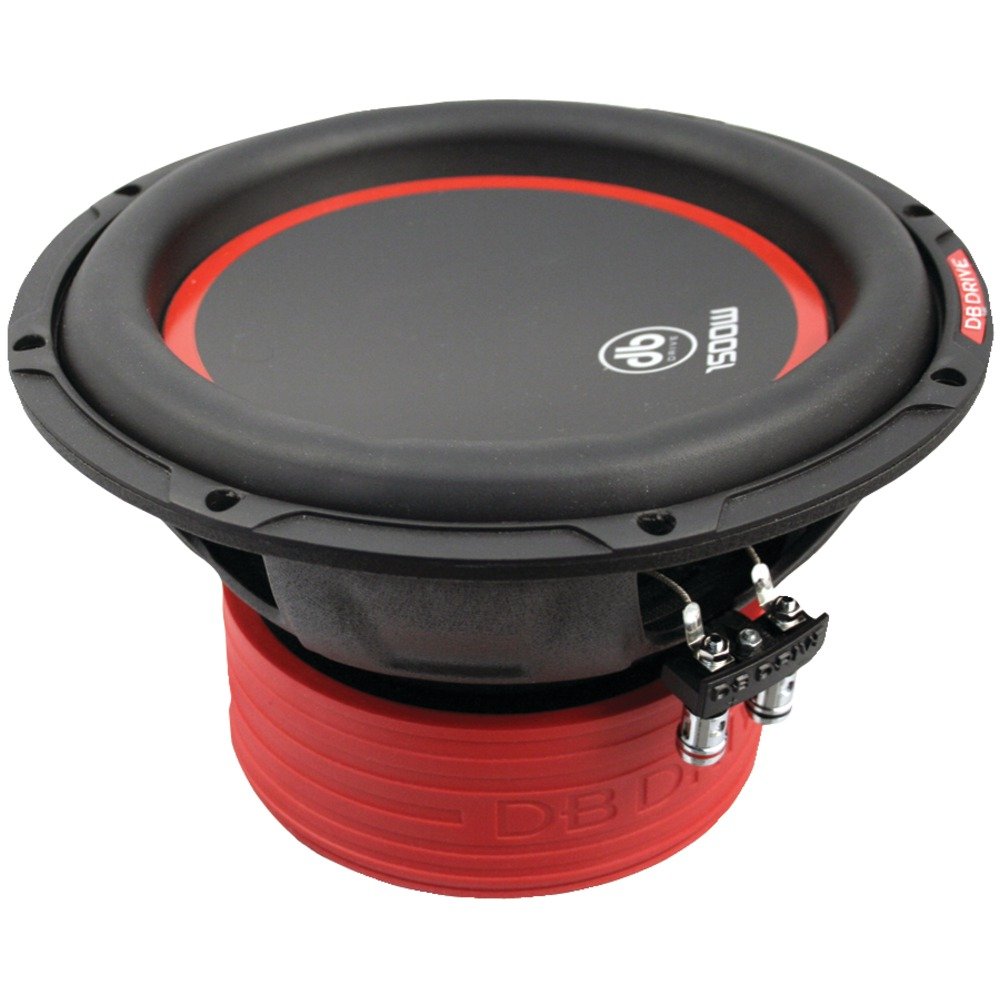
Figure 1: DB DRIVE K5 12D4V2 Subwoofer. This image displays the top view of the subwoofer, highlighting its black cone with a red trim, the durable black frame, and the heavy-gauge spring terminals for electrical connections. The red magnet cover is visible at the bottom.
5. Operating Instructions
Once installed, follow these general guidelines for operating your subwoofer:
- Initial Power-Up: After installation, turn on your car's audio system at a low volume. Gradually increase the volume and check for proper operation.
- Amplifier Settings: Adjust the gain, crossover frequency, and phase settings on your amplifier to blend the subwoofer's output seamlessly with your main speakers.
- Gain: Set the gain to match the output voltage of your head unit. Avoid setting it too high, which can cause distortion.
- Low-Pass Filter (LPF): Set the LPF to filter out frequencies above the subwoofer's intended range (typically 60Hz-100Hz).
- Phase: Adjust the phase (0° or 180°) to ensure the subwoofer's output is in sync with your main speakers, preventing cancellation or weak bass.
- Break-In Period: Allow a break-in period of approximately 20-30 hours of normal listening before pushing the subwoofer to its limits. This allows the suspension components to loosen up and perform optimally.
- Avoid Overdriving: Do not continuously play the subwoofer at distorted levels. This can cause permanent damage to the voice coil and other components.
6. Maintenance
The DB DRIVE K5 12D4V2 subwoofer requires minimal maintenance:
- Cleaning: Use a soft, dry cloth to wipe down the cone and surround. Avoid using harsh chemicals or abrasive cleaners.
- Inspection: Periodically inspect the wiring connections to ensure they are secure and free from corrosion. Check the subwoofer's surround for any signs of cracking or damage.
- Environmental Factors: Protect the subwoofer from extreme temperatures, direct sunlight, and moisture, which can degrade its performance and lifespan.
7. Troubleshooting
If you experience issues with your subwoofer, refer to the following common problems and solutions:
| Problem | Possible Cause | Solution |
|---|---|---|
| No Sound from Subwoofer |
|
|
| Distorted or Unclear Bass |
|
|
| Subwoofer Overheating |
|
|
If the problem persists after attempting these solutions, contact DB DRIVE customer support or a qualified car audio technician.
8. Specifications
| Feature | Detail |
|---|---|
| Brand | DB DRIVE |
| Model Number | SB-58148 |
| Speaker Size | 12 Inches |
| Max Power Handling | 1,500W |
| Voice Coil | 2.5" 4-layer 4-ohm DVC |
| Basket Material | Heavy-gauge stamped steel |
| Dust Cap | Injection-molded bowl PP |
| Surround Material | High-excursion butyl rubber |
| Terminals | Heavy-gauge spring terminal |
| UPC | 731215374418, 782386080233 |
| Mounting Type | Flush Mount |
| Date First Available | March 30, 2016 |
9. Warranty and Support
For information regarding warranty coverage, technical support, or service, please refer to the official DB DRIVE website or contact their customer service department directly. Keep your proof of purchase for warranty claims.
DB DRIVE Official Website: www.dbdrive.net (Note: This is a placeholder URL, please verify the actual official website for DB DRIVE.)
Related documentsSB-58148


Ask a question about this manual
Ask about setup, troubleshooting, compatibility, parts, safety, or missing instructions. Manuals+ will review the question and use this page’s manual context to help answer it.