
Introduction
This manual provides detailed instructions for the setup, operation, and maintenance of your Acer R271 bid 27-inch IPS Full HD (1920 x 1080) Display. Please read this manual thoroughly before using your monitor to ensure proper functionality and to maximize your viewing experience.

Front view of the Acer R271 bid 27-inch IPS Full HD Display.
Setup
Package Contents
Verify that all components are present in the package:
- Acer R271 bid 27-inch Display
- Monitor Stand
- Power Cord
- HDMI Cable (may vary by region)
- VGA Cable (may vary by region)
Monitor Assembly
To assemble the monitor, carefully attach the stand to the back of the display panel. Ensure it clicks securely into place. Place the monitor on a stable, flat surface.
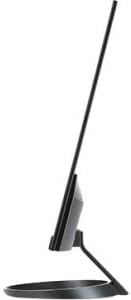
Side view illustrating the slim design of the Acer R271 bid monitor.
Connecting the Monitor
The Acer R271 bid monitor supports multiple input options. Connect the appropriate cable from your computer or device to the corresponding port on the monitor.
- HDMI: For high-definition digital video and audio.
- DVI (w/HDCP): For digital video connection.
- VGA: For analog video connection.
After connecting the video cable, connect the power cord to the monitor and then to a power outlet.
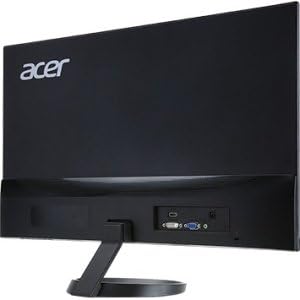
Rear view of the Acer R271 bid monitor, highlighting the HDMI, DVI, and VGA input ports.
Powering On
Press the power button, usually located on the bottom right side of the monitor, to turn on the display. The monitor will automatically detect the active input source.
Operating Instructions
Basic Functions
Use the buttons located on the bottom bezel of the monitor to navigate the On-Screen Display (OSD) menu. These buttons typically allow you to:
- Power On/Off the monitor.
- Select input source (HDMI, DVI, VGA).
- Adjust volume (if applicable).
- Access the OSD menu for advanced settings.
Display Settings
The OSD menu provides options to customize your display. Common adjustments include:
- Brightness: Adjust the overall luminance of the screen.
- Contrast: Modify the difference between light and dark areas.
- Color Settings: Fine-tune color temperature, gamma, and individual RGB levels.
- Picture Mode: Select preset modes for different content types (e.g., Standard, Movie, Game).
Key Features
The Acer R271 bid monitor incorporates several features designed to enhance your viewing experience:
- IPS Technology: Provides clear and bright colors from wide viewing angles (up to 178 degrees).
- ZeroFrame Design: An edge-to-edge display that minimizes bezels, ideal for multi-monitor setups.
- Eye Protect Technology: Includes features like Blue Light Filter, Flicker-less, and ComfyView to reduce eye strain during prolonged use.
Official product video showcasing the Acer R1 Series monitor's features, including ZeroFrame design, Full HD resolution, IPS technology for wide viewing angles, and Eye Protect technology for user comfort.
Maintenance and Care
Cleaning the Monitor
To clean the screen, gently wipe it with a soft, lint-free cloth. For stubborn marks, dampen the cloth with a mild, non-abrasive screen cleaner. Avoid using alcohol-based cleaners or spraying liquid directly onto the screen.
General Care
Keep the monitor away from direct sunlight, excessive heat, and moisture. Do not block the ventilation openings. Avoid placing heavy objects on the monitor or its cables.
Troubleshooting
No Display or "No Signal" Message
- Ensure the power cable is securely connected to both the monitor and the power outlet.
- Verify that the video cable (HDMI, DVI, or VGA) is firmly connected to both the monitor and your computer.
- Check if the correct input source is selected on the monitor using the OSD menu.
- Confirm your computer is powered on and not in sleep mode.
Poor Image Quality
- Adjust the brightness, contrast, and color settings through the OSD menu.
- Ensure your computer's display resolution is set to the monitor's native resolution (1920 x 1080).
- Check for any physical damage to the video cable or ports.
Specifications
| Feature | Specification |
|---|---|
| Screen Size | 27 Inches |
| Screen Resolution | 1920 x 1080 (Full HD) |
| Panel Type | IPS |
| Response Time | 4ms |
| Pixel Pitch | 0.311mm |
| Brightness | 250 nit |
| Signal Inputs | 1 x HDMI, 1 x DVI (w/HDCP), 1 x VGA |
| Aspect Ratio | 16:9 |
| Item Weight | 8.05 pounds |
| Product Dimensions (LxWxH) | 24.8 x 18.1 x 9.4 inches |
| Color | Black |

Detailed dimensions of the Acer R271 bid monitor.
Warranty Information
The Acer R271 bid monitor typically comes with a 3-year limited warranty. Please refer to the warranty card included with your product or visit the official Acer website for specific terms and conditions, as warranty details may vary by region and retailer.
Customer Support
For further assistance, technical support, or to download the latest drivers and software, please visit the official Acer support website:
You may also contact Acer customer service directly for personalized support.


