
WASABI MANGO UHD400
WASABI MANGO UHD400 REAL 4K Monitor User Manual
Model: UHD400
1. Introduction
This manual provides comprehensive instructions for the setup, operation, and maintenance of your WASABI MANGO UHD400 REAL 4K HDMI 2.0 40" UHD Monitor. Please read this manual thoroughly before using the product to ensure proper and safe operation.
2. Safety Information
Observe the following safety precautions to prevent damage to the monitor and ensure user safety:
- Do not expose the monitor to rain or moisture.
- Do not block ventilation openings.
- Use only the power adapter provided with the monitor.
- Avoid placing the monitor in direct sunlight or near heat sources.
- Disconnect the power cord during lightning storms or when unused for long periods.
- Refer all servicing to qualified service personnel.
3. Package Contents
Verify that all items are present in the package:
- WASABI MANGO UHD400 REAL 4K Monitor
- Power Adapter (AC 110~240V / 50~60Hz Free Voltage)
- US Plug Adapter
- User Manual (this document)
- Note: Bracket for VESA wall mount is not included.
4. Setup
4.1 Attaching the Stand
Carefully place the monitor face down on a soft, clean surface. Attach the provided stand components to the back of the monitor using the designated screws. Ensure the stand is securely fastened before proceeding.
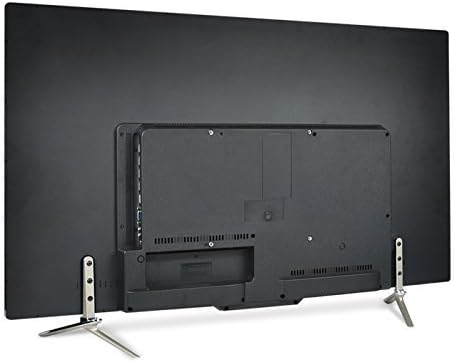
Figure 4.1: Rear view of the monitor showing the VESA mount area and attached stand.
4.2 Connecting Cables
Connect the necessary cables to the monitor's input ports. Ensure your graphic card supports 3840x2160 UHD resolution. Recommended graphic card: NVIDIA GTX960 2GB.
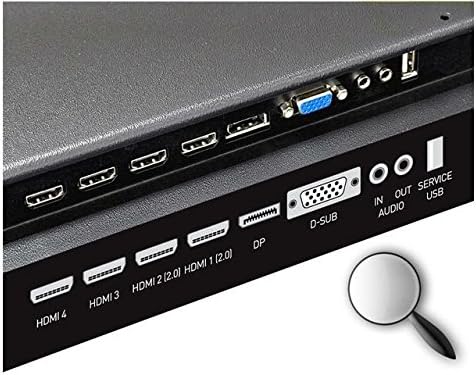
Figure 4.2: Detailed view of the monitor's input/output ports.
- Power: Connect the power adapter to the monitor's power input and then to a wall outlet.
- Video Input:
- HDMI: Connect an HDMI cable from your computer's graphics card to one of the monitor's HDMI ports (HDMI 2.0x2, HDMI 1.4ax2). HDMI 2.0 ports support 4K at 60Hz.
- DisplayPort (DP): Connect a DisplayPort cable from your computer's graphics card to the monitor's DP 1.2 port.
- D-SUB: Connect a D-SUB (VGA) cable for analog video input.
- Audio: Connect audio cables to the AUDIO IN/OUT ports as needed. The monitor has built-in 10W x 10W stereo speakers.
5. Operating Instructions
5.1 Powering On/Off
Press the power button located on the monitor to turn it on or off. The power indicator light will illuminate when the monitor is on.
5.2 Input Selection
Use the input selection button (or navigate through the On-Screen Display menu) to switch between connected video sources (DP1.2, HDMI 2.0, HDMI 1.4a, D-SUB).
5.3 On-Screen Display (OSD) Menu
The OSD menu allows you to adjust various display settings such as brightness, contrast, color temperature, and picture modes. Navigate the OSD using the buttons on the monitor.
5.4 Special Features
- HDCP 2.2 Support: The monitor supports HDCP 2.2, enabling viewing of UHD broadcasting content.
- Chroma Subsampling 4:4:4: The UHD400 REAL4K HDMI2.0 supports YCbCr444, which provides superior color accuracy and a high degree of definition, crucial for clear text and vibrant images.
- PIP (Picture-in-Picture) and PBP (Picture-by-Picture): These functions allow you to display content from multiple input sources simultaneously on the screen.
- PIP: Displays a smaller window of a second input source over the main display.
- PBP: Divides the screen into multiple sections, each displaying a different input source side-by-side.
- Flicker-Free Technology: Reduces screen flickering, which can cause eye strain and fatigue during prolonged use.
- Low Blue Light Function: Minimizes the emission of harmful blue light, further contributing to reduced eye fatigue and improved viewing comfort.
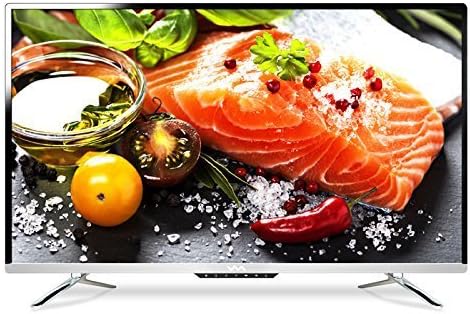
Figure 5.1: The monitor displaying a high-resolution image, showcasing its vibrant color capabilities.
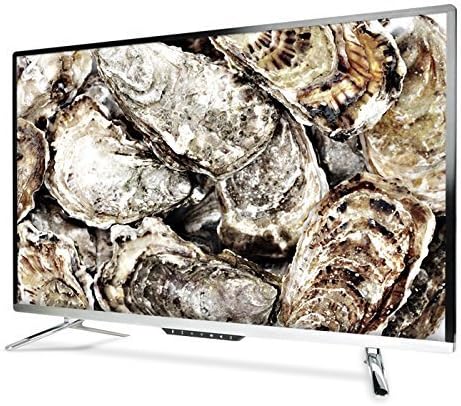
Figure 5.2: Side view of the monitor, highlighting its wide viewing angles.

Figure 5.3: Another angled view, demonstrating the monitor's image clarity and color reproduction.
6. Maintenance
6.1 Cleaning the Screen
Gently wipe the screen with a soft, lint-free cloth. For stubborn marks, dampen the cloth slightly with water or a non-abrasive screen cleaner. Do not spray liquid directly onto the screen.
6.2 Cleaning the Casing
Use a soft, dry cloth to clean the monitor's casing. Avoid using strong detergents or solvents that may damage the finish.
7. Troubleshooting
| Problem | Possible Cause | Solution |
|---|---|---|
| No image on screen | Power cable disconnected; Incorrect input source selected; Video cable loose or disconnected. | Check power connections; Select correct input source; Reconnect video cable securely. |
| Image is blurry or distorted | Incorrect resolution setting; Faulty video cable. | Set display resolution to 3840x2160; Try a different video cable. |
| No audio | Audio cable disconnected; Volume too low; Muted. | Check audio cable connection; Increase volume; Unmute audio. |
| Monitor not detected by PC | Graphics card driver issue; Cable issue. | Update graphics card drivers; Ensure cable is firmly connected. |
8. Specifications
| Feature | Detail |
|---|---|
| Model | WASABI MANGO UHD400 REAL 4K HDMI 2.0 |
| Panel Type | PVA LED Backlight |
| Screen Size / Aspect Ratio | 40 inch (101.5cm) / 16:9 Wide |
| Recommended Resolution | 3840x2160 (UHD 4K) |
| Color Bit | 107B Dithered 10bit |
| Brightness | 350cd/m2 |
| Contrast Ratio | 5,000:1 |
| Dynamic Contrast Ratio | 5,000,000:1 |
| Response Rate | 5ms (GTG) |
| View Angle | 178° (Horizontal) / 178° (Vertical) |
| Vertical Frequency | 60Hz |
| Horizontal Frequency | 30-80KHz |
| Input Signal | DP1.2 / HDMI 2.0x2 / HDMI 1.4ax2 / AUDIO IN / AUDIO OUT / D-SUB / SERVICE USB |
| Audio Output | 10W x 10W Stereo Speakers |
| Input Voltage | AC 110~240V / 50~60Hz (Free Voltage) |
| Consumption Voltage | Normal: 60W / Sleep Mode: 0.5W |
| Dimensions (with stand) | 95mm(W) x 590mm(H) x 245mm(D) |
| VESA Wall Mount | 200mm x 200mm |
9. Warranty and Support
For warranty information and technical support, please refer to the documentation provided at the time of purchase or contact WASABI MANGO customer service. Keep your purchase receipt as proof of purchase for warranty claims.
For further assistance, visit the official WASABI MANGO website or contact their support channels.
Ask a question about this manual
Ask about setup, troubleshooting, compatibility, parts, safety, or missing instructions. Manuals+ will review the question and use this page’s manual context to help answer it.