Introduction
The House of Marley Chant Mini is a compact and portable wireless Bluetooth speaker designed for on-the-go audio. Crafted with eco-friendly materials like bamboo and Rewind Fabric, it offers clear sound, splash resistance, and an integrated microphone for hands-free calls. This manual provides essential information for setting up, operating, and maintaining your Chant Mini speaker.
Safety Information
- Do not expose the speaker to extreme temperatures or direct sunlight for extended periods.
- Keep the speaker away from water sources when ports are open. Ensure the protective cover for ports is securely closed when near liquids.
- Do not attempt to disassemble or modify the speaker. This may void the warranty and cause damage.
- Use only the provided USB charging cable or a certified equivalent for charging.
- Avoid dropping or subjecting the speaker to strong impacts.
- Clean the speaker with a soft, dry cloth. Do not use harsh chemicals or abrasive materials.
Package Contents
Verify that all items are present in your package:
- House of Marley Chant Mini Wireless Bluetooth Speaker
- Removable Carabiner
- Auxiliary Cord (3.5mm)
- USB Charging Cable (Micro USB)
Product Overview
Familiarize yourself with the components and controls of your Chant Mini speaker.

Figure 1: Top-down view of the Chant Mini speaker, showcasing the speaker grille and bamboo trim.
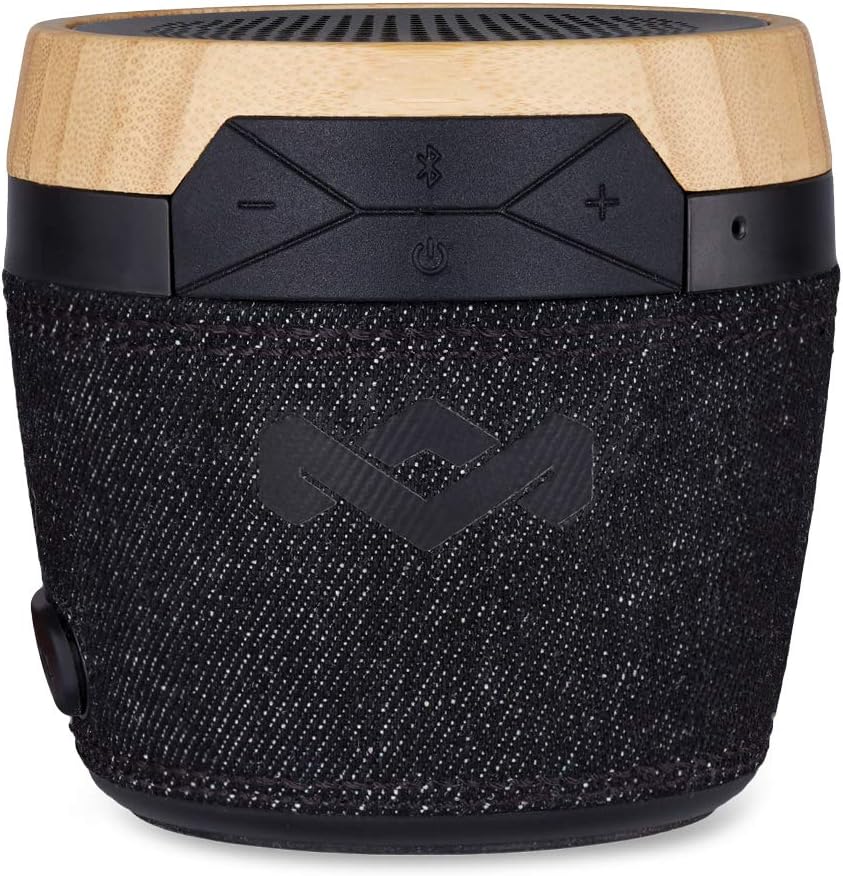
Figure 2: Close-up of the speaker's top panel, highlighting the wireless control buttons.
- Power Button: Turns the speaker on/off.
- Bluetooth Pairing Button: Initiates Bluetooth pairing mode.
- Volume Up/Next Track Button: Increases volume (short press) or skips to the next track (long press).
- Volume Down/Previous Track Button: Decreases volume (short press) or goes to the previous track (long press).
- Integrated Microphone: For hands-free calling.
- Micro USB Port: For charging the speaker. Located under a protective flap.
- 3.5mm Aux-in Port: For wired audio connection. Located under a protective flap.
- Carabiner Clip Attachment Point: For attaching the included carabiner.

Figure 3: Side view showing the detachable carabiner for portability.
Setup
Charging the Speaker
- Locate the protective rubber flap on the side of the speaker.
- Gently open the flap to reveal the Micro USB charging port.
- Connect the Micro USB end of the charging cable to the speaker's port.
- Connect the USB-A end of the charging cable to a USB power adapter (not included) or a computer's USB port.
- The LED indicator light will illuminate to show charging status.
- Allow approximately 2-3 hours for a full charge. A full charge provides up to 6 hours of playtime.
- Once fully charged, disconnect the cable and securely close the protective rubber flap to maintain splash resistance.
Operating Instructions
Powering On/Off
- To power on, press and hold the Power button (⏻) for 2 seconds. You will hear an audible tone.
- To power off, press and hold the Power button (⏻) for 2 seconds. You will hear an audible tone.
Bluetooth Pairing
- Ensure the speaker is powered on.
- The speaker will automatically enter pairing mode, indicated by a blinking blue LED light.
- On your device (smartphone, tablet, computer), enable Bluetooth and search for available devices.
- Select "Chant Mini" from the list of devices.
- Once paired, the LED light will turn solid blue, and you will hear a confirmation tone.
- If pairing fails, turn off the speaker and your device's Bluetooth, then repeat the steps.
Playing Audio
- After successful Bluetooth pairing, begin playing audio from your connected device.
- Volume Control:
- Press the + button to increase volume.
- Press the - button to decrease volume.
- Track Control:
- Long press the + button to skip to the next track.
- Long press the - button to go to the previous track.
- Play/Pause: Press the Bluetooth button (with the Bluetooth symbol) to play or pause audio.
Hands-Free Calling
- When a call comes in, the speaker will ring.
- Press the Bluetooth button (with the Bluetooth symbol) to answer an incoming call.
- Press the Bluetooth button again to end a call.
- To reject an incoming call, long press the Bluetooth button.
- The integrated microphone allows for clear communication during calls.
Auxiliary Input
- To use the 3.5mm auxiliary input, open the protective rubber flap and connect one end of the auxiliary cord to the speaker's Aux-in port.
- Connect the other end of the auxiliary cord to your audio device's headphone jack.
- The speaker will automatically switch to Aux-in mode.
- Note: Volume and track control may need to be managed directly from your connected device when using Aux-in.
Video 1: Official product overview of the House of Marley Chant Mini Wireless Bluetooth Speaker, demonstrating its features and portability.
Maintenance
- Cleaning: Wipe the speaker with a soft, lint-free cloth. For stubborn dirt, slightly dampen the cloth with water. Do not use abrasive cleaners, alcohol, or solvents.
- Storage: Store the speaker in a cool, dry place away from direct sunlight and extreme temperatures.
- Battery Care: To prolong battery life, avoid fully discharging the speaker frequently. Charge it regularly, even if not in use for extended periods.
- Port Protection: Always ensure the rubber flap covering the charging and aux ports is securely closed when not in use, especially in wet or dusty environments, to maintain splash resistance.
Troubleshooting
| Problem | Possible Solution |
|---|---|
| Speaker does not power on. | Ensure the battery is charged. Connect the speaker to a power source using the USB charging cable. |
| Cannot pair via Bluetooth. |
|
| No sound or low volume. |
|
| Sound distortion. |
|
| Microphone not working during calls. |
|
Specifications
| Feature | Detail |
|---|---|
| Model Name | Chant Mini Signature |
| Model Number | EM-JA007-SB |
| Brand | Marley (House of Marley) |
| Connectivity Technology | Bluetooth |
| Wireless Communication Technology | Bluetooth |
| Speaker Type | Portable Bluetooth Speaker |
| Speaker Maximum Output Power | 3 Watts |
| Audio Driver Type | Dynamic Driver |
| Battery Life | 6 Hours |
| Battery Capacity | 1100 mAh (Lithium Ion) |
| Special Feature | Waterproof (IPX4 Splash Resistant) |
| Material | Wood (Bamboo), Rewind Fabric |
| Dimensions (L x W x H) | 4.3 x 4.3 x 5 inches |
| Item Weight | 12.8 ounces (363 Grams) |
| Included Components | Removable carabiner, Auxiliary cord, USB charging cable |
Warranty and Support
The House of Marley Chant Mini Wireless Bluetooth Speaker comes with a Limited Warranty. For specific warranty terms and conditions, please refer to the warranty card included in your product packaging or visit the official House of Marley website.
For technical support, troubleshooting assistance, or to inquire about replacement parts, please contact House of Marley customer service through their official channels. Contact information can typically be found on their website or in your product documentation.
Online Resources:
- Visit the Marley Store on Amazon for product information and updates.