
1. Introduction
The Lepy LP-168S is a compact Hi-Fi stereo audio amplifier designed to deliver clear and natural sound. This amplifier is suitable for various audio setups, providing efficient output for music enthusiasts. This manual provides essential information for the proper setup, operation, and maintenance of your LP-168S amplifier.
2. Safety Information
- Power Supply: This product does not include a power cord or power adapter. Use a compatible DC 12-19V power supply with sufficient current capacity (e.g., 3A or higher) to avoid damage or malfunction.
- Ventilation: Ensure adequate ventilation around the amplifier. Do not block ventilation openings. Avoid placing the unit in enclosed spaces or on soft surfaces that may obstruct airflow.
- Moisture: Keep the amplifier away from water, moisture, and high humidity. Do not operate with wet hands.
- Heat: Avoid placing the unit near heat sources such as radiators, heat registers, stoves, or other heat-producing appliances. The amplifier enclosure acts as a heatsink and may become warm during prolonged use.
- Cleaning: Disconnect power before cleaning. Use a dry, soft cloth. Do not use liquid cleaners or aerosol sprays.
- Servicing: Do not attempt to service this product yourself. Refer all servicing to qualified service personnel.
3. Package Contents
Please check the package for the following items:
- Lepy LP-168S Hi-Fi Stereo Audio Amplifier Unit
- User Manual (this document)
Note: A power cord, power adapter, and power supply are not included with this product and must be purchased separately.
4. Product Overview
4.1 Front Panel Controls

Image 1: Front view of the Lepy LP-168S amplifier, showing the power switch, volume, bass, treble, sub volume controls, and AUX input.
- Power Switch: Toggles the amplifier on or off.
- Main Volume Control: Adjusts the overall output volume of the main stereo channels.
- Bass Control: Adjusts the low-frequency response of the main stereo channels.
- Treble Control: Adjusts the high-frequency response of the main stereo channels.
- Sub Volume Control: Adjusts the output volume of the dedicated subwoofer channel.
- AUX Input (3.5mm): Connects portable audio devices using a 3.5mm stereo cable.
4.2 Rear Panel Connections
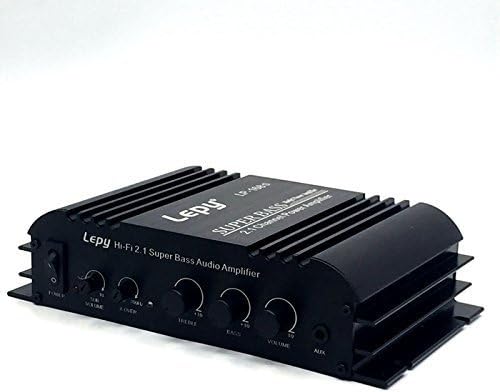
Image 2: Rear view of the Lepy LP-168S amplifier, showing speaker terminals, subwoofer output, audio input, and DC power input.
- Speaker Output Terminals (L/R): Connect passive stereo speakers. Ensure correct polarity (+ to + and - to -).
- Subwoofer Output: Connects to a passive subwoofer.
- Audio Input (RCA L/R): Connects audio sources such as CD players, DACs, or media players using RCA cables.
- DC Power Input: Connects to a compatible DC 12-19V power adapter (not included).
5. Setup
Follow these steps to set up your Lepy LP-168S amplifier:
- Connect Speakers: Connect your passive stereo speakers to the L/R speaker output terminals on the rear panel. Ensure the positive (+) terminal on the amplifier connects to the positive (+) terminal on the speaker, and the negative (-) terminal on the amplifier connects to the negative (-) terminal on the speaker.
- Connect Subwoofer (Optional): If using a passive subwoofer, connect it to the Subwoofer Output terminals on the rear panel, observing polarity.
- Connect Audio Source:
- For RCA input: Connect your audio source (e.g., CD player, computer) to the RCA Audio Input (L/R) on the rear panel using an RCA cable.
- For AUX input: Connect a portable audio device (e.g., smartphone, MP3 player) to the 3.5mm AUX Input on the front panel using a 3.5mm stereo audio cable.
- Connect Power: Connect a compatible DC 12-19V power adapter (not included) to the DC Power Input on the rear panel. Plug the power adapter into a wall outlet.
- Initial Volume Setting: Before powering on, turn the Main Volume control and Sub Volume control to their minimum (counter-clockwise) positions.
6. Operating Instructions
- Power On: Press the Power Switch on the front panel to turn on the amplifier. An indicator light will illuminate.
- Play Audio: Start playing audio from your connected source.
- Adjust Volume: Slowly turn the Main Volume control clockwise to increase the overall sound level. Adjust the Sub Volume control to balance the subwoofer output with the main speakers.
- Adjust Tone: Use the Bass and Treble controls to fine-tune the audio's low and high frequencies according to your preference.
- Power Off: When finished, turn the Main Volume control to its minimum position, then press the Power Switch to turn off the amplifier.
7. Troubleshooting
| Problem | Possible Cause | Solution |
|---|---|---|
| No sound output. |
|
|
| Distorted or unclear sound. |
|
|
| Amplifier gets very hot. |
|
|
8. Specifications
| Feature | Detail |
|---|---|
| Model Number | LEPY 168S |
| Brand | Lepy |
| Power Input | DC 12-19V (Power adapter not included) |
| Channels | 2.1 Channel (Stereo + Subwoofer) |
| Package Dimensions | 11.26 x 6.46 x 2.6 inches |
| Item Weight | 1.76 pounds |
| Date First Available | April 11, 2016 |
9. Maintenance
- Cleaning: Disconnect the amplifier from the power source before cleaning. Use a soft, dry cloth to wipe the exterior. Do not use abrasive cleaners, waxes, or solvents.
- Storage: If storing the amplifier for an extended period, disconnect it from power and store it in a cool, dry place, away from direct sunlight and extreme temperatures.
- Ventilation: Regularly check that the ventilation fins are free from dust and debris to ensure proper heat dissipation.
10. Warranty and Support
For warranty information or technical support, please refer to the documentation provided at the time of purchase or contact your retailer. Keep your purchase receipt as proof of purchase.


