
1. Introduction
This manual provides essential instructions for the installation, operation, and maintenance of your Razor Universal 6-Pin Throttle. This throttle is designed for compatibility with various Razor electric vehicles, including EcoSmart (All Versions), MX500 (Versions 21+), MX650 (Versions 14+), and SX500 (All Versions). Please read this manual thoroughly before installation and use to ensure proper function and safety.
2. Product Overview
The Razor Universal 6-Pin Throttle is a replacement part designed to restore or upgrade the speed control functionality of compatible Razor electric vehicles. It features a twist-grip mechanism for acceleration and a 6-pin connector for electrical integration.
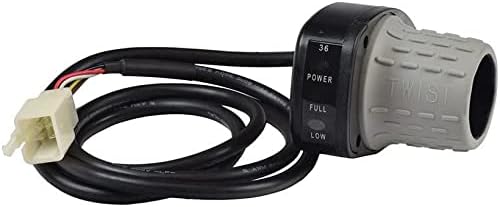
Image 2.1: The Razor Universal 6-Pin Throttle, showing the twist grip and the attached wiring with a 6-pin connector.

Image 2.2: Another view of the Razor Universal 6-Pin Throttle, highlighting the cable and connector assembly.
3. Compatibility and Version Identification
To ensure proper compatibility, it is crucial to identify the specific version of your Razor product. The throttle is compatible with EcoSmart (All Versions), MX500 (Versions 21+), MX650 (Versions 14+), and SX500 (All Versions).
How to Identify Your Razor Model Version:
Product versions can be determined by locating the 8-digit barcode ID on your vehicle. This barcode is typically found on the bottom of the vehicle, under the battery cover, on the charger, or on the stem. The 7th and 8th digits in the barcode series indicate the version number of your product (e.g., '01' for version 1, '09' for version 9, and so on).

Image 3.1: Example of a Razor barcode ID, illustrating where to find the version number (7th and 8th digits).
4. Installation Instructions
Installation of the Razor Universal 6-Pin Throttle is designed to be straightforward. Basic tools may be required. Ensure the vehicle is powered off and disconnected from any power source before beginning installation.
Required Tools (Not Included):
- Screwdriver (appropriate size for existing throttle housing)
- Wire cutters/strippers (if wiring modification is necessary, though typically plug-and-play)
Installation Steps:
- Power Disconnection: Ensure the vehicle's power is completely off and the battery is disconnected to prevent accidental activation or electrical shock.
- Remove Old Throttle: Carefully loosen any screws or clamps securing the existing throttle to the handlebar. Disconnect its electrical connector. Note the routing of the old cable for reference.
- Position New Throttle: Slide the new Razor Universal 6-Pin Throttle onto the handlebar in the desired position. Ensure it does not interfere with braking or other controls.
- Connect Electrical Plug: Locate the corresponding 6-pin connector on your vehicle's wiring harness. Align the pins and firmly push the throttle's connector into place until it clicks securely.
- Secure Throttle: Tighten any screws or clamps to firmly secure the new throttle to the handlebar. Ensure it does not rotate freely.
- Test Functionality: Reconnect the battery and power on the vehicle. Slowly twist the throttle to verify proper operation and smooth acceleration. Check for any error indicators.

Image 4.1: The Razor Universal 6-Pin Throttle shown installed on a vehicle's handlebar, demonstrating its typical placement and appearance.
5. Operating Instructions
Once installed, the Razor Universal 6-Pin Throttle operates similarly to the original equipment. It provides variable speed control based on the degree of twist applied.
Basic Operation:
- Power On: Ensure your Razor vehicle is powered on.
- Accelerate: Gently twist the throttle grip towards you (or as indicated by the 'TWIST' marking) to engage the motor and accelerate.
- Control Speed: The further you twist the throttle, the faster the vehicle will go, up to its maximum speed.
- Decelerate/Stop: Release the throttle grip to return it to its neutral position, which will reduce power to the motor and allow the vehicle to slow down or stop. Always use the vehicle's brakes for controlled stopping.
Some throttle models may include indicator lights for power levels (e.g., 'POWER', 'FULL', 'LOW'). Refer to your vehicle's main manual for specific interpretations of these indicators.
6. Maintenance
Regular maintenance helps ensure the longevity and reliable performance of your Razor Universal 6-Pin Throttle.
Maintenance Tips:
- Cleaning: Keep the throttle grip clean from dirt, dust, and debris. Use a damp cloth to wipe the exterior. Avoid using harsh chemicals or abrasive cleaners.
- Connection Check: Periodically inspect the 6-pin electrical connection to ensure it remains secure and free from corrosion.
- Cable Inspection: Check the throttle cable for any signs of wear, fraying, or damage. Ensure it is not pinched or stretched.
- Smooth Operation: Verify that the twist grip moves smoothly without sticking or excessive resistance. If it feels stiff, a small amount of silicone-based lubricant can be applied to the rotating parts, avoiding electrical components.
- Storage: If the vehicle is stored for an extended period, ensure the throttle is clean and protected from extreme temperatures or moisture.
7. Troubleshooting
If you encounter issues with your Razor Universal 6-Pin Throttle, refer to the following common problems and solutions:
Common Issues and Solutions:
- Throttle Not Responding:
- Check if the vehicle's power is on and the battery is charged.
- Verify that the 6-pin connector is fully seated and secure.
- Inspect the throttle cable for any visible damage or breaks.
- Intermittent Power/Jerky Acceleration:
- Ensure the electrical connection is clean and free of corrosion.
- Check for any loose wiring connections within the throttle or to the controller.
- Confirm the throttle grip moves smoothly without internal obstruction.
- Throttle Stuck/Stiff:
- Clean the area around the twist grip to remove any dirt or debris.
- Apply a small amount of silicone lubricant to the rotating parts if necessary.
If these troubleshooting steps do not resolve the issue, it may indicate a fault with the throttle itself, the vehicle's controller, or the battery. In such cases, professional assistance or replacement may be required.
8. Specifications
| Feature | Detail |
|---|---|
| Brand | Razor |
| Model Number | 119-234 |
| Part Number | 119-234 |
| Handle Attachment Mechanism | 6-Pin Plug |
| Color | Black |
| Exterior Finish | Smooth |
| Special Feature | Easy to Install |
| Included Components | Installation Hardware |
| Item Weight | 6.4 ounces |
| UPC | 752584716395 |
9. Warranty and Support
For warranty information or technical support regarding your Razor Universal 6-Pin Throttle, please refer to the documentation provided with your original Razor vehicle or visit the official Razor website. You may also contact Razor customer service directly for assistance with parts and compatibility queries.
Razor Official Website: www.razor.com