
1. Introduction and Overview
The Karcher T300 Surface Cleaner is designed to efficiently clean large, flat surfaces such as decks, garage floors, driveways, and patios. It features an 11-inch diameter cleaning head with two spinning nozzles, significantly reducing cleaning time compared to standard spray nozzles. The integrated variable pressure dial allows for adjustment to suit different surfaces.
This attachment is compatible with Karcher Electric Pressure Washers from the K2 to K5 series, excluding models K1700 cube, K1700, K1800, K1900, and K2000. It ensures a drier cleaning experience by minimizing overspray and helps eliminate streaks by maintaining a fixed nozzle height from the cleaning surface.
2. Safety Information
WARNING: Always read and understand the pressure washer's instruction manual before using this attachment. Failure to follow all instructions may result in serious injury.
- Always wear appropriate eye protection (safety glasses or goggles) when operating the pressure washer and its attachments.
- Ensure all connections are secure before starting the pressure washer.
- Keep hands, feet, and all body parts clear of the rotating nozzles and cleaning head during operation.
- Do not direct the spray at people, pets, or electrical equipment.
- Disconnect the pressure washer from the power source and water supply before performing any maintenance or assembly.
- Proposition 65 Warning: This product may contain chemicals known to the State of California to cause cancer and birth defects or other reproductive harm.
3. Package Contents
Verify that all items are present in your package:
- Karcher T300 Surface Cleaner Attachment (11" diameter head)
- 32" Extension Wand (consisting of two 16" sections)
- Two sets of interchangeable nozzles (e.g., for different flow rates)

Image: Karcher T300 Surface Cleaner with its included extension wands.
4. Assembly
Follow these steps to assemble your Karcher T300 Surface Cleaner:
- Attach Extension Wands: Connect the two 16-inch extension wands together by twisting them until they lock securely.
- Connect to Surface Cleaner: Attach one end of the assembled extension wand to the top of the T300 Surface Cleaner head. Ensure it clicks into place.
- Install Nozzles (if necessary): The T300 comes with pre-installed nozzles. Depending on your pressure washer's flow rate (GPM), you may need to switch to a different set of nozzles. Refer to your pressure washer's specifications for the correct nozzle type. To change nozzles, carefully remove the existing ones and insert the new set, ensuring they are properly seated and keyed.
- Connect to Pressure Washer: Attach the remaining end of the extension wand to your Karcher electric pressure washer's spray gun. Ensure a secure, leak-free connection.

Image: The T300 cleaner with a single extension wand attached.

Image: The T300 cleaner fully assembled with both extension wands.
5. Setup
Before operating, ensure your pressure washer is properly set up and connected to a water source and power supply.
- Compatibility Check: The T300 Surface Cleaner is designed for Karcher Electric Pressure Washers K2-K5 series. It is NOT compatible with Karcher models K1700 cube, K1700, K1800, K1900, and K2000, or gas pressure washers.

Image: Compatibility chart showing K2, K3, K5 series are compatible.
- Pressure Adjustment: The T300 features a variable pressure dial on the top of the cleaning head. Turn the dial to adjust the pressure output. Turn towards 'HARD' for tougher surfaces like concrete and 'SOFT' for more delicate surfaces like wood decks.

Image: A hand adjusting the power dial on the T300 Surface Cleaner.
6. Operating Instructions
The Karcher T300 Surface Cleaner is designed for efficient and splash-free cleaning of various flat surfaces.
- Start Pressure Washer: Turn on your pressure washer and ensure water is flowing through the system.
- Begin Cleaning: Place the T300 Surface Cleaner flat on the surface to be cleaned. Squeeze the trigger on your pressure washer's spray gun to begin the water flow.
- Movement: Move the surface cleaner slowly and steadily across the surface in overlapping passes. For heavily soiled areas, a slower movement or multiple passes may be required. The shroud and splash-free skirt will help contain water and debris, keeping you drier.
- Adjust Pressure: If needed, adjust the pressure dial on the cleaner head during operation to optimize cleaning for different areas or types of dirt.
- Vertical Cleaning: The T300 can also be used for vertical surfaces like garage doors or siding. Hold the cleaner head flat against the surface and move it steadily.

Image: A man demonstrating the use of the T300 Surface Cleaner on a paved patio.
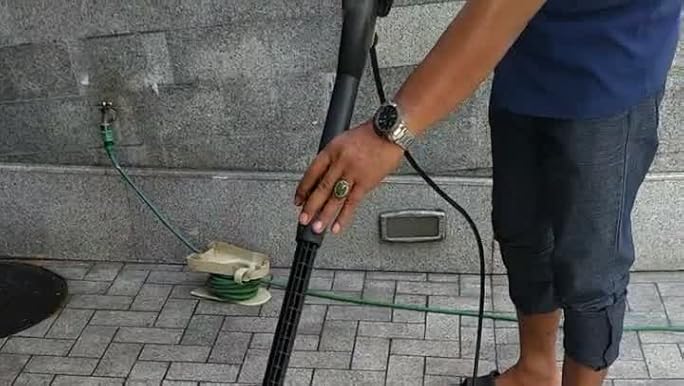
Image: Close-up of the T300 Surface Cleaner effectively cleaning a dirty patio surface.

Image: A woman cleaning a wooden deck with the T300 Surface Cleaner.

Image: The T300 Surface Cleaner being used to clean a vertical garage door.
Official Product Video
Video: Official Karcher video demonstrating the features and use of the T300 Surface Cleaner.
7. Maintenance
Regular maintenance ensures optimal performance and extends the life of your T300 Surface Cleaner.
- Cleaning the Head: After each use, rinse the surface cleaner head thoroughly with clean water to remove any dirt, debris, or detergent residue.
- Nozzle Inspection: Periodically check the nozzles for clogs or damage. If a nozzle is clogged, use a small pin or the included nozzle cleaning tool to clear the obstruction. Replace damaged nozzles immediately to maintain spray pattern and pressure.
- Storage: Store the surface cleaner in a dry, frost-free location. Disconnect it from the pressure washer and drain any remaining water.

Image: The underside of the T300 Surface Cleaner, showing the rotating spray bar and nozzles.
8. Troubleshooting
If you encounter issues with your T300 Surface Cleaner, refer to the table below for common problems and solutions.
| Problem | Possible Cause | Solution |
|---|---|---|
| Poor cleaning performance or streaking | Clogged or worn nozzles; Incorrect pressure setting; Moving too fast | Clean or replace nozzles; Adjust pressure dial to 'HARD'; Move slower and ensure overlapping passes |
| No water flow or low pressure | Nozzles clogged; Improper connection to pressure washer; Pressure washer issue | Clear nozzle clogs; Ensure secure connections; Refer to your pressure washer manual for troubleshooting low pressure |
| Excessive splashing | Cleaning head not flat on surface; Damaged skirt | Ensure the cleaner head is flat against the surface; Inspect skirt for damage and replace if necessary |
| Attachment does not fit pressure washer | Incompatible pressure washer model | Verify your pressure washer is a Karcher K2-K5 electric model (excluding K1700 cube, K1700, K1800, K1900, K2000). |
9. Specifications
- Brand: Karcher
- Model: 2.643-211.0 (T300)
- Product Dimensions: 15"L x 7"W x 12"H
- Item Weight: 4 Pounds
- Maximum Pressure: 2300 Pound per Square Inch (PSI)
- Compatibility: Karcher Electric Pressure Washers K2-K5 series (excluding K1700 cube, K1700, K1800, K1900, K2000)
- Cleaning Head Diameter: 11 inches
10. Warranty and Support
For warranty information, product support, or to purchase replacement parts, please contact Karcher customer service or visit the official Karcher website. Keep your proof of purchase for warranty claims.
Optional protection plans may be available for extended coverage. Please refer to your purchase details for more information on these plans.

