
1. Introduction
The David Clark DC ONE-X ENC Headset is engineered for superior comfort, durability, and advanced technology. It features Hybrid Electronic Noise Cancellation (ENC) and Bluetooth connectivity, designed to provide clear communication and a comfortable experience during extended use. This manual provides essential information for the proper setup, operation, and maintenance of your headset.
- Hybrid Electronic Noise Cancellation: Advanced technology for effective noise reduction.
- Digital Signal Processing: Ensures high-fidelity audio for clear communication.
- Bluetooth Wireless Technology: Seamless connectivity to smart devices for calls and audio.
- Lightweight Design: Magnesium alloy suspension and leatherette ear seals for enhanced comfort.
2. Setup
2.1 Unpacking and Initial Inspection
Carefully remove the headset and all accessories from the carrying case. Inspect for any visible damage. The package includes the headset and ear cushions.

Image: The David Clark DC ONE-X ENC Headset folded for storage in its protective carrying case.
2.2 Battery Installation
The headset requires 2 AA batteries. Locate the battery compartment on the control module. Insert the batteries, ensuring correct polarity. The power indicator light will illuminate upon activation.
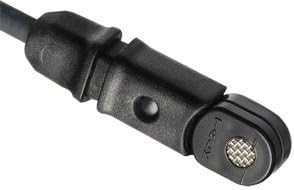
Image: The control module of the DC ONE-X headset, featuring controls for volume, ANC, Bluetooth, and a mute switch. The battery compartment is typically located on the back or side of this module.
2.3 Adjusting the Headset for Comfort
- Headband Adjustment: Extend or retract the headband slides to achieve a comfortable fit on your head. The adjustable headband ensures a secure yet light fit, minimizing pressure during long flights.
- Microphone Placement: The microphone boom is flexible and can be adjusted to either the left or right side of the headset. Position the microphone approximately 1/4 inch from your lips for optimal voice transmission.
- Ear Seals: The plush leatherette ear seals are designed for comfort and effective passive noise reduction. Ensure they form a good seal around your ears.
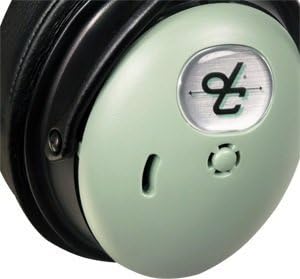
Image: The flexible microphone boom of the DC ONE-X headset, shown being adjusted. The microphone can be positioned on either side of the headset for user preference.
3. Operating Instructions
3.1 Powering On/Off and ANC Control
- Power On: Press and hold the power button on the control module until the indicator light turns green.
- ANC Levels: Use the ANC switch to select between High, Medium, or Low noise cancellation settings based on your environment.
- Power Off: Press and hold the power button until the indicator light flashes orange and then turns off.
- Battery Indicator: The indicator light will flash green for sufficient battery, orange for low battery, and red when batteries are critically low and about to shut off.
3.2 Bluetooth Connectivity
The DC ONE-X features Bluetooth wireless technology for connecting to compatible devices such as smartphones and tablets. This allows for seamless integration of phone calls and audio playback into your headset experience.
- Pairing: Activate Bluetooth on your device and put the headset into pairing mode (refer to the control module for specific pairing instructions, usually a dedicated Bluetooth button). Select 'DC ONE-X' from your device's Bluetooth list.
- Functionality: Once paired, you can make/receive calls and listen to audio. The headset automatically lowers audio volume for incoming radio communications, ensuring you don't miss critical information.
3.3 Volume and Mute Controls
- Volume Control: Adjust the volume using the dedicated controls on the control module.
- Mute/Mix/Off Switch: This switch allows you to mute the microphone, mix auxiliary audio, or turn off the microphone.
4. Maintenance
- Cleaning: Use a soft, damp cloth to clean the headset. Avoid harsh chemicals.
- Ear Cushions: Replace ear cushions as needed to maintain comfort and acoustic seal.
- Storage: Store the headset in its provided carrying case when not in use to protect it from damage.
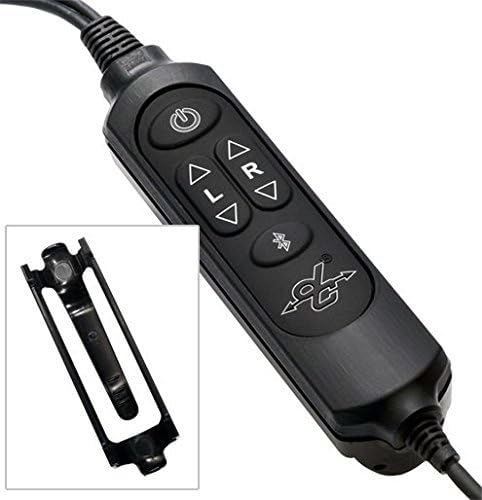
Image: The compact carrying case for the David Clark DC ONE-X headset, designed for protection and portability.
5. Troubleshooting
- No Audio/Intermittent Audio: Check all cable connections, ensure batteries are fresh and correctly installed, and verify headset is powered on.
- Microphone Not Transmitting: Ensure the microphone is properly connected and not muted. Check for any obstructions.
- Poor Noise Cancellation: Verify ear seals are properly seated and not worn. Adjust ANC level to High if needed.
- Bluetooth Pairing Issues: Ensure the headset is in pairing mode and within range of your device. Forget previous pairings on your device and try again.
- Fail-Safe Operation: The headset is designed with a fail-safe capability, ensuring basic communication functionality even if the active electronics fail or batteries run out. This provides a crucial backup in critical situations.
6. Specifications
| Feature | Specification |
|---|---|
| Noise Control | Hybrid Noise Cancellation |
| Connectivity Technology | Wireless |
| Wireless Communication Technology | Bluetooth |
| Material | Aluminum |
| Item Weight | 2.44 pounds (1.11 Kilograms) |
| Battery Life | 50 Hours (2 AA batteries required) |
| Bluetooth Range | 10 Meters |
| Earpiece Shape | Over-the-ear |
| Hardware Interface | 3.5mm Audio |
| Item Model Number | 43102G-01 |
| UPC | 718117870699, 658939974833 |
7. Official Product Video
Video: An official overview of the David Clark PRO-X2 ANR Aviation Headset, highlighting its key features, design, and device compatibility. This video provides a visual guide to the headset's capabilities and construction.
8. Warranty and Support
David Clark products are known for their ruggedness and excellent customer service. While specific warranty details are not provided in this document, David Clark is recognized for prioritizing customer satisfaction and support.
For any issues, technical assistance, or warranty inquiries, please contact David Clark customer support directly. Refer to the official David Clark website or product packaging for the most current contact information.


