Introduction
The AVANTEK Non-Contact Digital Laser IR Infrared Thermometer is designed for safe and accurate surface temperature measurement. This device utilizes infrared radiation to measure temperatures from a distance, making it ideal for various applications including cooking, automotive diagnostics, and home maintenance. Its instant readout capability and wide temperature range ensure efficient and reliable performance.

Figure 1: The AVANTEK Infrared Thermometer is versatile, suitable for measuring temperatures in automotive engines, fireplaces, refrigerators, and during grilling.
Safety Information
Please read and understand all safety instructions before using this product. Failure to follow these instructions may result in injury or damage to the device.
- Laser Safety: Do not look directly into the laser beam or point it at people or animals. The laser is used for targeting only and does not measure temperature.
- Non-Contact Use: This thermometer is designed for non-contact surface temperature measurement. Do not attempt to measure internal temperatures of objects or body temperature.
- Electrical Safety: Do not expose the device to water or extreme temperatures. Do not attempt to disassemble or modify the device.
- Battery Safety: Use only the specified 9V battery. Ensure correct polarity when installing. Remove the battery if the device will not be used for an extended period.
- Operating Environment: Use the thermometer in a clean, dry environment. Avoid areas with high humidity, dust, or corrosive gases.
Product Overview
Package Contents
Upon unpacking, ensure all items listed below are present:
- AVANTEK Non-Contact Digital Laser IR Infrared Thermometer
- 9V Battery
- User Manual (this document)

Figure 2: The product package includes the AVANTEK thermometer, a 9V battery, and the user manual.
Device Components
Familiarize yourself with the main components of your thermometer:

Figure 3: Key components of the thermometer, including the digital display, unit conversion button, backlight button, laser/IR switch, mode button, laser aperture, infrared lens, and trigger.
- Digital Display: Shows temperature readings and settings.
- °C/°F Conversion Key: Switches between Celsius and Fahrenheit units.
- LCD Backlight Key: Toggles the display backlight.
- Infrared/Laser Switch Key: Activates or deactivates the laser pointer.
- Mode Switch Key: Cycles through different measurement modes (if applicable).
- Laser Hole: Emits the laser for targeting.
- Infrared Lens: Detects infrared radiation for temperature measurement.
- Temperature Measurement Key (Trigger): Initiates temperature measurement.
Key Features
- Wide Measurement Range: Measures temperatures from -50°C to 550°C (-58°F to 1022°F).
- Fast Response Time: Provides an immediate reading within 500 ms.
- Non-Contact Technology: Safely measures surface temperatures without direct contact.
- Distance to Spot Ratio (D:S): 12:1, allowing accurate measurement from a distance.
- Fixed Emissivity: 0.95, suitable for most common surfaces.
- LCD Backlit Screen: Ensures clear readings in various lighting conditions.
- Unit Conversion: Easily switch between Celsius and Fahrenheit.
- Auto Power-Off: Automatically shuts off after 7 seconds of inactivity to conserve battery.
Setup
Battery Installation
The thermometer requires one 9V battery (included). Follow these steps to install the battery:
- Locate the battery compartment cover on the handle of the thermometer.
- Gently pull down the cover to open the compartment.
- Insert the 9V battery, ensuring the correct polarity (+ and - terminals match the markings inside the compartment).
- Close the battery compartment cover until it clicks securely into place.

Figure 4: Battery installation process for the AVANTEK thermometer.
Operating Instructions
Taking a Measurement
- Point the infrared lens towards the surface of the object you wish to measure.
- Press and hold the Temperature Measurement Key (trigger). The laser pointer will activate (if enabled) to help you target the desired spot.
- The temperature reading will appear on the digital display within 500 milliseconds.
- Release the trigger to hold the last measured temperature on the display. The device will automatically power off after 7 seconds of inactivity.

Figure 5: Using the AVANTEK thermometer to take a non-contact temperature measurement.
Switching Temperature Units (°C/°F)
To switch between Celsius and Fahrenheit:
- While the device is on, press the °C/°F Conversion Key (refer to Figure 3) to toggle between the two units.
Activating/Deactivating Backlight
To turn the LCD backlight on or off:
- While the device is on, press the LCD Backlight Key (refer to Figure 3).
Laser Pointer Control
To activate or deactivate the laser pointer:
- While the device is on, press the Infrared/Laser Switch Key (refer to Figure 3).
Distance to Spot Ratio (D:S)
The thermometer has a D:S ratio of 12:1. This means that at a distance of 12 inches, the measurement spot diameter will be 1 inch. To ensure accurate readings, make sure the target area is larger than the spot size at your chosen measurement distance.
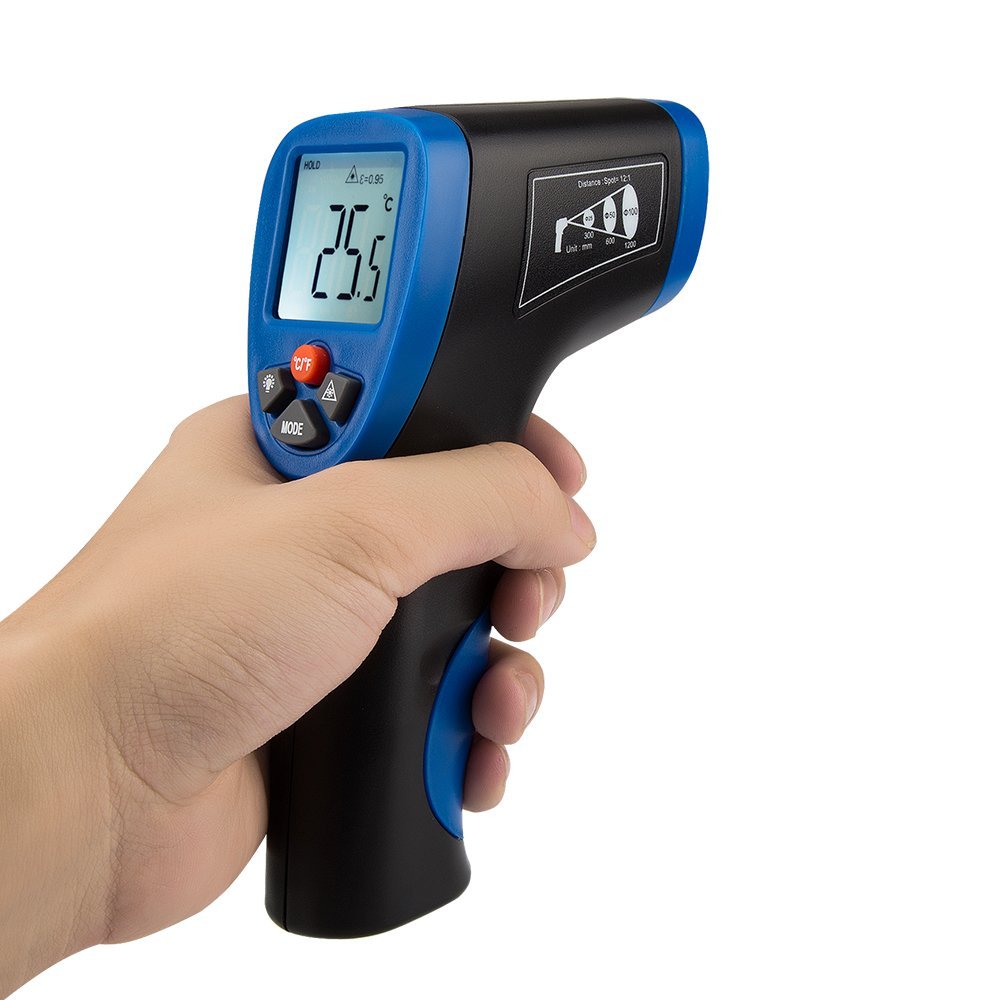
Figure 6: The thermometer display and D:S ratio guide on the side of the device.
Maintenance
- Cleaning: Wipe the device clean with a soft, damp cloth. Do not use abrasive cleaners or solvents. Ensure the infrared lens is kept clean and free from dust or debris for accurate readings.
- Storage: Store the thermometer in a cool, dry place, away from direct sunlight and extreme temperatures. Remove the battery if storing for extended periods to prevent leakage.
- Battery Replacement: Replace the 9V battery when the low battery indicator appears on the display.
Troubleshooting
| Problem | Possible Cause | Solution |
|---|---|---|
| Device does not power on. | Battery is dead or incorrectly installed. | Check battery polarity. Replace with a new 9V battery. |
| Inaccurate temperature readings. |
|
|
| Laser pointer not working. | Laser is deactivated. | Press the Infrared/Laser Switch Key to activate the laser. |
| Display is dim or flickering. | Low battery. | Replace the 9V battery. |
Specifications
| Model Number | CECOMINOD046427 |
| Measurement Range | -50°C to 550°C (-58°F to 1022°F) |
| Accuracy | ±2% reading or ±2°C / 4°F (whichever is greater) |
| Response Time | 500 ms |
| Distance to Spot Ratio (D:S) | 12:1 |
| Emissivity | Fixed at 0.95 |
| Power Source | 1 x 9V Battery |
| Auto Power-Off | 7 seconds |
| Display Type | LCD with Backlight |
| Material | Plastic |
| Dimensions (LxWxH) | 10.7 x 6.1 x 19.8 cm |
| Weight | 259 g |
Warranty Information
This AVANTEK product is covered by a 12-month warranty from the date of purchase. In the unlikely event of a defect or malfunction during this period, AVANTEK will provide a replacement. Please retain your proof of purchase for warranty claims. This warranty does not cover damage caused by misuse, accident, unauthorized modification, or normal wear and tear.
Support
For any questions, technical assistance, or warranty claims, please contact AVANTEK customer support through the retailer's platform or the official AVANTEK website. Please have your model number (CECOMINOD046427) and purchase details ready when contacting support.


