
1. Introduction
This manual provides essential instructions for the proper setup, operation, and maintenance of your Gator Cases GTSA-MIX12PU 12U Pop-Up Mixer Flight Case. Designed for rack-mountable mixers up to 12U, this case offers robust protection and convenient features for transport and use. Please read this manual thoroughly before using the product to ensure optimal performance and longevity.

Figure 1: Gator Cases GTSA-MIX12PU 12U Pop-Up Mixer Flight Case (Closed)
2. Key Features
- Capacity: Designed to securely hold rack-mountable mixers up to 12U.
- Construction: Features nearly indestructible polyethylene construction for maximum durability.
- Rack Rails: Equipped with threaded rack rails for easy mixer installation.
- Pop-Up System: Patented pop-up ratchet system allows for flat transport and elevation to various angles for quick setup and comfortable mixing.
- Wrist Rest: Includes a padded wrist rest for enhanced comfort during operation.
- Latches: Features two latches, including one TSA-approved locking latch, each protected by an impact diversion dish.
- Handles: Comfortable ergo-grip handles and additional padded spring-loaded side handles for easy lifting and transport.
- Protection: Protective corners are integrated to deflect impacts.
3. Setup Instructions
- Unpacking: Carefully remove the flight case from its packaging. Inspect for any signs of damage during transit.
- Opening the Case: Release the latches on the front of the case. The TSA-approved latch may require a key (not included, standard TSA key). Lift the top lid to open the case.
- Mixer Installation:
- Position your rack-mountable mixer onto the threaded rack rails inside the case.
- Secure the mixer using appropriate rack screws (not included) through the mounting holes on your mixer and into the threaded rails. Ensure all screws are tightened to prevent movement during transport.
- Adjusting the Pop-Up System:
- With the mixer installed, the patented pop-up ratchet system allows you to angle the mixer for optimal viewing and access. Gently lift the mixer section from the rear to engage the ratchet mechanism.
- Adjust to your desired angle. To lower, lift slightly to disengage the ratchet and carefully lower the mixer section back to the flat position.
- Padded Wrist Rest: The integrated padded wrist rest is designed for comfort during extended mixing sessions. Ensure it is positioned correctly for your ergonomic needs.
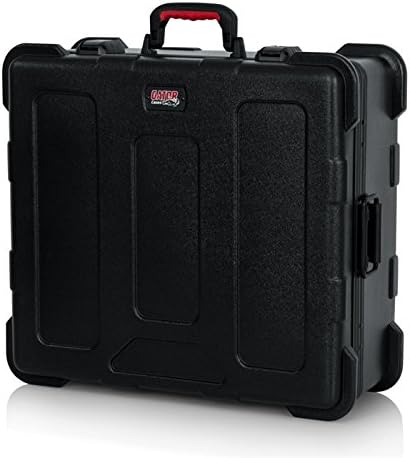
Figure 2: Detail of Latches and Handles on GTSA-MIX12PU Case
4. Operating Instructions
Once your mixer is securely installed, the GTSA-MIX12PU case is ready for transport and use.
- Transport: Before transport, ensure the mixer is in the flat position and all latches are securely closed. The TSA-approved latch can be locked for added security. Use the ergo-grip handle for carrying or the padded spring-loaded side handles for two-person lifting.
- On-Site Setup: Upon arrival, place the case on a stable, flat surface. Open the latches and lift the lid. Engage the pop-up ratchet system to angle your mixer as needed for your performance or mixing session.
- TSA Latch: The TSA-approved latch allows security personnel to inspect the case without damaging the lock. For personal security, use a TSA-compatible lock.
5. Maintenance
Regular maintenance will help preserve the condition and functionality of your flight case.
- Cleaning: Clean the polyethylene exterior with a damp cloth and mild soap. Avoid abrasive cleaners that may scratch the surface.
- Latch Inspection: Periodically check all latches for proper function and alignment. Ensure they close securely. If a latch appears damaged, contact Gator Cases support.
- Rack Rails: Inspect threaded rack rails for any damage or stripped threads. Replace if necessary to ensure secure mounting of your equipment.
- Storage: Store the case in a cool, dry place away from direct sunlight when not in use.
6. Troubleshooting
| Problem | Possible Cause | Solution |
|---|---|---|
| Latches do not close securely. | Obstruction, misalignment, or damage to the latch mechanism. | Check for any debris blocking the latch. Ensure the lid is properly aligned with the base. If damaged, contact customer support. |
| Mixer does not fit or is loose. | Incorrect mixer size for the case, or screws are not tightened. | Verify your mixer's rack unit (U) size matches the case's 12U capacity. Ensure all rack screws are securely fastened. Consider using additional padding if there is excessive space around the mixer. |
| Pop-up system is stiff or not engaging. | Mechanism may be dirty or obstructed. | Inspect the ratchet mechanism for debris. Gently clean if necessary. Do not force the system; if issues persist, contact support. |
7. Specifications
| Feature | Detail |
|---|---|
| Model Number | GTSA-MIX12PU |
| Capacity | Up to 12U Rack Mountable Mixers |
| Exterior Dimensions | 27 x 10.25 x 23 inches (68.58 x 26.03 x 58.42 cm) |
| Interior Dimensions (Mixer Area) | 21" x 19" x 7.5" (L x W x H) |
| Item Weight | 17 pounds (7.71 kg) |
| Material Type | Polyethylene (PE) |
| Color | Black |
| Latches | 2 latches, including 1 TSA-approved locking latch |
8. Warranty and Support
For warranty information, product support, or to inquire about replacement parts, please visit the official Gator Cases website or contact their customer service department. Keep your purchase receipt as proof of purchase.
Gator Cases Official Website: www.gatorcases.com


