
ELEGOO UNO Project Super Starter Kit
ELEGOO UNO Project Super Starter Kit Instruction Manual
Model: EL-KIT-003
1. Introduction
The ELEGOO UNO Project Super Starter Kit is designed for beginners interested in learning electronics, programming, and robotics. This comprehensive kit provides all the necessary components, sensors, wires, and the ELEGOO UNO R3 board, which is fully compatible with Arduino IDE. It serves as an excellent platform for hands-on learning and creating various electronic projects.
This manual provides essential information regarding the kit's components, setup, operation, maintenance, and troubleshooting. For detailed project tutorials and code libraries, please refer to the included CD or download them from the official ELEGOO website.

Image: All components of the ELEGOO UNO Project Super Starter Kit, including the UNO R3 board, breadboard, various sensors, LEDs, and wires.
2. Kit Components
The ELEGOO UNO Project Super Starter Kit includes a wide array of components to facilitate diverse projects. Below is a list of the main items you will find in your kit:
- 1pcs UNO R3 Controller Board
- LCD1602 Module (with pin header)
- Breadboard Expansion Power Supply (WARNING: Pls. do not use the voltage higher than 9V)
- Joystick Module
- IR Receiver
- Servo Motor (SG90)
- Stepper Motor
- ULN2003 Driver Ultrasonic Sensor
- DHT11 Temperature and Humidity Sensor
- 9V Battery with DC Connector
- 65 Jumper Wires
- USB Cable
- Active Buzzer
- Passive Buzzer
- Potentiometer
- 5V Relay
- Breadboard
- Remote Control
- Tilt Switch
- 5pcs Button (small)
- 1 digit 7-segment Display
- 4 Yellow LED
- Blue, Green, Red RGB LEDs
- 2pcs Photoresistor
- Thermistor
- Diode Rectifier (1N4007)
- NPN Transistor (PN2222)
- IC 74HC595
- 120pcs Resistors
- 10pcs Female-to-male DuPont Wires
- 130 DC Motor
- Fan Blade

Image: The kit box opened, revealing neatly organized compartments containing various electronic components, wires, and the UNO R3 board.
3. Setup
To begin using your ELEGOO UNO Project Super Starter Kit, follow these general setup steps:
- Software Installation: Install the Arduino IDE on your computer. The necessary software and drivers can be found on the included CD or downloaded from the official ELEGOO website.
- Connect the UNO R3 Board: Use the provided USB cable to connect your ELEGOO UNO R3 board to your computer. Ensure the drivers are correctly installed for your operating system.
- Access Tutorials: Refer to the PDF tutorial provided on the CD or available for download. This tutorial contains more than 22 lessons, guiding you through various projects from basic to advanced.
- Component Identification: The kit's packaging includes a clear diagram labeling all components with pictures, which is helpful for identifying each part as you follow the tutorials.

Image: A detailed diagram illustrating the different connection points and functionalities of the ELEGOO UNO R3 board, crucial for proper setup.
4. Operating the Kit
The ELEGOO UNO Project Super Starter Kit is designed for hands-on learning and experimentation. Each lesson in the tutorial guides you through building a specific circuit and writing the corresponding code. Key operational aspects include:
- Circuit Building: Use the breadboard and jumper wires to assemble circuits according to the tutorial diagrams. The solderless breadboard simplifies prototyping.
- Programming: Write and upload code to the UNO R3 board using the Arduino IDE. The kit is 100% compatible with official Arduino software.
- Testing and Debugging: Follow the tutorial's instructions for testing your circuits and code. Pay attention to component placement and wiring to avoid errors.
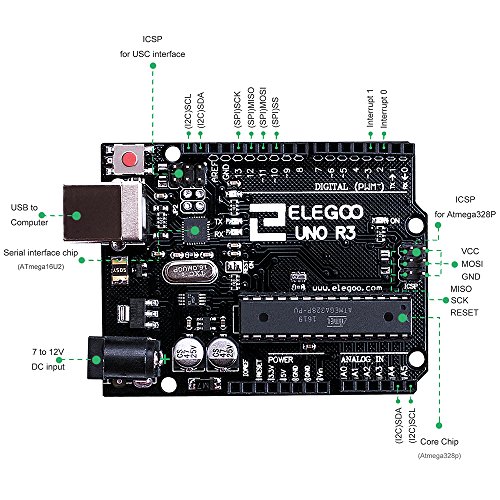
Image: A close-up view of the ELEGOO UNO R3 microcontroller board, the central processing unit for all projects in the kit.
5. Maintenance
Proper maintenance ensures the longevity and functionality of your kit components:
- Storage: Store all components in their designated compartments within the provided plastic case. This prevents loss and damage.
- ESD Protection: Handle electronic components, especially the UNO R3 board, with care to prevent damage from electrostatic discharge (ESD). The kit includes antistatic bags for sensitive parts.
- Cleanliness: Keep components free from dust and moisture. Use a soft, dry cloth for cleaning if necessary.
- Battery Care: The kit includes 2 CR2 batteries. Ensure they are stored properly and replaced when depleted.

Image: Illustration of the protective packaging, including foam inserts to prevent pin bending and antistatic bags to protect sensitive chips from electrostatic discharge.
6. Troubleshooting
If you encounter issues while working with your kit, consider the following troubleshooting steps:
- Check Connections: Verify all wires and components are correctly connected to the breadboard and UNO R3 board as per the tutorial diagrams. Loose connections are a common cause of problems.
- Review Code: Double-check your code for syntax errors, logical errors, or typos. Ensure the correct libraries are included and the board type is selected in Arduino IDE.
- Power Supply: Confirm that the UNO R3 board is receiving adequate power, either via USB or the 9V battery.
- Component Functionality: If a specific component is not working, try testing it in a simpler circuit or replacing it with a known working component if available.
- Consult Tutorials/Online Resources: The provided PDF tutorial is a primary resource. Additionally, many online communities and forums exist for Arduino and electronics enthusiasts where you can find solutions or ask for help.
- Contact Support: If issues persist, contact ELEGOO customer support for assistance.
7. Specifications
| Feature | Detail |
|---|---|
| Model Name | UNO Project Super Starter Kit |
| Item Model Number | EL-KIT-003 |
| Brand | ELEGOO |
| Product Dimensions | 8.3 x 5.5 x 1.97 inches |
| Item Weight | 1.2 Pounds |
| CPU Speed | 16 MHz |
| RAM Memory Installed Size | 2 KB |
| Connectivity Technology | USB |
| Batteries | 2 CR2 batteries required (included) |
| Manufacturer | ELEGOO |
| Date First Available | March 21, 2016 |
8. Warranty and Support
ELEGOO is committed to providing high-quality products and customer satisfaction. For any questions, technical support, or warranty inquiries regarding your UNO Project Super Starter Kit, please refer to the following:
- Official User Guide: A detailed Instructions for Use (IFU) PDF is available for download: ELEGOO UNO Project Super Starter Kit User Guide
- Customer Service: Contact information for ELEGOO customer service can typically be found on the product packaging, the included CD, or the official ELEGOO website.
- Protection Plans: Additional protection plans may be available for purchase separately to extend coverage beyond the standard warranty.