
1. Introduction
This manual provides essential instructions for the safe and effective use of your Otech C048HB-8538 battery, designed for compatibility with JVC BN-V124 camcorders. This battery is equipped with high-quality cells to ensure optimum service life and low self-discharge. Each unit undergoes individual load and capacity testing prior to shipment to ensure functionality.
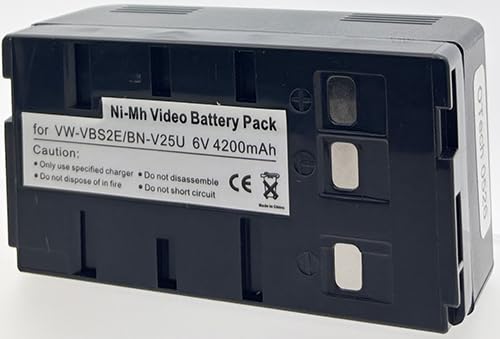
Figure 1: Otech C048HB-8538 Battery. This image displays the black, rectangular battery pack, highlighting its compact design and the OTech branding visible on the top surface.
2. Setup
2.1 Initial Charging
Before first use, fully charge the battery. This process conditions the battery cells for optimal performance and longevity.
- Connect the battery to a compatible JVC BN-V124 camcorder or an external charger designed for this battery type.
- Ensure the charger is connected to a power source.
- Allow the battery to charge until the charging indicator on your device or charger signals a full charge. Refer to your camcorder's or charger's manual for specific indicator details.
2.2 Installation
To install the battery into your camcorder:
- Turn off the camcorder and disconnect it from any power source.
- Locate the battery compartment on your JVC camcorder.
- Align the battery with the compartment's terminals and slide it in until it clicks securely into place.
- Close the battery compartment cover, if applicable.
3. Operation
3.1 Charging the Battery
Regular charging is essential for maintaining battery performance. Always use a charger compatible with JVC BN-V124 type batteries.
- Connect the battery to the charger.
- Plug the charger into a standard electrical outlet.
- Monitor the charging indicator. Disconnect the battery once fully charged to prevent overcharging, although modern chargers typically have protection mechanisms.
3.2 Discharging and Usage
The battery powers your camcorder during operation. The actual operating time will vary depending on camcorder usage, settings, and environmental conditions.
- Ensure the battery is fully charged before extended use.
- Avoid completely draining the battery frequently, as this can reduce its overall lifespan.
- If the camcorder indicates low battery, save your work and charge the battery promptly.
4. Maintenance
4.1 Storage
Proper storage extends battery life.
- Store the battery in a cool, dry place, away from direct sunlight and extreme temperatures.
- For long-term storage, charge the battery to approximately 50-70% capacity. Avoid storing it fully charged or completely discharged.
- Remove the battery from the camcorder if it will not be used for an extended period.
4.2 Cleaning
Keep battery contacts clean for optimal connection.
- Use a clean, dry cloth to wipe the battery terminals if they appear dirty.
- Do not use liquid cleaners or abrasive materials.
4.3 Safety Precautions
Observe the following safety guidelines:
- Do not disassemble, crush, puncture, or short-circuit the battery.
- Do not expose the battery to fire or water.
- Keep the battery away from children and pets.
- Dispose of depleted batteries according to local regulations.
5. Troubleshooting
| Problem | Possible Cause | Solution |
|---|---|---|
| Battery not charging |
|
|
| Short operating time |
|
|
6. Specifications
| Feature | Detail |
|---|---|
| Brand | Otech |
| Model Number | C048HB-8538 |
| Compatibility | JVC BN-V124 |
| Voltage | 3 Volts |
| Item Weight | 0.1 Kilograms (100 g) |
| Battery Weight | 358 Grams |
| ASIN | B01D3K92AW |
| Manufacturer | OTech |
7. Warranty and Support
Specific warranty details for the Otech C048HB-8538 battery are not provided in this manual. Please refer to the original purchase documentation or contact your retailer for warranty information.
For technical support or inquiries, please contact Otech customer service through their official website or the contact information provided at the point of purchase.