
Important Safety Information
Please read this instruction manual carefully before installing, operating, or performing maintenance on your Amica GSP 14544 W dishwasher. Keep this manual for future reference.
- Ensure the dishwasher is properly grounded before use.
- Do not allow children to play with or operate the dishwasher.
- Use only detergents and rinse aids specifically designed for automatic dishwashers.
- Never open the dishwasher door during operation, especially during the hot wash cycle.
- In case of malfunction, disconnect the appliance from the power supply before attempting any inspection or repair.
Setup and Installation
The Amica GSP 14544 W is designed as an under-counter, built-in appliance. Proper installation is crucial for safe and efficient operation.
1. Unpacking and Positioning
Carefully remove all packaging materials. Inspect the dishwasher for any damage incurred during transit. Place the dishwasher in its intended under-counter location, ensuring it is level.

Image: Front view of the Amica GSP 14544 W dishwasher, ready for installation.
2. Water Connection
Connect the water inlet hose to a cold water supply. The dishwasher features an Aquastop safety hose for enhanced protection against leaks. Ensure the connection is secure and leak-free. The maximum water inlet temperature should not exceed 60°C.

Image: Detailed view of the Aquastop safety hose being connected to a water tap.
3. Drain Connection
Connect the drain hose to your household drainage system, ensuring it is properly secured and allows for adequate water flow without kinks or blockages.
4. Electrical Connection
Plug the dishwasher into a grounded electrical outlet. The appliance operates on 230 Volts at 50 Hz. Do not use extension cords or adapters.
5. Initial Settings: Water Hardness
It is essential to adjust the dishwasher's water softener system according to your local water hardness. Refer to the detailed instructions in the complete user manual for specific steps on how to set the water hardness level, as this often involves specific button combinations on the control panel.
Operating Instructions
Your Amica GSP 14544 W dishwasher features intuitive touch controls and a clear display for easy program selection and monitoring.
1. Loading the Dishwasher
Arrange dishes, cutlery, and cookware in the baskets, ensuring that water can reach all surfaces. Avoid overcrowding. The dishwasher accommodates 9 place settings.
- Upper Basket: Ideal for glasses, cups, and smaller plates. The upper basket is height-adjustable when unloaded.
- Lower Basket: Suitable for larger plates, bowls, and pots. It features foldable grids for flexible loading.
- Cutlery Basket: Place cutlery with handles down for best cleaning results.
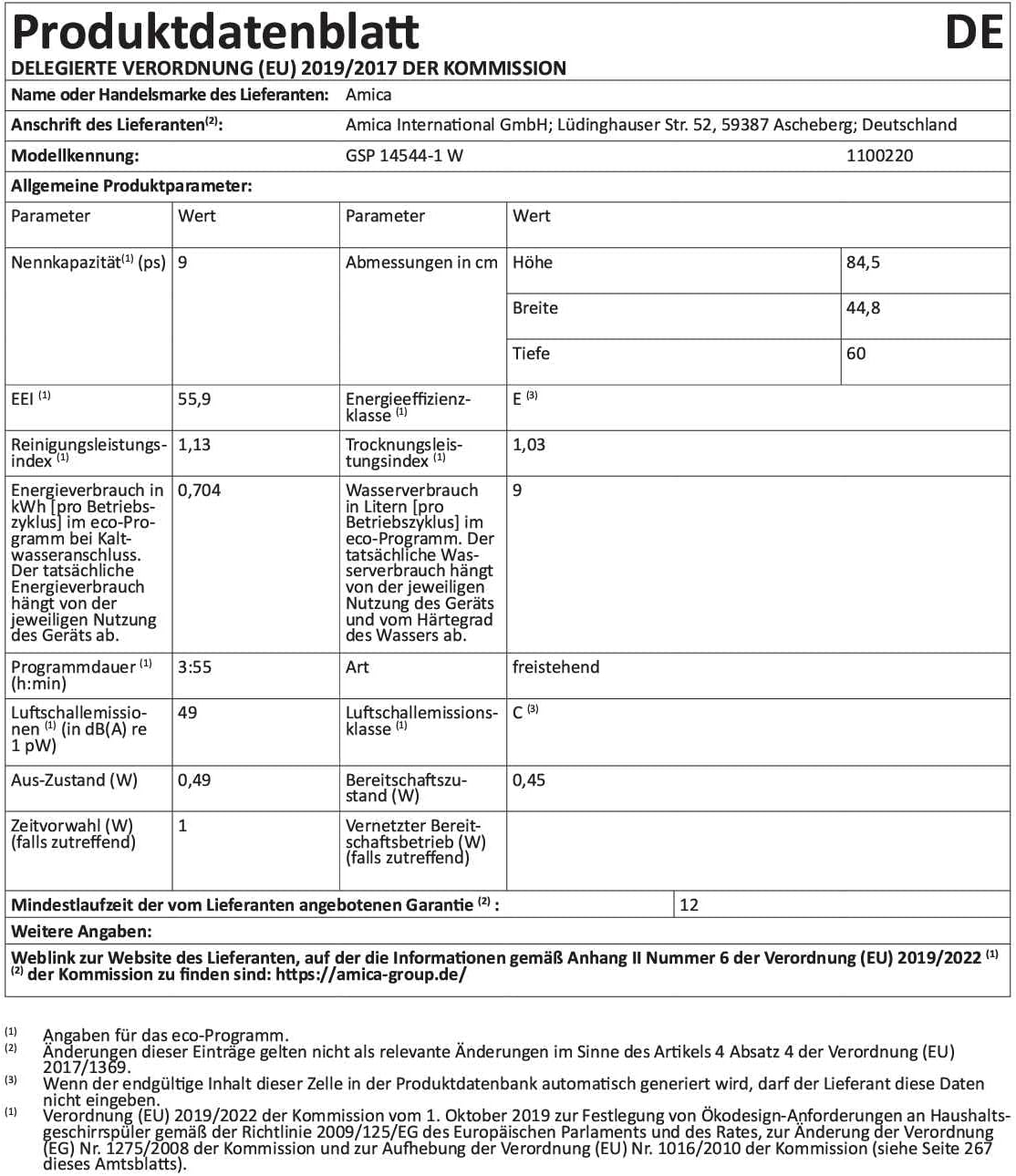
Image: Open dishwasher showing the stainless steel interior and dish racks.

Image: A cutlery basket filled with utensils, positioned in the lower rack.
2. Adding Detergent and Rinse Aid
Fill the detergent dispenser with the appropriate amount of dishwasher detergent. Check the rinse aid indicator; if low, refill the rinse aid dispenser to ensure streak-free drying.
3. Program Selection
Use the touch control panel to select one of the 6 available wash programs. The display will show the selected program and estimated cycle time.

Image: Close-up of the dishwasher's touch control panel with a digital timer display.
| Program | Temperature | Approx. Duration | Description |
|---|---|---|---|
| Normal | 55°C | 175 min | For normally soiled daily dishes. |
| Eco | 45°C | 190 min | Energy-efficient program for standard soiled dishes. |
| Glass | 40°C | 125 min | Gentle cleaning for delicate glassware. |
| 90 min | 65°C | 90 min | Quick wash for lightly soiled dishes. |
| Intensive | 65°C | 200 min | For heavily soiled dishes and pots. |
4. Additional Functions
- Start Time Delay: You can delay the start of a wash cycle by 3, 6, 9, or 12 hours.
- Half-Load: Use this function when the dishwasher is not fully loaded to save water and energy.
5. Starting and Ending a Cycle
Press the Start button to begin the selected program. The dishwasher will automatically complete the cycle. Once finished, carefully open the door and allow dishes to cool before unloading.
Maintenance and Care
Regular maintenance ensures optimal performance and longevity of your dishwasher.
1. Cleaning Filters
The dishwasher's filter system should be cleaned regularly to prevent blockages and ensure effective cleaning. Refer to the full manual for instructions on how to remove and clean the filters.
2. Refilling Salt and Rinse Aid
The dishwasher is equipped with indicators for rinse aid and salt levels. Refill these compartments when the respective indicator lights illuminate on the control panel.
3. Exterior and Interior Cleaning
Wipe the exterior of the dishwasher with a soft, damp cloth. The interior, made of stainless steel, can be cleaned periodically with a dishwasher cleaner or a mixture of vinegar and water to remove mineral deposits and odors.
Troubleshooting
Before contacting customer service, please check the following common issues:
- Dishwasher not starting: Ensure the power cord is securely plugged in and the door is fully closed. Check your household's circuit breaker.
- Dishes not clean: Check if spray arms are blocked, filters are clean, and detergent dispenser is filled correctly. Ensure dishes are loaded properly.
- Water not draining: Check the drain hose for kinks or blockages. Clean the filters.
- Water hardness setting: Incorrect water hardness settings can lead to poor cleaning results or white residue. Refer to the full manual for detailed instructions on adjusting this setting.
For more complex issues or error codes displayed on the panel, consult the comprehensive troubleshooting guide in your full user manual or contact Amica customer support.
Product Specifications
Detailed technical specifications for the Amica GSP 14544 W dishwasher:
| Feature | Specification |
|---|---|
| Brand | Amica |
| Model Name | GSP 14544 W |
| Installation Type | Built-in (Under-counter) |
| Product Dimensions (D x W x H) | 44.8 cm x 60 cm x 84.5 cm |
| Capacity | 9 Place Settings |
| Special Features | Aquastop safety hose, Start time delay (3/6/9/12h) |
| Color | White |
| Control Type | Touch |
| Material | Stainless Steel (Interior) |
| Noise Level | 49 Decibels |
| Voltage | 230 Volts |
| Operating Frequency | 50 Hz |
| Number of Programs | 6 |
| Display Type | Touchscreen |
| Energy Efficiency Class | E (New EU Label) |
| Energy Consumption (Eco program) | 0.704 kWh/cycle |
| Water Consumption (Eco program) | 9 Liters/cycle |
| Program Duration (Eco program) | 3:55 (h:min) |
Warranty Information
The Amica GSP 14544 W dishwasher comes with a minimum manufacturer's warranty of 12 months. Please retain your proof of purchase for warranty claims. For detailed terms and conditions, refer to the warranty card included with your appliance or visit the official Amica website.
Customer Support
For further assistance, technical support, or to access additional resources, please visit the official Amica website:
You can also find more product information and support details on the product data sheet available via the EPREL database.


