
1. Introduction
This manual provides instructions for the proper operation and maintenance of your Seiko SKS519P1 Stainless Steel Chronograph Watch. Please read this manual thoroughly to ensure correct usage and to maximize the lifespan of your timepiece.
2. Product Overview
The Seiko SKS519P1 is a quartz chronograph watch featuring a black dial, stainless steel case, and bracelet. It includes a stopwatch function and is water-resistant to 100 meters.
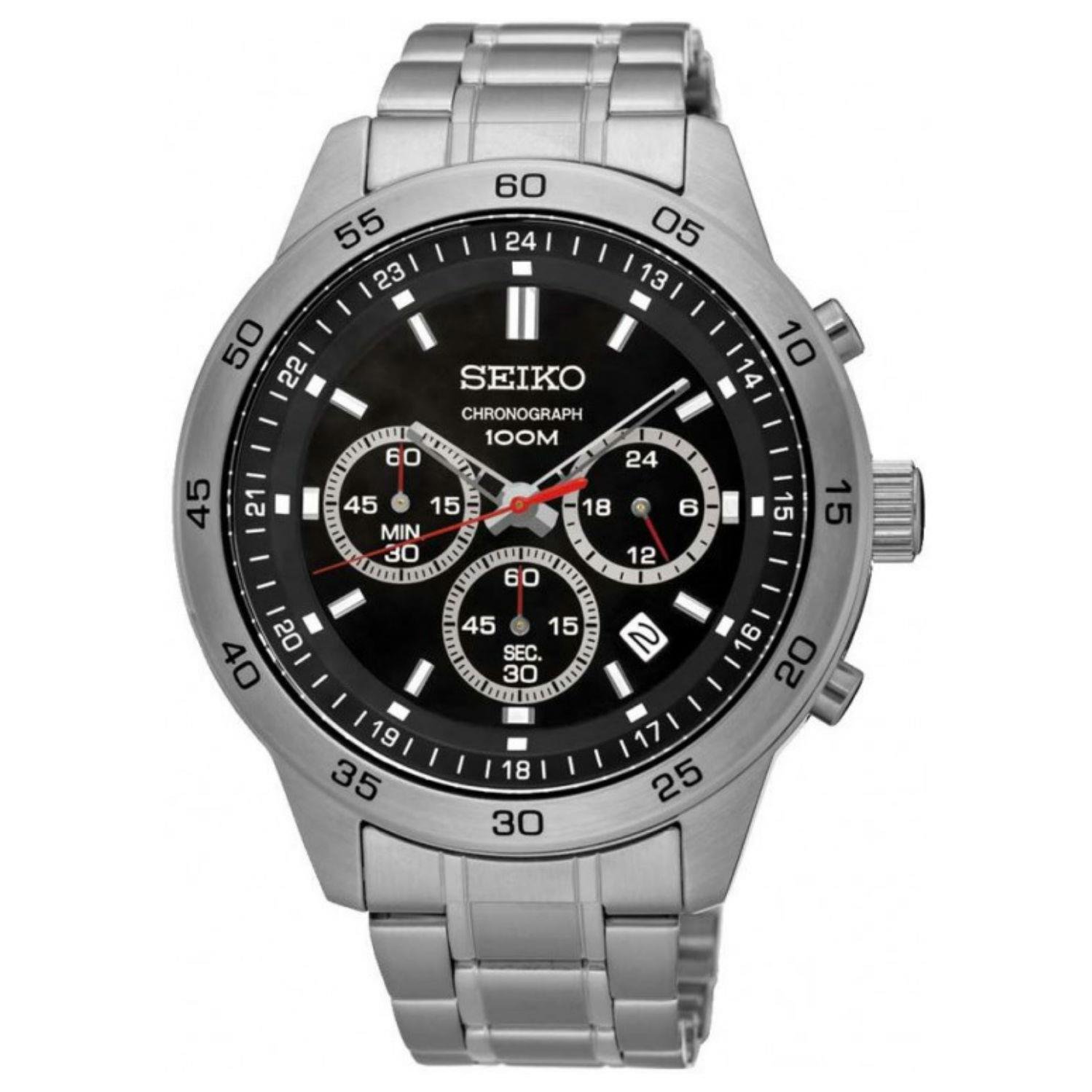
Figure 2.1: Front view of the Seiko SKS519P1 Chronograph Watch, showcasing the black dial and stainless steel bracelet.
2.1 Components
- Crown: Used for setting time and date.
- Pushers (A & B): Used for operating the chronograph function.
- Main Dial: Displays hours, minutes, and seconds.
- Sub-dials: Chronograph minute, second, and 24-hour indicator.
- Date Window: Displays the current date.
- Bracelet: Stainless steel band with a push-button clasp.
3. Setup
3.1 Setting the Time
- Pull the crown out to the second click position. The small second hand will stop.
- Turn the crown to set the hour and minute hands. Ensure the AM/PM is correctly set by observing the 24-hour sub-dial or by advancing the hands past 12 o'clock to see if the date changes.
- Push the crown back into the normal position. The small second hand will resume movement.
3.2 Setting the Date
- Pull the crown out to the first click position.
- Turn the crown to set the date. Avoid setting the date between 9:00 PM and 3:00 AM, as this may damage the date mechanism. If the date needs to be set during this period, first set the time outside this range, then set the date, and finally reset the time.
- Push the crown back into the normal position.
4. Operating the Chronograph
The chronograph function allows for measuring elapsed time up to 60 minutes in 1/5 second increments.

Figure 4.1: Detail of the watch dial, highlighting the chronograph sub-dials and pushers.
4.1 Measuring Elapsed Time
- Start: Press pusher A to start the chronograph. The chronograph second hand and minute hand will begin to move.
- Stop: Press pusher A again to stop the chronograph. The elapsed time will be indicated by the chronograph hands.
- Reset: Press pusher B to reset the chronograph. The chronograph hands will return to their zero positions.
4.2 Split Time Measurement
- Start: Press pusher A to start the chronograph.
- Split: Press pusher B to measure a split time. The chronograph hands will stop to indicate the split time, while the internal timing continues.
- Release Split: Press pusher B again to release the split time. The chronograph hands will instantly catch up to the ongoing elapsed time.
- Stop: Press pusher A to stop the chronograph.
- Reset: Press pusher B to reset the chronograph.
5. Maintenance
5.1 Cleaning
Wipe the watch case and bracelet periodically with a soft, dry cloth to remove dirt and moisture. For stainless steel, a slightly damp cloth can be used, followed by a dry cloth. Avoid using chemical cleaners or solvents.
5.2 Water Resistance
This watch is water-resistant to 100 meters (10 bar), suitable for swimming and snorkeling. It is not suitable for scuba diving. Ensure the crown is fully pushed in before exposing the watch to water. Do not operate the crown or pushers while the watch is wet or submerged, as this can compromise the water resistance.

Figure 5.1: Side view of the watch, illustrating the crown and chronograph pushers.
5.3 Battery Replacement
The watch is powered by a quartz movement and requires a battery. When the battery is depleted, the watch will stop. Battery replacement should be performed by a qualified watch technician to ensure proper sealing and water resistance integrity.
6. Troubleshooting
- Watch not running: Check if the crown is fully pushed in. If the watch still does not run, the battery may need replacement.
- Date changes at noon: The AM/PM setting is incorrect. Advance the time by 12 hours.
- Chronograph hands do not reset to zero: Perform a chronograph reset. If the issue persists, consult a service center.
7. Specifications
| Feature | Specification |
|---|---|
| Model Number | SKS519P1 |
| Movement Type | Quartz |
| Case Material | Stainless Steel |
| Case Diameter | 44 mm |
| Case Thickness | 12 mm |
| Band Material | Stainless Steel |
| Band Width | 20 mm |
| Dial Color | Black |
| Dial Glass Material | Hardlex |
| Water Resistance | 100 meters (10 bar) |
| Display Type | Chronograph |
| Clasp Type | Push-Button |
8. Warranty Information
This Seiko watch is covered by a manufacturer's warranty against defects in materials and workmanship. The specific terms and duration of the warranty may vary by region. Please refer to the warranty card included with your purchase or visit the official Seiko website for detailed warranty information.
9. Customer Support
For further assistance, service, or inquiries regarding your Seiko SKS519P1 watch, please visit the official Seiko website or contact an authorized Seiko service center. You can find contact information and service locations on the official Seiko website: www.seikowatches.com


