
1. Introduction
The Mondi Mini Greenhouse Thermo-Hygrometer (Model E100) is designed to accurately measure and display both temperature and humidity levels within your mini greenhouse environment. This device helps maintain optimal conditions for plant growth by providing precise environmental data.
2. Product Features
- Simultaneous display of temperature and humidity.
- Switchable temperature units (Celsius or Fahrenheit).
- Minimum and Maximum value recall for both temperature and humidity.
- Easy-to-read digital display.
- Compact design suitable for mini greenhouses.
- Unique mounting feature for versatile placement.

This image shows the Mondi Mini Greenhouse Thermo-Hygrometer installed inside a mini greenhouse. The display clearly indicates temperature and humidity readings. Labels point to key functions such as temperature unit switch, Min/Max button, On/Off switch, and Reset button. A unique mounting feature is also highlighted.
3. Setup
3.1 Battery Installation
- Locate the battery compartment on the back of the device.
- Open the compartment cover.
- Insert the included battery, ensuring correct polarity (+/-).
- Close the battery compartment cover securely.
3.2 Mounting
The Thermo-Hygrometer can be placed on a tabletop or mounted using its unique feature. For optimal readings, position the device away from direct sunlight or heat sources that could skew measurements.
- Tabletop Placement: Simply place the device on a flat, stable surface within your mini greenhouse.
- Unique Mounting: Utilize the integrated mounting feature to attach the device to a suitable surface within the greenhouse. Refer to the product packaging or included diagrams for specific mounting instructions.
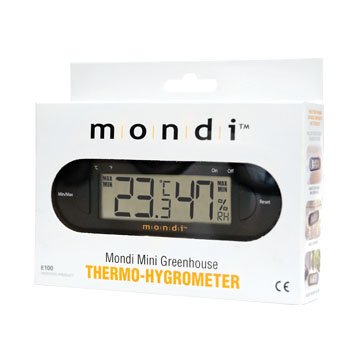
The product packaging for the Mondi Mini Greenhouse Thermo-Hygrometer. The front of the box displays the device with its digital screen showing temperature and humidity, along with the brand name 'Mondi' and the product title 'Mondi Mini Greenhouse Thermo-Hygrometer'. The packaging may also illustrate the unique mounting feature.
4. Operating Instructions
4.1 Power On/Off
Locate the ON/OFF switch on the device. Slide the switch to the 'ON' position to power on the unit. Slide it to 'OFF' to power off.
4.2 Reading Temperature and Humidity
Once powered on, the current temperature and humidity readings will be displayed prominently on the digital screen.
4.3 Switching Temperature Units (°C/°F)
A switch or button labeled °C/°F (or similar) allows you to toggle between Celsius and Fahrenheit temperature displays. Locate this switch and slide or press it to select your preferred unit.
4.4 Min/Max Function
The MIN/MAX button allows you to view the lowest and highest temperature and humidity recorded since the last reset.
- Press MIN/MAX once to display the maximum recorded values.
- Press MIN/MAX again to display the minimum recorded values.
- Press MIN/MAX a third time to return to current readings.
4.5 Resetting Min/Max Values
To clear the recorded minimum and maximum values, press and hold the RESET button (often located near the MIN/MAX button) for a few seconds while in MIN/MAX display mode. The display will revert to current readings, and new min/max values will begin recording.
5. Maintenance
5.1 Battery Replacement
When the display becomes dim or inaccurate, it is time to replace the battery. Follow the battery installation steps in Section 3.1.
5.2 Cleaning
Wipe the device with a soft, dry cloth. Do not use abrasive cleaners or immerse the device in water.
5.3 Storage
Store the device in a cool, dry place when not in use for extended periods. Remove the battery if storing for several months to prevent leakage.
6. Troubleshooting
- No Display: Check battery installation and ensure the battery is not depleted. Replace if necessary.
- Inaccurate Readings: Ensure the device is not exposed to direct sunlight, drafts, or extreme temperature fluctuations. Recalibration is not user-serviceable; if issues persist, contact support.
- Buttons Not Responding: Try removing and reinserting the battery to reset the device.
7. Specifications
| Brand | Mondi |
| Model | Mini Greenhouse Thermo-Hygrometer (E100) |
| Item Weight | 25.5 Grams (0.9 ounces) |
| Battery Description | 1 battery included |
| Mounting Type | Tabletop, Unique Mounting Feature |
| Operating Humidity | 25% RH TO 98% RH |
| Upper Temperature Rating | 50 Degrees Celsius (122 Degrees Fahrenheit) |
| UPC | 876395001034 |
8. Warranty and Support
For warranty information or technical support, please refer to the contact details provided on the product packaging or visit the official Mondi website. Keep your purchase receipt as proof of purchase.


