
Quantum QE1200.2
Quantum QE1200.2 2 Channel Amplifier 1200W User Manual
Model: QE1200.2
Product Overview
The Quantum QE1200.2 is a high-performance 2-channel stereo amplifier designed to deliver powerful and clear audio. This amplifier is part of the Quantum Xtreme series, offering 1200W of power for an enhanced audio experience in your vehicle. It features a robust design and essential connections for easy integration into car audio systems.
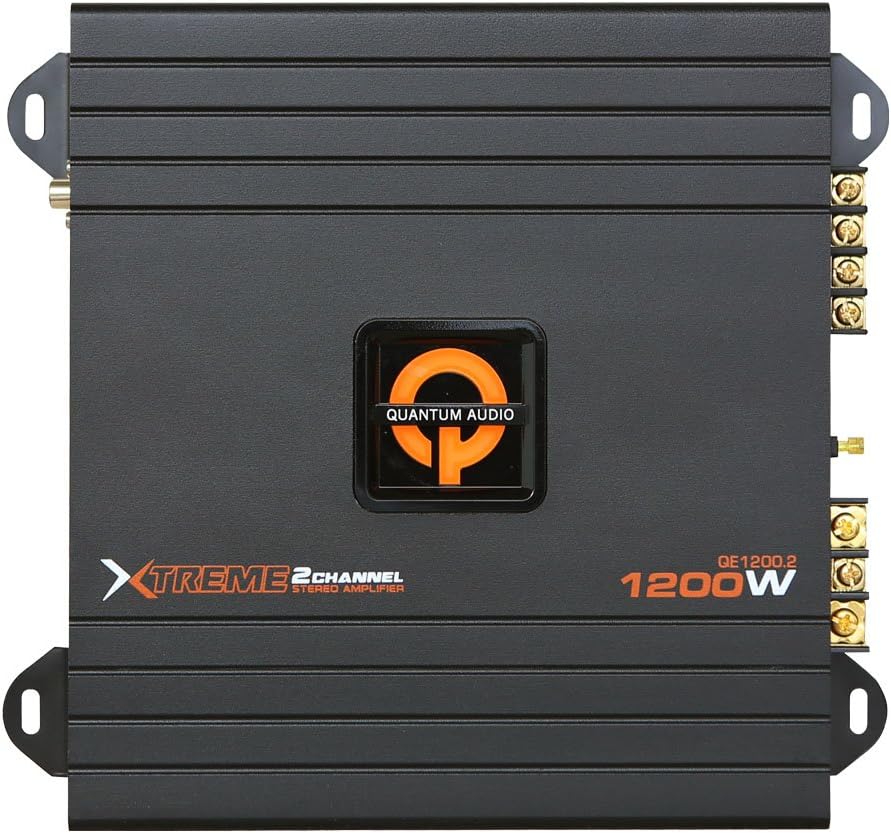
Figure 1: Top view of the Quantum QE1200.2 2 Channel Amplifier, showcasing its sleek black design, the Quantum Audio logo, and the model designation QE1200.2 with 1200W power rating.
Safety Information
- Always disconnect the vehicle's battery before installing or servicing the amplifier.
- Ensure proper grounding to prevent electrical hazards.
- Do not expose the amplifier to moisture or extreme temperatures.
- Use appropriate gauge wiring for power, ground, and speaker connections to avoid overheating.
- Consult a professional installer if you are unsure about any installation steps.
Setup and Installation
1. Mounting the Amplifier
Choose a secure, well-ventilated location for mounting the amplifier. Ensure it is away from direct sunlight, heat sources, and moisture. Use the provided mounting hardware to secure the amplifier firmly to a solid surface in your vehicle.
2. Wiring Connections
Proper wiring is crucial for optimal performance and safety. Refer to the diagram below for typical wiring connections. Always use high-quality cables.
- Power (B+): Connect to the positive terminal of the vehicle's battery via an inline fuse (not included).
- Ground (GND): Connect to a clean, unpainted metal surface of the vehicle chassis. Ensure a solid connection.
- Remote (REM): Connect to the remote turn-on lead from your head unit.
- RCA Inputs: Connect to the RCA pre-outs of your head unit.
- Speaker Outputs: Connect your speakers to the amplifier's speaker terminals. Observe correct polarity (+ to + and - to -).
Note: A detailed wiring diagram is typically provided in the physical manual. For specific configurations, consult a professional.
Operating Instructions
1. Initial Power-Up
Once all connections are secure, reconnect the vehicle's battery. Turn on your head unit. The amplifier should power on, indicated by an illuminated power LED.
2. Gain Adjustment
The gain control matches the amplifier's input sensitivity to the output of your head unit. Start with the gain set to minimum. Play a familiar track at about 75% of your head unit's maximum volume. Slowly increase the amplifier's gain until you hear distortion, then back off slightly. This ensures maximum clean output.
3. Crossover Settings
The QE1200.2 features built-in crossovers to optimize sound. Adjust the High-Pass Filter (HPF) for full-range speakers or the Low-Pass Filter (LPF) for subwoofers, if applicable. Refer to your speaker specifications for recommended crossover frequencies.
Maintenance
- Cleaning: Periodically wipe the amplifier's exterior with a soft, dry cloth. Do not use harsh chemicals or abrasive cleaners.
- Ventilation: Ensure the amplifier's cooling fins are free from dust and debris to maintain proper airflow.
- Connections: Occasionally check all wiring connections for tightness and corrosion. Loose connections can lead to poor performance or damage.
Troubleshooting
| Problem | Possible Cause | Solution |
|---|---|---|
| No Power / Power LED Off | Blown fuse, loose power/ground connection, faulty remote wire. | Check inline fuse, verify power and ground connections, ensure remote wire is connected and receiving 12V. |
| No Sound Output | RCA cables disconnected, speaker wires loose/shorted, gain set too low, head unit volume low. | Check RCA and speaker connections, adjust gain, increase head unit volume. |
| Distorted Sound | Gain set too high, poor ground connection, speaker impedance mismatch. | Reduce gain, check ground connection, verify speaker impedance matches amplifier's capabilities. |
| Amplifier Overheating / Protection Mode | Insufficient ventilation, low impedance load, prolonged high volume. | Ensure proper airflow around amplifier, check speaker impedance, reduce volume. Allow amplifier to cool down. |
Specifications
| Feature | Detail |
|---|---|
| Model Number | QE1200.2 |
| Brand | Quantum |
| Channels | 2 Channel |
| Power Output | 1200W (Peak/Max) |
| Dimensions (L x W x H) | 27.94 x 27.61 x 9.53 cm (11 x 10.87 x 3.75 inches) |
| Weight | 2.02 kg (4.45 pounds) |
| Manufacturer | Quantum |
| Country of Origin | China |
Warranty Information
Quantum products are designed and manufactured to the highest quality standards. This product is covered by a limited warranty against defects in materials and workmanship. The specific duration and terms of the warranty may vary by region and retailer. Please retain your proof of purchase for warranty claims.
For detailed warranty information, please refer to the warranty card included with your product or visit the official Quantum Audio website.
Customer Support
If you encounter any issues or have questions regarding your Quantum QE1200.2 amplifier that are not covered in this manual, please contact Quantum Audio customer support. Support contact information can typically be found on the manufacturer's website or on the product packaging.
When contacting support, please have your product model number (QE1200.2) and purchase details ready.
Related documentsQE1200.2


Ask a question about this manual
Ask about setup, troubleshooting, compatibility, parts, safety, or missing instructions. Manuals+ will review the question and use this page’s manual context to help answer it.