
1. Introduction
This manual provides essential information for the safe and effective use of your Banshee 1800mAh Li-Ion Battery, model QKB47L-18. Please read this manual thoroughly before use and retain it for future reference. This battery is designed to provide reliable power for compatible Kenwood two-way radios.
2. Product Overview
The Banshee QKB47L-18 is a high-capacity 1800mAh Lithium-Ion battery designed for compatible Kenwood two-way radios. It operates at 7.5V and is engineered to meet or exceed original equipment manufacturer (OEM) specifications for performance and reliability.
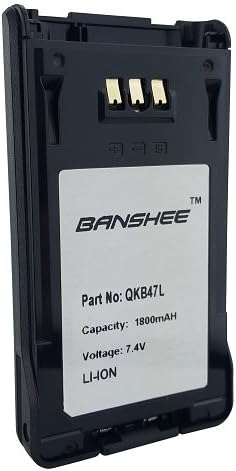
Image 1: Front view of the Banshee QKB47L-18 Li-Ion battery, displaying the brand logo, part number, capacity, and voltage information.
Key Features:
- 7.5V Li-Ion Battery
- 1800mAh Battery Capacity
- Utilizes high-quality cells and components
- Compatible with Kenwood TK-5220, TK-5320, NX-200, NX-300, and KNB-47L models.
3. Safety Information
Please observe the following safety precautions to prevent injury or damage to the battery and radio:
- Do not disassemble, open, or shred the battery pack.
- Do not expose the battery to heat or fire. Avoid storage in direct sunlight.
- Do not short-circuit the battery.
- Do not expose the battery to mechanical shock.
- In case of a battery leak, do not allow the liquid to come into contact with skin or eyes. If contact has occurred, wash the affected area with copious amounts of water and seek medical advice.
- Use only the charger specified for this battery.
- Keep batteries out of reach of children.
- Dispose of used batteries promptly and according to local regulations.
4. Setup and Installation
This section outlines the general procedure for installing the Banshee QKB47L-18 battery into a compatible two-way radio.
- Ensure the radio is powered off before attempting battery installation or removal.
- Align the battery with the battery compartment on the back of the radio, ensuring the contacts on the battery align with the terminals on the radio.
- Slide the battery into place until it clicks securely. Ensure the battery latch engages properly to prevent accidental detachment.
- To remove the battery, disengage the battery latch (usually a small button or lever) and slide the battery out of the compartment.
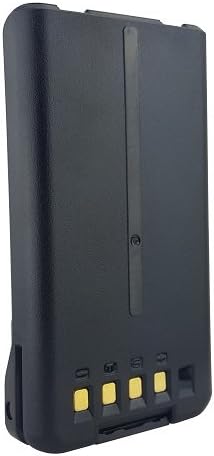
Image 2: Back view of the Banshee QKB47L-18 Li-Ion battery, highlighting the electrical contacts for connection to the radio.
5. Charging
To ensure optimal performance and longevity, use only chargers specified for Lithium-Ion batteries compatible with the Kenwood radio models listed.
- Connect the charger to a suitable power source.
- Place the radio with the installed battery into the charging cradle, or connect the battery directly to a compatible standalone charger. Ensure the battery is seated correctly and the charging contacts are aligned.
- Observe the charger's indicator light for charging status. Refer to your radio's or charger's manual for specific indicator meanings (e.g., red for charging, green for fully charged).
- Do not overcharge the battery. Remove the battery once fully charged to prevent potential damage and prolong its lifespan.
6. Operation
Once installed and charged, the battery powers your compatible two-way radio. Refer to your radio's specific user manual for detailed operating instructions.
- Monitor the radio's battery level indicator to avoid unexpected power loss during critical operations.
- For best performance and battery health, operate the battery within its specified temperature range, typically between -10°C to +60°C (14°F to 140°F).
7. Maintenance
Proper maintenance extends the life of your Banshee battery and ensures reliable performance.
- Cleaning: Periodically clean the battery contacts and radio terminals with a clean, dry, lint-free cloth to ensure good electrical connection and prevent corrosion.
- Storage: If storing the battery for an extended period (more than one month), charge it to approximately 50% capacity. Store it in a cool, dry place away from direct sunlight, extreme temperatures, and corrosive materials.
- Avoid Deep Discharge: Do not allow the battery to fully discharge repeatedly, as this can reduce its overall lifespan and capacity. Recharge the battery when the radio indicates a low battery level.
8. Troubleshooting
This section addresses common issues you might encounter with your battery.
| Problem | Possible Cause | Solution |
|---|---|---|
| Battery not charging | Incorrectly seated in charger; Faulty charger; Dirty contacts on battery or charger. | Ensure battery is properly seated in the charger; Try a different, known-good charger; Clean battery and charger contacts with a dry cloth. |
| Short operating time after full charge | Battery not fully charged; Battery nearing end of its service life; Extreme operating temperatures. | Ensure battery is fully charged according to charger indicators; If the issue persists, consider replacing the battery; Operate within recommended temperature ranges. |
| Radio not powering on with battery | Battery not installed correctly; Battery fully discharged; Battery fault. | Re-install battery securely, ensuring latches engage; Charge the battery fully; If still unresponsive, the battery may be faulty and require replacement. |
9. Specifications
Technical specifications for the Banshee QKB47L-18 battery:
| Specification | Value |
|---|---|
| Model Number | QKB47L-18 |
| Battery Type | Lithium Ion (Li-Ion) |
| Nominal Voltage | 7.5V |
| Capacity | 1800 mAh |
| Compatible Radios | Kenwood TK-5220, TK-5320, NX-200, NX-300, KNB-47L |
| Manufacturer | BatteryJack Inc. |
| Approximate Item Weight | 1 pound |
| Date First Available | March 15, 2016 |
10. Warranty and Support
This Banshee battery comes with an 18-month warranty. This warranty covers cells, casings, and all components from the date of purchase, provided the product has been used according to the instructions in this manual and has not been subjected to misuse or unauthorized modification.
For warranty claims, technical support, or any product-related inquiries, please contact Banshee customer service through their official website or the retailer from whom the product was purchased. Please have your purchase receipt and product model number (QKB47L-18) available when contacting support.