
1. Introduction
Thank you for choosing the Stagg SDM70 Dynamic Microphone. This microphone is designed to deliver clear and accurate sound reproduction for both vocal and instrumental performances. Please read this manual carefully to ensure proper setup, operation, and maintenance of your new microphone.
2. Key Features
- Versatile use for both vocal and instrumental performance
- Equipped with a DC18 moving coil element
- Cardioid polar pattern for focused sound capture
- Wide frequency response: 50 Hz to 15 KHz
- Balanced XLR output for professional connections
3. What's in the Box
Upon opening the package, you should find the following items:
- Stagg SDM70 Dynamic Microphone
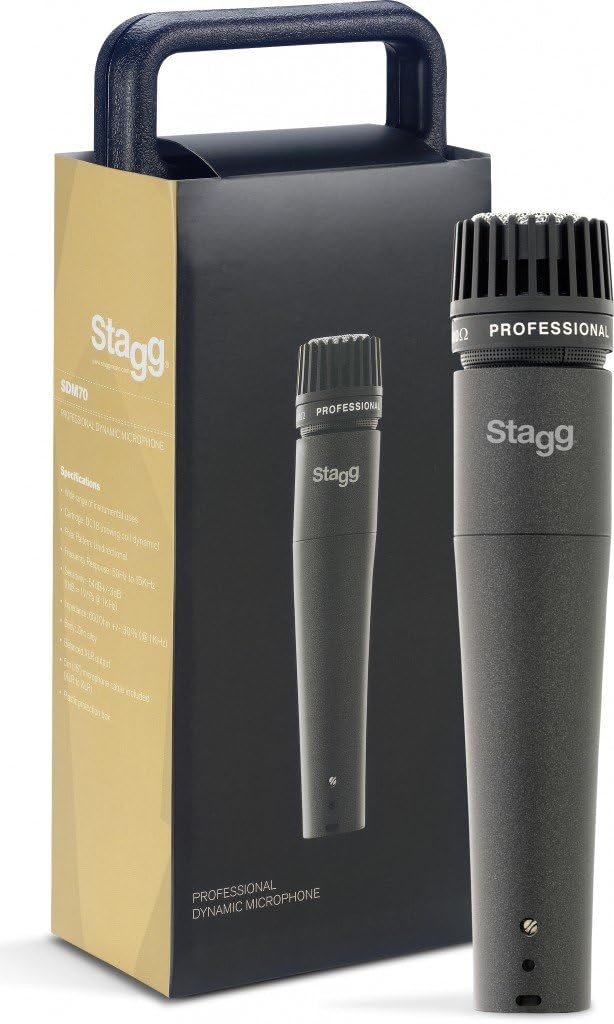
Image: The Stagg SDM70 Dynamic Microphone shown alongside its retail packaging.
4. Setup
Follow these steps to set up your Stagg SDM70 microphone:
- Connect the Microphone Cable: Insert the female end of a standard XLR cable into the XLR output port at the base of the microphone. Ensure a secure connection.
- Connect to Audio Equipment: Connect the male end of the XLR cable to an available XLR input on your mixer, audio interface, or amplifier.
- Secure the Microphone: If using a microphone stand, attach the microphone securely to the stand's clip. Adjust the stand's height and angle for optimal positioning.
- Power On: Ensure your connected audio equipment is powered on and the input gain for the microphone channel is set to a low level before speaking or playing into the microphone.
5. Operating Instructions
The Stagg SDM70 is a dynamic microphone with a cardioid polar pattern, meaning it primarily picks up sound from the front and rejects sound from the sides and rear. This characteristic is beneficial for minimizing background noise and preventing feedback.
- Vocal Performance: For vocals, hold the microphone approximately 2-6 inches (5-15 cm) from your mouth. Experiment with distance to achieve the desired tone and to control plosive sounds (P's and B's).
- Instrumental Performance: When miking instruments, position the microphone close to the sound source. For guitar amplifiers, aim the microphone at the center of the speaker cone for a brighter sound, or towards the edge for a warmer tone. For drums, position the microphone to capture the desired attack and resonance.
- Gain Adjustment: Gradually increase the gain on your mixer or audio interface until you reach an appropriate signal level without clipping or distortion.
6. Maintenance
Proper care will extend the life and performance of your microphone:
- Cleaning: Use a soft, dry cloth to clean the microphone body. For the grille, a soft brush can be used to gently remove dust or debris. Do not use liquid cleaners or solvents.
- Storage: Store the microphone in a dry, dust-free environment when not in use. Avoid extreme temperatures and humidity.
- Handling: Avoid dropping the microphone or subjecting it to harsh impacts, as this can damage the internal components.
7. Troubleshooting
If you encounter issues with your Stagg SDM70 microphone, refer to the following common problems and solutions:
- No Sound:
- Check all cable connections to ensure they are secure.
- Verify that the microphone input channel on your mixer/interface is not muted and the gain is turned up.
- Test with a different XLR cable to rule out a faulty cable.
- Ensure your audio equipment is powered on.
- Distorted Sound:
- Reduce the input gain on your mixer/interface. The signal may be too hot.
- Ensure the microphone is not too close to the sound source, causing overload.
- Feedback (High-pitched squeal):
- Move the microphone further away from speakers or monitors.
- Reduce the overall volume or the gain of the microphone channel.
- Adjust the microphone's position to point away from speakers.
8. Specifications
| Specification | Value |
|---|---|
| Item Weight | 1 Pounds |
| Microphone Form Factor | Handheld |
| Item dimensions L x W x H | 8 x 3 x 3 inches |
| Power Source | Corded Electric |
| Signal-to-Noise Ratio | 70 dB |
| Number of Channels | 1 |
| Frequency Response | 50 Hz to 15 KHz |
| Manufacturer | Stagg |
| UPC | 882030225239 |
| Product Dimensions | 8 x 3 x 3 inches |
| Item model number | SDM70 |
| Date First Available | March 9, 2016 |
| Color Name | Black |
| Recommended Uses For Product | Instrumental |
| Connectivity Technology | Wired, Wireless |
| Connector Type | XLR |
| Special Feature | XLR |
| Compatible Devices | Professional Audio Equipment |
| Color | Black |
| Included Components | Microphone |
| Polar Pattern | Unidirectional |
| Audio Sensitivity | 54 Decibels |
9. Warranty and Support
For information regarding warranty coverage, technical support, or service inquiries, please refer to the documentation provided with your purchase or visit the official Stagg website. Keep your proof of purchase for any warranty claims.
