
1. Introduction
The Excalibur EXC10EL Electric Food Dehydrator is designed for efficient and even food preservation. This appliance utilizes a 600W heating element and a fan to circulate warm air, removing moisture from food items. It features 10 stainless steel trays, a 99-hour timer, and adjustable temperature control, making it suitable for dehydrating various foods such as fruits, vegetables, herbs, and meats.

Figure 1.1: The Excalibur EXC10EL Electric Food Dehydrator with its glass doors closed, showcasing its stainless steel exterior and digital control panel.
2. Important Safety Information
Please read all instructions carefully before using the Excalibur EXC10EL Dehydrator. Failure to follow these safety guidelines may result in electric shock, fire, or injury.
- Electrical Safety: Ensure the dehydrator is connected to a grounded 120V AC outlet. Do not operate with a damaged cord or plug. Keep the appliance away from water or other liquids.
- Placement: Place the dehydrator on a stable, heat-resistant surface, away from walls and other appliances to allow for proper airflow. Do not block air vents.
- Supervision: Do not leave the dehydrator unattended during operation, especially when children are present.
- Hot Surfaces: The dehydrator's interior and trays will become hot during operation. Use oven mitts or allow to cool before handling.
- Cleaning: Always unplug the unit before cleaning. Refer to the Maintenance section for proper cleaning procedures.
- Food Safety: Always prepare food according to recommended guidelines for dehydration to prevent spoilage.
3. Components Included
Your Excalibur EXC10EL Dehydrator package includes the following items:
- Excalibur EXC10EL Electric Food Dehydrator Unit
- 10 Stainless Steel Trays
- Removable Drip Tray
- Guide to Dehydration (Digital Download)
4. Setup Instructions
4.1 Unpacking and Initial Inspection
- Carefully remove all components from the packaging.
- Inspect the dehydrator and its accessories for any signs of damage. If any damage is found, do not operate the unit and contact customer support.
- Remove all packing materials, including any protective films or ties.
4.2 Placement
Place the dehydrator on a flat, stable, and heat-resistant surface. Ensure there is at least 6 inches of clearance on all sides for adequate air circulation.
4.3 Initial Cleaning
Before first use, clean all removable parts and the interior of the dehydrator.
- Wash the 10 stainless steel trays and the removable drip tray with warm, soapy water. Rinse thoroughly and dry completely.
- Wipe the interior and exterior surfaces of the dehydrator with a damp cloth. Do not immerse the main unit in water.
4.4 Tray Installation
Slide the stainless steel trays into the designated slots inside the dehydrator. Ensure they are seated securely on the rails.

Figure 4.1: The dehydrator with its glass doors open, revealing the 10 stainless steel trays properly installed on their support rails.
5. Operating Instructions
5.1 Control Panel Overview
The digital control panel allows you to set the temperature and drying time.

Figure 5.1: A detailed view of the digital control panel, showing the 'Start' and 'Stop' buttons, and controls for adjusting temperature and time.
- START/STOP: Initiates or halts the dehydration process.
- TEMP: Adjusts the drying temperature.
- TIME: Sets the drying duration up to 99 hours.
- +/- Buttons: Used to increase or decrease temperature and time settings.
5.2 Loading Trays
Prepare your food items by slicing them evenly. Arrange the food in a single layer on the stainless steel trays, ensuring there is space between pieces for optimal airflow. Do not overload the trays.

Figure 5.2: The dehydrator with its doors open, showing trays loaded with evenly sliced red onions, ready for dehydration.
5.3 Setting Temperature and Time
- Plug the dehydrator into a grounded 120V AC outlet.
- Press the TEMP button and use the +/- buttons to set the desired temperature (range 95°F to 165°F).
- Press the TIME button and use the +/- buttons to set the desired drying duration (up to 99 hours).
- Press the START button to begin the dehydration process. The unit will automatically shut off once the timer expires.
5.4 Parallex Horizontal Airflow Technology
The Excalibur EXC10EL features Parallex Horizontal Airflow, which ensures even drying across all trays without the need for rotation. The fan and heating element are located at the rear of the unit, distributing warm air horizontally across each tray for consistent results.

Figure 5.3: Examples of various foods that can be dehydrated, including dried herbs, vegetables, fruit leather, and meat jerky.
6. Maintenance and Cleaning
Regular cleaning ensures optimal performance and longevity of your dehydrator.
6.1 Cleaning the Trays and Drip Tray
The stainless steel trays and the removable drip tray are dishwasher safe. Alternatively, they can be washed by hand with warm, soapy water. Rinse thoroughly and dry completely before re-installing.

Figure 6.1: The removable stainless steel drip tray, designed to catch any food particles or liquids during dehydration, making cleanup easier.
6.2 Cleaning the Interior and Exterior
- Ensure the dehydrator is unplugged and completely cooled before cleaning.
- Wipe the interior surfaces with a damp cloth and mild detergent. Avoid abrasive cleaners.
- Clean the exterior with a damp cloth. Do not spray water directly onto the control panel or electrical components.
- Ensure all surfaces are dry before plugging the unit back in.
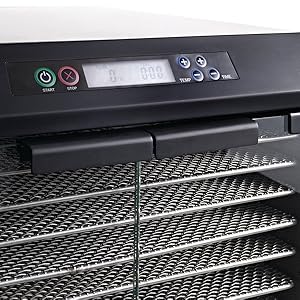
Figure 6.2: An interior view of the dehydrator, highlighting the rear-mounted fan and heating element responsible for the horizontal airflow system.
7. Troubleshooting
If you encounter issues with your Excalibur EXC10EL Dehydrator, refer to the following common problems and solutions:
| Problem | Possible Cause | Solution |
|---|---|---|
| Dehydrator does not turn on. | Not plugged in; power outlet issue; unit malfunction. | Ensure the unit is securely plugged into a working outlet. Check circuit breaker. If problem persists, contact customer support. |
| Uneven drying. | Overloaded trays; improper food preparation; blocked vents. | Ensure food is sliced evenly and arranged in a single layer. Do not overload trays. Check that air vents are not obstructed. |
| Dehydrator is too noisy. | Normal fan operation; loose component. | A certain level of fan noise is normal. If the noise is excessive or unusual, ensure the unit is on a stable surface. If it persists, contact customer support. |
| Food not drying properly. | Incorrect temperature/time settings; high humidity; food too thick. | Verify temperature and time settings are appropriate for the food type. Ensure food is sliced to recommended thickness. High ambient humidity can extend drying times. |
For issues not listed here or if troubleshooting steps do not resolve the problem, please contact Excalibur customer support.
8. Specifications
| Feature | Detail |
|---|---|
| Brand | Excalibur |
| Model Number | EXC10EL |
| Power | 600 Watts |
| Voltage | 120V |
| Number of Trays | 10 |
| Drying Space | 16 square feet |
| Material | Stainless Steel (interior and trays) |
| Temperature Range | 95°F to 165°F |
| Timer | 99-hour digital timer with automatic shut-off |
| Dimensions (W x D x H) | 20.5" x 17.25" x 17" |
| Item Weight | 63 Pounds |
| Dishwasher Safe Parts | Trays, Drip Tray |
9. Warranty and Support
9.1 Product Warranty
The Excalibur EXC10EL Electric Food Dehydrator is covered by a 10-year limited warranty. This warranty covers defects in materials and workmanship under normal use. Please retain your proof of purchase for warranty claims.
9.2 Customer Support
For technical assistance, warranty claims, or general inquiries, please visit the official Excalibur website or contact their customer service department. Refer to the product packaging or the official brand website for the most current contact information.


