
1. Introduction
Thank you for purchasing the Onkyo HT-R380 AV Stereo Receiver. This manual provides detailed instructions for the proper setup, operation, and maintenance of your new receiver. Please read this manual thoroughly before using the unit to ensure safe and optimal performance.
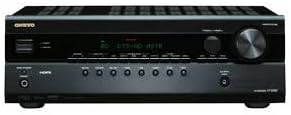
Figure 1: Front view of the Onkyo HT-R380 AV Stereo Receiver. This image shows the black receiver with its display, control knobs, and input jacks on the front panel.
2. Safety Information
Always observe the following safety precautions to prevent electric shock, fire, or damage to the unit.
- Power Supply: Connect the unit only to an AC outlet of the voltage specified on the rear panel.
- Ventilation: Ensure adequate ventilation. Do not block ventilation openings.
- Water and Moisture: Do not expose the unit to rain or moisture. Do not place objects filled with liquids on the unit.
- Foreign Objects: Do not insert any foreign objects into the unit.
- Servicing: Do not attempt to service the unit yourself. Refer all servicing to qualified service personnel.
- Speaker Impedance: Ensure connected speakers have an impedance between 6Ω and 16Ω.
3. Package Contents
Verify that all items are present in the package:
- Onkyo HT-R380 AV Stereo Receiver Unit
- Remote Control (with batteries)
- FM Indoor Antenna
- AM Loop Antenna
- Power Cord
- Instruction Manual (this document)
4. Setup
4.1 Speaker Connection
The HT-R380 supports a 5.1 channel surround sound configuration. Connect your speakers to the corresponding terminals on the rear panel of the receiver. Ensure correct polarity (+ to + and - to -) for all speakers.
- Front Speakers (L/R): Connect to the FRONT L/R terminals.
- Center Speaker: Connect to the CENTER terminal.
- Surround Speakers (L/R): Connect to the SURROUND L/R terminals.
- Subwoofer: Connect to the SUBWOOFER PRE OUT terminal (requires a powered subwoofer).
Note: The speaker load impedance should be between 6Ω and 16Ω.
4.2 Audio/Video Component Connection
Use RCA cables for connecting audio and video sources. The receiver features RCA connectivity for various devices.
- DVD/Blu-ray Player: Connect the audio output of your player to the DVD/BD audio input on the receiver.
- Game Console: Connect the audio output of your console to an available audio input (e.g., GAME).
- CD Player: Connect the audio output of your CD player to the CD audio input.
- TV Audio: Connect the audio output from your TV to the TV/CD audio input.
4.3 Power Connection
After all audio and speaker connections are made, connect the supplied power cord to the receiver's AC inlet and then to a wall outlet.
5. Operating Instructions
5.1 Basic Operation
- Power On/Off: Press the POWER button on the front panel or remote control to turn the receiver on or off.
- Input Selection: Use the INPUT SELECTOR knob or buttons on the front panel/remote to choose your desired audio/video source (e.g., DVD/BD, CD, GAME).
- Volume Control: Rotate the MASTER VOLUME knob on the front panel or use the VOLUME +/- buttons on the remote control to adjust the sound level.
5.2 Sound Modes
The HT-R380 offers various audio output modes, including Surround and Stereo. Use the listening mode buttons on the remote control to select the desired sound field.
- Surround: Activates 5.1 channel surround sound for an immersive experience.
- Stereo: Outputs audio through the front left and right speakers.
5.3 Radio Tuner Operation
To listen to radio broadcasts:
- Select the TUNER input.
- Use the TUNING buttons to manually tune to a station or the PRESET buttons to select a stored station.
- To store a station, tune to the desired frequency, then press and hold a PRESET button until the display flashes.
6. Maintenance
Proper maintenance ensures the longevity of your receiver.
- Cleaning: Wipe the unit with a soft, dry cloth. Do not use abrasive cloths, thinners, alcohol, or other chemical solvents, as these may damage the finish.
- Ventilation: Regularly check that the ventilation openings are not obstructed by dust or debris.
- Power Cord: Periodically inspect the power cord for any damage. If damaged, contact qualified service personnel for replacement.
7. Troubleshooting
If you experience issues with your Onkyo HT-R380, refer to the following common problems and solutions:
| Problem | Possible Cause | Solution |
|---|---|---|
| No power | Power cord disconnected; Power outlet faulty | Ensure power cord is securely connected; Try a different outlet. |
| No sound | Incorrect input selected; Volume too low; Speakers not connected properly; Mute function active | Select correct input; Increase volume; Check speaker connections and polarity; Deactivate mute. |
| Poor radio reception | Antenna not connected or positioned incorrectly | Connect FM/AM antennas securely; Adjust antenna position for better reception. |
| Remote control not working | Batteries depleted; Obstruction between remote and receiver | Replace batteries; Remove any obstructions; Ensure remote is pointed at the receiver's sensor. |
If the problem persists after trying these solutions, please contact Onkyo customer support or a qualified service technician.
8. Specifications
Key technical specifications for the Onkyo HT-R380 AV Stereo Receiver:
- Model: HT-R380
- Brand: Onkyo
- Output Power: 100 watts per channel @ 6Ω
- Surround Output: 100W (Front), 100W (Center), 100W (Rear)
- Frequency Response: 20Hz to 50kHz
- Speaker Load Impedance: 6Ω to 16Ω
- Surround Sound Channel Configuration: 5.1
- Audio Output Mode: Surround, Stereo
- Connectivity Technology: RCA
- Item Weight: 25 pounds
- Package Dimensions: 20.7 x 20.3 x 19.7 inches
- Date First Available: March 2, 2016
9. Warranty and Support
For warranty information and technical support, please refer to the warranty card included with your product or visit the official Onkyo website. Keep your proof of purchase for warranty claims.
Onkyo Official Website: www.onkyo.com
For service inquiries, please contact Onkyo customer support.


