1. Introduction
This manual provides instructions for the setup, operation, and maintenance of your Insignia RC-801-0A LCD TV Remote Control. This remote is designed for use with various Insignia LCD TV models, ensuring seamless control over your television's functions.
2. Package Contents
- 1 x Insignia RC-801-0A Remote Control
Note: Batteries and a user manual are not included in the package.
3. Setup
3.1 Battery Installation
- Locate the battery compartment on the back of the remote control.
- Slide the battery compartment cover downwards to open it.
- Insert two (2) AAA batteries, ensuring the positive (+) and negative (-) terminals align correctly with the markings inside the compartment.
- Slide the battery compartment cover back into place until it clicks securely.
Important: The remote requires 2 AAA batteries (not included).
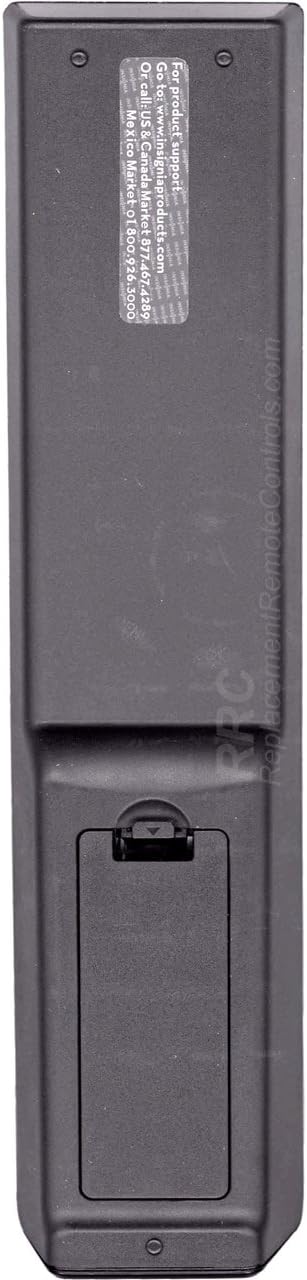
Figure 1: Back view of the Insignia RC-801-0A remote control, showing the battery compartment at the bottom. The compartment cover is designed to slide open for battery insertion.
3.2 Initial Use
The Insignia RC-801-0A remote control is pre-programmed for compatible Insignia LCD TV models. No additional programming or setup is typically required. Once batteries are installed, the remote should function immediately with your television.
4. Operating Instructions
Familiarize yourself with the buttons on your remote control to effectively operate your Insignia LCD TV.

Figure 2: Front view of the Insignia RC-801-0A remote control, displaying all control buttons. Key sections include power, input selection, number pad, volume/channel controls, menu navigation, and media playback buttons.
4.1 Key Button Functions
- Power (●): Turns the TV on or off.
- COMP/AV, HDMI, TV: Selects the video input source.
- Number Pad (0-9): Directly enters channel numbers.
- RECALL: Returns to the previously viewed channel.
- VOL (+/-): Adjusts the volume level.
- CH (▲/▼): Changes the TV channel up or down.
- MUTE: Silences the TV audio.
- INPUT: Cycles through available input sources.
- MENU: Opens the TV's main menu.
- Navigation Buttons (▲▼◀▶): Navigates through menu options.
- ENTER/OK: Confirms selections in menus.
- EXIT: Closes the current menu or on-screen display.
- GUIDE: Displays the electronic program guide (if available).
- Media Playback Buttons (◀◀, ▶, ▮▮, ▶▶): Controls playback of connected media devices (e.g., DVD player, USB).
- ZOOM: Adjusts the screen zoom level.
5. Maintenance
5.1 Battery Replacement
Replace batteries when the remote's response becomes inconsistent or stops working. Follow the battery installation steps in Section 3.1. Always replace both batteries at the same time with new AAA batteries.
5.2 Cleaning
To clean the remote control, gently wipe its surface with a soft, dry cloth. For stubborn dirt, slightly dampen the cloth with water. Avoid using harsh chemicals or abrasive cleaners, as these can damage the remote's finish or internal components.
6. Troubleshooting
- Remote not responding:
- Ensure the batteries are inserted correctly with the correct polarity.
- Replace old batteries with new ones.
- Check for any obstructions between the remote and the TV's IR sensor.
- Point the remote directly at the TV's IR sensor.
- Specific buttons not working:
- Clean the remote's surface, especially around the non-functional buttons, to remove any debris.
- If the issue persists after battery replacement and cleaning, the remote may require replacement.
7. Specifications
| Model Number | RC-801-0A |
| Brand | INSIGNIA |
| Product Dimensions | 8 x 2 x 1 inches |
| Item Weight | 3.67 ounces |
| Power Source | 2 x AAA Batteries (not included) |
| Compatible Devices | Insignia LCD Televisions |
| Color | Black |
8. Warranty and Support
8.1 Warranty Information
This product comes with a Six Months Warranty from the date of purchase. Please retain your proof of purchase for warranty claims. The warranty covers manufacturing defects but does not cover damage caused by misuse, accidents, or unauthorized modifications.
8.2 Customer Support
For product support or warranty inquiries, please refer to the contact information provided by your retailer or the manufacturer's official website. The back of the remote may contain specific support details (see Figure 3).

Figure 3: Back view of the Insignia RC-801-0A remote control, showing a sticker with support information. The text indicates to visit www.insigniaproducts.com for product support and provides phone numbers for US/Canada and Mexico.
Specific support details from the remote's back sticker:
- For product support: Go to www.insigniaproducts.com
- Call US & Canada: 1-877-467-4289
- Mexico: 01-800-926-3000


