
Introduction
This user manual provides essential information for the safe and efficient operation of your Magic Chef 1.6-cu. ft. Countertop Microwave Oven. Please read this manual thoroughly before using the appliance and retain it for future reference. This microwave oven is designed to simplify your cooking tasks with its generous capacity and 1100 watts of power.
Important Safety Information
When using electrical appliances, basic safety precautions should be followed, including the following:
- Read all instructions before using the appliance.
- Do not operate the microwave oven when empty.
- Do not heat sealed containers, as they may explode.
- Ensure the microwave oven is properly grounded.
- Always supervise children when the microwave oven is in use.
- Do not attempt to service or repair the appliance yourself. Contact qualified service personnel.
- Clean the microwave oven regularly to prevent grease buildup, which can be a fire hazard.
Package Contents
Your Magic Chef Countertop Microwave Oven package should include the following items:
- Microwave Oven Unit
- Glass Turntable
- Turntable Hub
- Roller Guide
- User Manual (this document)
Setup and Installation
1. Choosing a Location
Place the microwave oven on a flat, stable surface that can support its weight and the heaviest food item likely to be cooked in it. Ensure adequate ventilation around the unit. Maintain a minimum of 4 inches (10 cm) of space on the top, back, and sides for proper airflow.
2. Electrical Requirements
The microwave oven requires a standard 120V, 60Hz AC outlet. Do not use extension cords or adapters. Ensure the electrical circuit is dedicated to the microwave oven to avoid overloading.
3. Turntable Assembly
- Place the roller guide ring in the center of the microwave oven cavity.
- Position the glass turntable on top of the roller guide, ensuring it sits securely on the turntable hub.
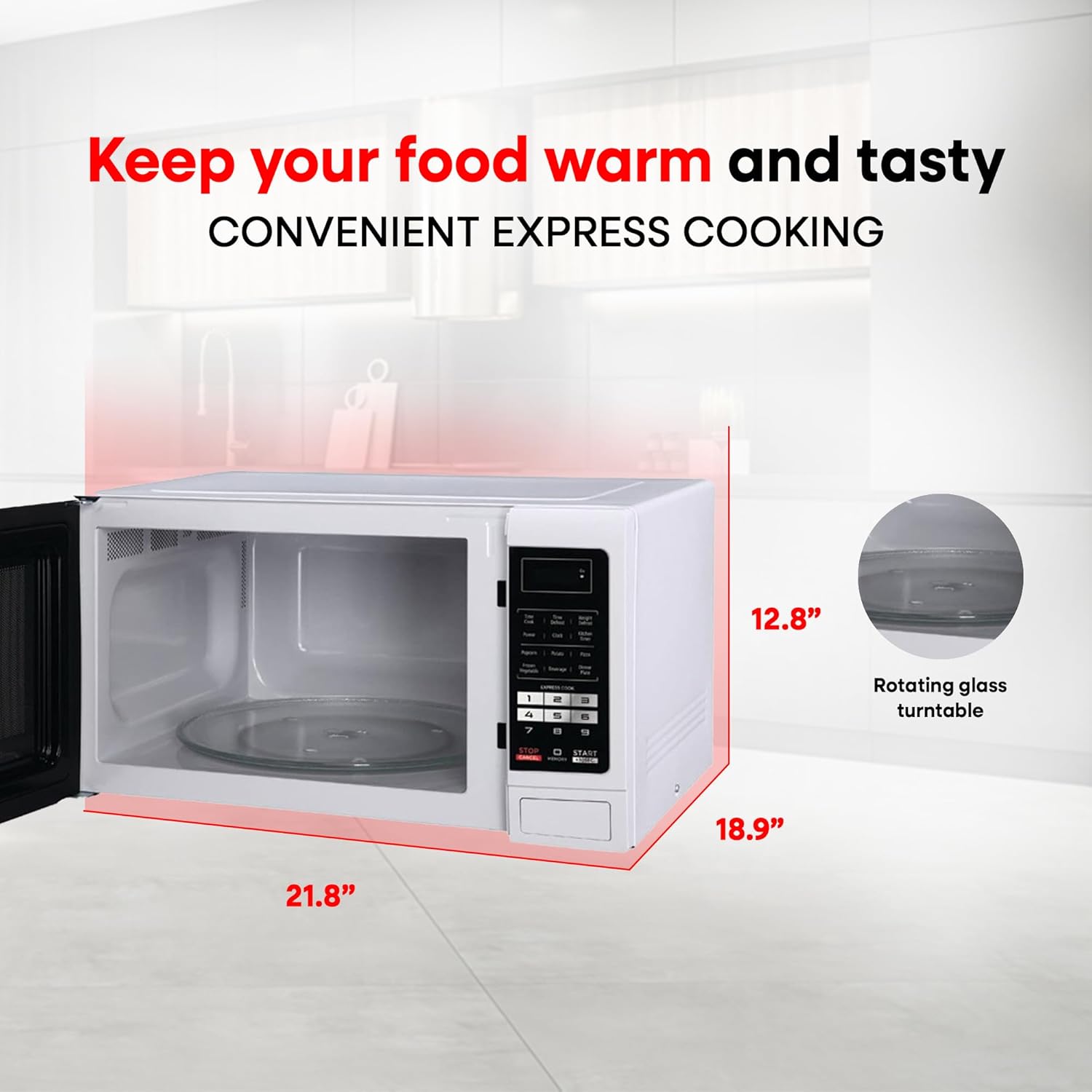
Figure 1: Microwave Oven with dimensions and turntable assembly. The unit measures approximately 21.8 inches wide, 12.8 inches high, and 18.9 inches deep. The rotating glass turntable is visible inside the cavity.
4. Initial Setup
Plug the microwave oven into a grounded electrical outlet. The display will show "0:00". To set the clock, press the "Clock" button, then use the number pad to enter the current time. Press "Clock" again to confirm.
Operating Instructions
Control Panel Overview

Figure 2: Front view of the Magic Chef Countertop Microwave Oven, highlighting the digital display and touch control panel with various function buttons.
Basic Cooking
- Place food in a microwave-safe container on the glass turntable.
- Close the door securely.
- Press the "Time Cook" button.
- Use the number pad to enter the desired cooking time.
- (Optional) To adjust power level, press "Power" and then use the number pad to select a power level from 1 (lowest) to 10 (highest).
- Press "Start" to begin cooking.
One-Touch Cooking Programs
The microwave features 6 one-touch cooking programs for common food items:
- Popcorn: For pre-packaged microwave popcorn.
- Potato: For baking potatoes.
- Pizza: For reheating pizza slices.
- Frozen Vegetable: For cooking frozen vegetables.
- Beverage: For heating drinks.
- Dinner Plate: For reheating a dinner plate.
Simply press the corresponding button for the desired food item. The microwave will automatically set the optimal cooking time and power level.
Defrost Function
The defrost feature allows you to defrost food by time or by weight.
- Time Defrost: Press "Time Defrost", enter the desired defrosting time using the number pad, then press "Start".
- Weight Defrost: Press "Weight Defrost", enter the food's weight in ounces using the number pad, then press "Start".
Express Cooking
For quick cooking, press any number from 1 to 6 on the number pad. The microwave will start cooking immediately for that many minutes at 100% power.
Kitchen Timer
To use the kitchen timer, press "Kitchen Timer", enter the desired time, then press "Start". This function operates independently of microwave cooking.
Child Safety Lock
To activate the child safety lock, press and hold the "Stop/Cancel" button for 3 seconds. The display will show "LOCK". To deactivate, press and hold "Stop/Cancel" again for 3 seconds.
Memory Function
The memory function allows you to save frequently used cooking settings. Refer to the detailed instructions in the full manual for programming and recalling memory settings.
Maintenance and Cleaning
Regular cleaning helps maintain the performance and longevity of your microwave oven.
- Interior: Wipe the interior cavity with a damp cloth and mild detergent after each use. For stubborn stains, place a bowl of water with lemon slices inside and microwave for a few minutes to loosen residue.
- Exterior: Clean the exterior surfaces with a soft, damp cloth. Avoid abrasive cleaners.
- Turntable: The glass turntable and roller guide can be removed and washed in warm, soapy water or in the dishwasher.
- Always ensure the microwave is unplugged before cleaning.
Troubleshooting
| Problem | Possible Cause | Solution |
|---|---|---|
| Microwave does not start. | Door not closed properly; Power cord unplugged; Fuse blown or circuit breaker tripped. | Ensure door is firmly closed; Check power cord connection; Check household fuse/circuit breaker. |
| Food not heating. | Incorrect cooking time/power level set; Door not closed properly. | Increase cooking time/power level; Ensure door is firmly closed. |
| Turntable not rotating. | Turntable not positioned correctly; Roller guide dirty or damaged. | Reposition turntable and roller guide; Clean or replace roller guide. |
| Oven light not working. | Light bulb burned out. | Contact qualified service personnel for bulb replacement. |
For more complex issues, please contact Magic Chef customer support or refer to the comprehensive troubleshooting guide in the full product manual.
Specifications
| Feature | Detail |
|---|---|
| Brand | Magic Chef |
| Model Number | MCM1611W |
| Capacity | 1.6 Cubic Feet |
| Wattage | 1100 Watts (Energy Use) / 1050 Watts (Cooking Wattage) |
| Dimensions (D x W x H) | 17.9" x 21.8" x 12.8" |
| Item Weight | 36.6 Pounds |
| Color | White |
| Material | Stainless Steel (Front), White Cabinet |
| Installation Type | Countertop |
| Special Features | 10 Power Levels, 6 One-Touch Cooking Programs, Defrost by Time/Weight, Express Cooking, Kitchen Timer, Child Safety Lock, Memory Function |
Warranty and Support
Magic Chef products are designed for reliability and ease of use. For detailed warranty information, please refer to the warranty card included with your product or visit the official Magic Chef website. If you require technical assistance or have questions regarding your microwave oven, please contact Magic Chef customer support.
For more information, you may visit the Magic Chef Store on Amazon.


