
Introduction
Thank you for choosing the Maclean MCE130 PIR Infrared Motion Detector. This device is designed to automatically switch on lighting based on detected movement, providing convenience and energy efficiency. It is suitable for various indoor and outdoor applications such as hallways, entrances, and stairwells. Its classic design allows it to integrate seamlessly into any room concept.
The MCE130 features 360° detection and offers adjustable time and light sensitivity settings for optimal performance.
Safety Information
Please read these instructions carefully before installation and use. Improper installation or operation can lead to electric shock or damage to the device. Always disconnect power at the main circuit breaker before performing any electrical work.
- Installation should only be performed by a qualified electrician.
- Ensure the power supply is switched off before installation or maintenance.
- Do not exceed the maximum load capacity specified in the technical specifications.
- Keep the device away from flammable materials.
- This product is designed for indoor and covered outdoor use (IP20 rating). Avoid direct exposure to water.
Product Features
- Integrated PIR motion detector with full 360° detection.
- Suitable for various locations including hallways, corridors, and stairwells.
- Classic design that blends with diverse interior aesthetics.
- Adjustable time delay and light sensitivity.
Setup and Installation
The installation of the Maclean MCE130 requires some manual skill. It is designed for ceiling mounting. Ensure the installation height is between 2.2 and 4 meters for optimal detection.

Figure 1: Front view of the Maclean MCE130 PIR Infrared Motion Detector, showing the sensor dome.
Wiring Instructions
Before wiring, ensure the power supply is completely disconnected. Connect the wires according to the diagram below. The device operates on 220-240V/AC, 50Hz.
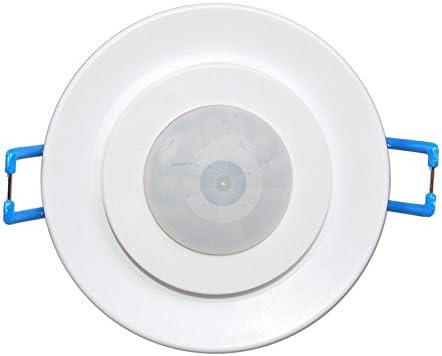
Figure 2: Back view of the MCE130, illustrating the wiring terminals for power input and load output.
The terminals are typically marked for Live (L), Neutral (N), and Load (L'). Connect the incoming Live wire to L, the incoming Neutral wire to N, and the Neutral wire to the load (e.g., light fixture) from N. Connect the Live wire to the load from L'.
Operating Instructions
The MCE130 motion detector features adjustable settings for both time delay and light sensitivity (LUX). These adjustments are typically made using small dials located on the unit.

Figure 3: Close-up of the adjustment dials for setting time delay and light sensitivity.
Adjusting Time Delay (TIME)
The TIME dial controls how long the connected light remains on after motion is detected and no further motion is sensed. The adjustable range is from a minimum of 10 seconds (± 3 seconds) to a maximum of 15 minutes (± 2 minutes). Turn the dial clockwise to increase the delay time and counter-clockwise to decrease it.
Adjusting Light Sensitivity (LUX)
The LUX dial determines the ambient light level at which the sensor will activate. When set to the 'sun' symbol, the sensor will operate both day and night. When set to the 'moon' symbol, the sensor will only activate in low light conditions (below 3-2000 lux). Adjust this setting according to your environmental lighting requirements.
Detection Area

Figure 4: Illustration of the 360-degree motion detection zone for the MCE130 sensor.
The sensor has a 360° detection angle and a maximum detection range of 6 meters (at temperatures below 24°C). Ensure the sensor is not obstructed by furniture or other objects that could block its field of view.
Maintenance
The Maclean MCE130 motion detector requires minimal maintenance. To ensure optimal performance:
- Regularly clean the sensor lens with a soft, dry cloth to remove dust or dirt that may impair detection.
- Do not use abrasive cleaners or solvents.
- Periodically check electrical connections for any signs of wear or damage.
Troubleshooting
| Problem | Possible Cause | Solution |
|---|---|---|
| Light does not turn on when motion is detected. | No power; incorrect wiring; LUX setting too high (daylight); faulty bulb. | Check power supply; verify wiring connections; adjust LUX setting; replace bulb. |
| Light stays on continuously. | Continuous motion in detection area; TIME setting too long; faulty sensor. | Remove obstructions; adjust TIME setting; contact support if sensor is faulty. |
| Detection range is too short or inconsistent. | Obstructions; incorrect installation height; high ambient temperature. | Clear obstructions; verify installation height (2.2-4m); note that range decreases at higher temperatures. |
If problems persist after attempting these solutions, please contact customer support.
Specifications
| Feature | Specification |
|---|---|
| Input Voltage | 220-240 V/AC / 50 Hz |
| Response Brightness | <3-2000 lux (adjustable) |
| Delay Time | Min. 10 sec ± 3 sec / Max. 15 min ± 2 min |
| Max. Power Load | 800 W (incandescent) / 400 W (LED/fluorescent) |
| Detection Angle | 360° |
| Detection Range | 6 m max. (<24 °C) |
| Operating Temperature | -20 ~ 40 °C |
| Relative Air Humidity | <93 % RH |
| Power Consumption | Approx. 0.5 W |
| Installation Height | 2.2-4 m |
| Response Speed | 0.6-1.5 m/s |
| Dimensions (L x W x H) | 10 x 8 x 8 cm |
| Weight | 100 Grams |
| Mounting Type | Ceiling mount |
Warranty and Support
Maclean products are designed and manufactured to the highest quality standards. This product is covered by the manufacturer's warranty against defects in materials and workmanship. For specific warranty details, please refer to the documentation provided with your purchase or visit the official Maclean website.
For technical support, troubleshooting assistance, or warranty claims, please contact your retailer or the Maclean customer service department. Contact information can typically be found on the product packaging or the official Maclean website.