
Introduction
Thank you for choosing the GoolRC TG3 2.4G 3CH AFHS Radio Remote Control System. This system is designed for reliable and precise control of your RC car or boat. Featuring advanced 2.4GHz AFHS (Automatic Frequency Hopping System) technology, it ensures strong anti-interference capabilities and fast response speed. This manual provides detailed instructions for setup, operation, and maintenance to help you get the most out of your new remote control system.

Figure 1: The GoolRC TG3 transmitter is compatible with both RC cars and boats.
Safety Precautions
- Always operate your RC vehicle in a safe and open area, away from people, pets, and obstacles.
- Ensure all batteries are fully charged and correctly installed before operation.
- Do not operate the remote control system in wet conditions or near water, unless your RC vehicle is specifically designed for such environments.
- Keep the transmitter and receiver away from extreme temperatures, direct sunlight, and dust.
- Supervise children when they are operating RC vehicles.
- Turn off the receiver first, then the transmitter, when you are finished operating your vehicle.
Package Contents
- GoolRC TG3 2.4G 3CH Transmitter
- GoolRC 3CH Receiver
- Binding Plug
- User Manual (this document)

Figure 2: The GoolRC TG3 Transmitter and its retail packaging.
Product Overview
Transmitter (TG3)

Figure 3: GoolRC TG3 Transmitter.
The TG3 transmitter features an ergonomic design for comfortable handling and precise control. Key components include:
- Steering Wheel: Controls the direction of the RC vehicle.
- Throttle Trigger: Controls forward and reverse speed.
- Steering Trim Dial: Adjusts the neutral position of the steering.
- Throttle Trim Dial: Adjusts the neutral position of the throttle.
- Steering Rate Knob: Adjusts the maximum steering angle.
- Throttle Limit Switch (L-M-H): Limits the maximum throttle output to Low, Medium, or High.
- Reverse Switches (ST/TH): Reverses the direction of steering or throttle channels.
- CH3 Button: Controls the third channel, typically for auxiliary functions.
- Power On/Off Switch: Turns the transmitter on or off.
- Battery Compartment: Holds 4 AA batteries.
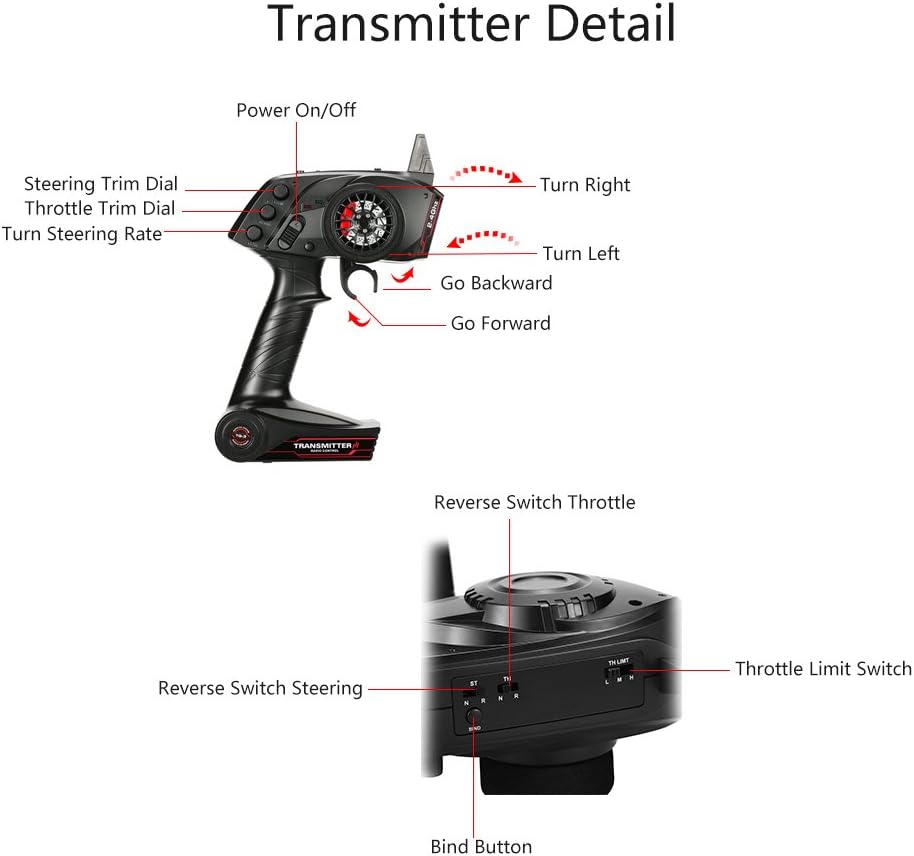
Figure 4: Detailed view of the TG3 Transmitter controls.
Receiver
The compact 3-channel receiver is designed to fit into various RC vehicle chassis. It features standard servo ports for Channel 1 (Steering), Channel 2 (Throttle), and Channel 3 (Auxiliary), along with a BIND/CH3 port for binding and auxiliary functions.

Figure 5: GoolRC 3CH Receiver and Binding Plug.
Setup
1. Transmitter Battery Installation
- Open the battery compartment cover on the bottom of the transmitter.
- Insert 4 AA batteries, ensuring correct polarity (+/-).
- Close the battery compartment cover securely.
2. Receiver Connection
- Connect the steering servo to the CH1 port on the receiver.
- Connect the Electronic Speed Controller (ESC) to the CH2 port on the receiver. The ESC will also provide power to the receiver.
- If using a third channel device (e.g., lights, gear shift servo), connect it to the CH3 port.
- Secure the receiver in your RC vehicle, ensuring the antenna is positioned correctly and not obstructed by metal parts.
3. Binding Procedure
The transmitter and receiver are typically pre-bound from the factory. If re-binding is necessary, follow these steps:
- Ensure the transmitter is turned OFF.
- Insert the binding plug into the BIND/CH3 port on the receiver.
- Power on the RC vehicle (which powers the receiver). The receiver's LED should flash rapidly, indicating it's in binding mode.
- While holding down the BIND button on the transmitter (refer to Figure 4 for location), turn on the transmitter.
- Release the BIND button on the transmitter once the receiver's LED becomes solid, indicating successful binding.
- Turn off both the receiver and the transmitter.
- Remove the binding plug from the receiver.
- Turn on the transmitter first, then the receiver, to confirm successful binding and operation.
Operating
Basic Controls
- Steering: Rotate the steering wheel clockwise to turn right, counter-clockwise to turn left.
- Throttle: Pull the throttle trigger towards you for forward movement. Push the throttle trigger away from you for reverse/brake.
Trim Adjustments
Use the trim dials to fine-tune the neutral position of your steering and throttle. If your vehicle pulls to one side or moves slightly without throttle input, adjust the corresponding trim dial until the vehicle remains straight and stationary.
Throttle Limit Switch (L-M-H)
This 3-position switch allows you to limit the maximum throttle output. This is useful for beginners, indoor driving, or specific driving conditions where less power is desired.
- L (Low): Reduced maximum throttle.
- M (Medium): Moderate maximum throttle.
- H (High): Full maximum throttle.
Reverse Switches (ST/TH)
These switches reverse the direction of the steering (ST) or throttle (TH) channels. If your steering or throttle responds in the opposite direction to your input, flip the corresponding reverse switch.
CH3 Button
The CH3 button provides an on/off or two-position control for devices connected to the receiver's CH3 port. Its function depends on the connected device (e.g., turning lights on/off, shifting gears).
Maintenance
- Cleaning: Use a soft, dry cloth to clean the transmitter and receiver. Avoid using solvents or harsh chemicals.
- Storage: Store the remote control system in a cool, dry place, away from direct sunlight and moisture.
- Battery Care: Remove batteries from the transmitter if it will not be used for an extended period to prevent leakage.
- Inspection: Periodically check all connections and wires for any signs of wear or damage.
Troubleshooting
| Problem | Possible Cause | Solution |
|---|---|---|
| No power to transmitter | Dead or incorrectly installed batteries | Replace batteries; check polarity |
| Vehicle not responding | Not bound; receiver not powered; loose connections | Perform binding procedure; check receiver power; secure all connections |
| Steering/Throttle reversed | Reverse switch incorrectly set | Flip the corresponding ST/TH reverse switch |
| Vehicle pulls to one side/creeps | Trim not adjusted | Adjust Steering Trim or Throttle Trim dial |
| Limited speed/power | Throttle Limit Switch set to L or M | Set Throttle Limit Switch to H (High) |
Specifications
| Feature | Detail |
|---|---|
| Product Dimensions | 10.63 x 7.56 x 3.86 inches |
| Item Weight | 0.085 ounces |
| Item Model Number | TG3 |
| Compatible Devices | RC Car, RC Boat |
| Connector Type | Radio Frequency |
| Color | black |
| Manufacturer | JIMI shop |
| Country of Origin | China |
Warranty and Support
GoolRC products are manufactured to high quality standards. For warranty information or technical support, please refer to the contact details provided with your purchase or visit the official GoolRC website. Please retain your proof of purchase for any warranty claims.
