
Introduction
Thank you for choosing the RICOO S2922 TV Wall Mount. This manual provides essential information for the safe and correct installation, operation, and maintenance of your wall mount. Please read these instructions thoroughly before installation and keep them for future reference.
The RICOO S2922 is a versatile TV monitor wall mount designed for screens ranging from approximately 27 to 55 inches. It offers swivel and tilt adjustments for optimal viewing angles and supports VESA mounting patterns up to 200x200 mm, with a maximum load capacity of 25 kg (55 lbs).
Safety Information
WARNING: Improper installation may result in serious personal injury or damage to your equipment. If you do not understand these instructions, or have doubts about the safety of the installation, please consult a qualified professional.
- Ensure the mounting surface can safely support the combined weight of the mount and the display.
- This mount is designed for installation on solid concrete walls only. Do not install on drywall or plasterboard without proper reinforcement.
- Do not exceed the maximum weight capacity of 25 kg (55 lbs).
- Always use the provided screws and hardware. If your TV requires different screws, ensure they are compatible and of appropriate length.
- Keep all small parts away from children.
- Check all connections periodically to ensure they remain secure.
Package Contents
Please verify that all components are present and undamaged before installation. If any parts are missing or defective, contact RICOO customer support.
- Wall Plate Assembly
- TV Bracket Plate
- Mounting Hardware Kit (screws, washers, spacers for TV and wall, concrete anchors)
- Instruction Manual
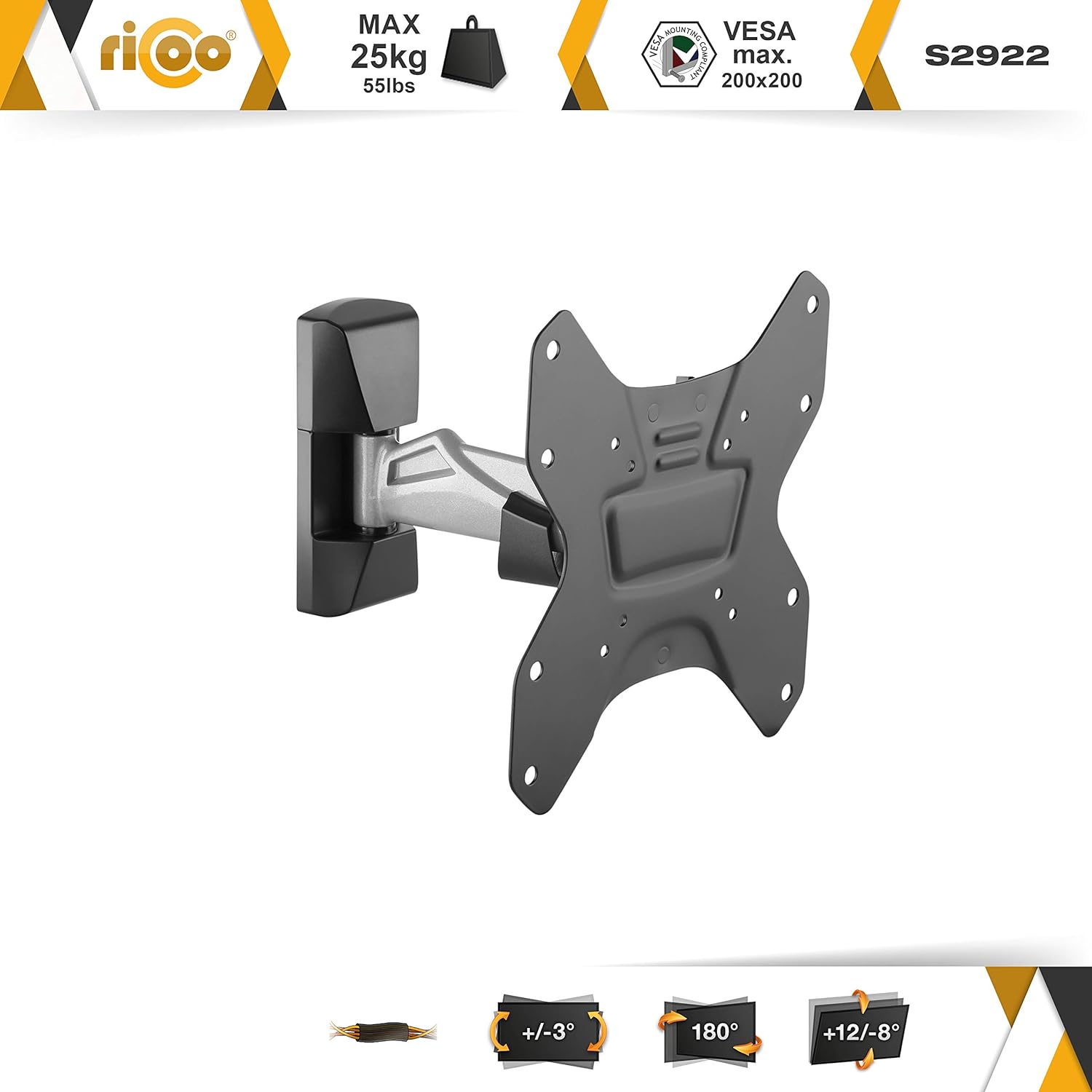
Image: Overview of the RICOO S2922 TV Wall Mount showing its main components and key features like max weight, VESA compatibility, and movement ranges.
Setup and Installation
1. Check VESA Compatibility
Before starting, ensure your TV's VESA mounting pattern is compatible with the S2922 mount. This mount supports VESA patterns: 75x75, 100x100, 200x100, and 200x200 mm. Note: VESA 100x200 mm is NOT supported.

Image: Guide to measure VESA pattern on a TV and a chart indicating supported VESA sizes for the S2922 mount.
2. Prepare the Wall
This mount is designed for solid concrete walls. Use a stud finder to ensure there are no hidden pipes or electrical wires in the drilling area. Determine the desired height for your TV.
3. Mark and Drill Holes
- Position the wall plate assembly against the wall at the desired height and use a pencil to mark the drilling points.
- Drill pilot holes at the marked locations. For concrete walls, use a masonry drill bit of appropriate size (refer to hardware kit instructions) and drill to the specified depth.
- Insert the concrete anchors into the drilled holes.
4. Attach Wall Plate to Wall
Secure the wall plate assembly to the wall using the provided screws and washers. Ensure the wall plate is level before fully tightening all screws.
5. Attach TV Brackets to TV
- Carefully place your TV face down on a soft, clean surface.
- Attach the TV bracket plate to the back of your TV using the appropriate screws, washers, and spacers from the hardware kit. Ensure the brackets are centered and securely fastened. Do not overtighten.
6. Mount TV to Wall Plate
With assistance, carefully lift the TV and hook the TV bracket plate onto the wall plate assembly. Ensure the TV is securely seated on the wall mount. Engage any safety locking mechanisms if present.

Image: Technical drawing showing detailed dimensions of the wall mount and VESA plate, including wall distance and movement ranges.
Operating Instructions (Adjustments)
The RICOO S2922 mount allows for flexible positioning of your TV to achieve the best viewing experience.
Swivel/Pivot Adjustment
The mount allows for swivelling/pivoting up to 180 degrees, depending on the width of your display. Gently push or pull the TV to the desired left or right angle.
Tilt Adjustment
The TV can be tilted +12 degrees upwards and -8 degrees downwards. Loosen the tilt adjustment screws on the TV bracket, adjust the screen to the desired vertical angle, and then retighten the screws to secure the position.
Wall Distance Adjustment
The wall distance can be adjusted between 48mm (minimum) and 213mm (maximum) by extending or retracting the arm.
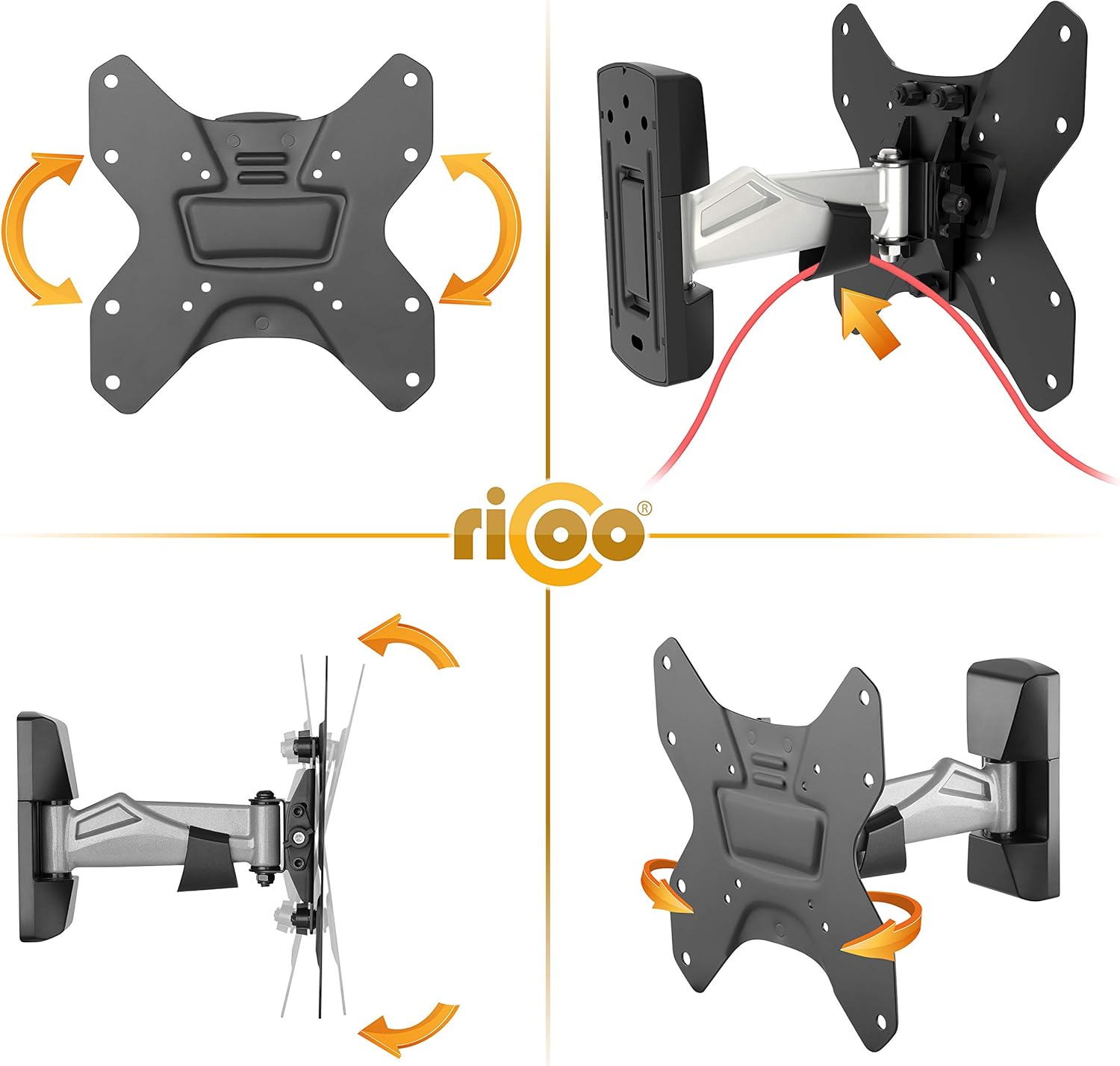
Image: Visual representation of the mount's swivel and tilt capabilities, along with integrated cable management features.
Maintenance
- Periodically check all screws and connections to ensure they are tight and secure.
- Clean the mount with a soft, dry cloth. Do not use abrasive cleaners or solvents.
- If any part becomes damaged or worn, discontinue use and contact customer support for replacement parts.
Troubleshooting
TV is not level after installation
Ensure the wall plate was installed level. If the TV bracket allows for minor rotational adjustment, loosen the relevant screws, adjust the TV, and retighten. Otherwise, the wall plate may need to be re-installed.
Mount feels loose or unstable
Immediately remove the TV from the mount. Check all wall mounting screws and TV attachment screws for tightness. Ensure the wall material is appropriate for the mount and that anchors are properly seated. Do not remount the TV until the issue is resolved.
Difficulty adjusting tilt or swivel
Check if any adjustment screws are overtightened. Loosen them slightly to allow movement, then retighten to secure the desired position. Ensure no cables are obstructing movement.
Specifications
| Feature | Specification |
|---|---|
| Model Number | S2922 |
| Mounting Type | Wall Mount |
| Movement Type | Tilt, Swivel |
| Material | Metal |
| Color | Black |
| Compatible Screen Sizes | 27 - 55 Inches |
| Max Load Capacity | 25 kg (55 lbs) |
| VESA Compatibility | 75x75, 100x100, 200x100, 200x200 mm (100x200 mm NOT supported) |
| Tilt Range | +12° / -8° |
| Swivel Range | Up to 180° (depending on TV width) |
| Wall Distance | 48 - 213 mm |
| Item Weight | 1800 Grams |

Image: Side profile of the TV mount, illustrating its extension from the wall and relative size.
Warranty and Support
Warranty Information
This product comes with a legal warranty of 24 months on new goods from the date of purchase.
Customer Support
If you have any questions about our products, require assistance with installation, or need to claim warranty, please contact our support team:
Email: support@ricoo.de


