
Important Safety Information
Please read all instructions carefully before using the Ossur Post-Op Knee Brace. This brace is intended for use under the guidance of a healthcare professional. Improper use may result in injury or ineffective treatment.
- Consult Your Doctor: Always consult with your physician or physical therapist regarding the appropriate use, fit, and range of motion settings for your specific condition.
- Do Not Modify: Do not attempt to modify the brace or its components. Use only Ossur-approved replacement parts.
- Skin Irritation: Discontinue use and consult a healthcare professional if you experience persistent skin irritation, discomfort, or swelling.
- Proper Fit: Ensure the brace is fitted correctly to prevent slippage and maximize support. An improperly fitted brace may not provide the intended therapeutic benefits.
Setup and Initial Fitting
Before applying the brace, ensure all components are present and undamaged. The brace includes an adjustable aluminum frame, D-ring strap system, adjustable Velcro straps, and an Innovator Hinge.

Image: Key components of the Ossur Post-Op Knee Brace, highlighting the Innovator Hinge, D-ring strap system, adjustable Velcro straps, and adjustable breakaway aluminum frame.

Image: Included accessories, such as zip ties for securing hinge settings and additional Velcro pads.
- Unpack: Carefully remove the brace and all accessories from the packaging. Inspect for any visible damage.
- Positioning: Place the brace on the affected leg, ensuring the hinge mechanism is aligned with the center of your knee joint. The brace should extend along the thigh and calf.
- Secure Straps: Begin by securing the straps closest to the knee, then proceed to the thigh and calf straps. Ensure the straps are snug but not overly tight, allowing for comfortable circulation. The D-ring strap system helps distribute pressure evenly.
- Adjust Frame Length: The aluminum frame is adjustable. If necessary, adjust the length of the brace to ensure it fits your leg comfortably without impeding movement or causing pressure points.
Operating Instructions
The Ossur Post-Op Knee Brace is designed to control or immobilize the knee's range of motion as prescribed by your healthcare professional.

Image: A user adjusting the straps of the Ossur Post-Op Knee Brace for a secure fit.
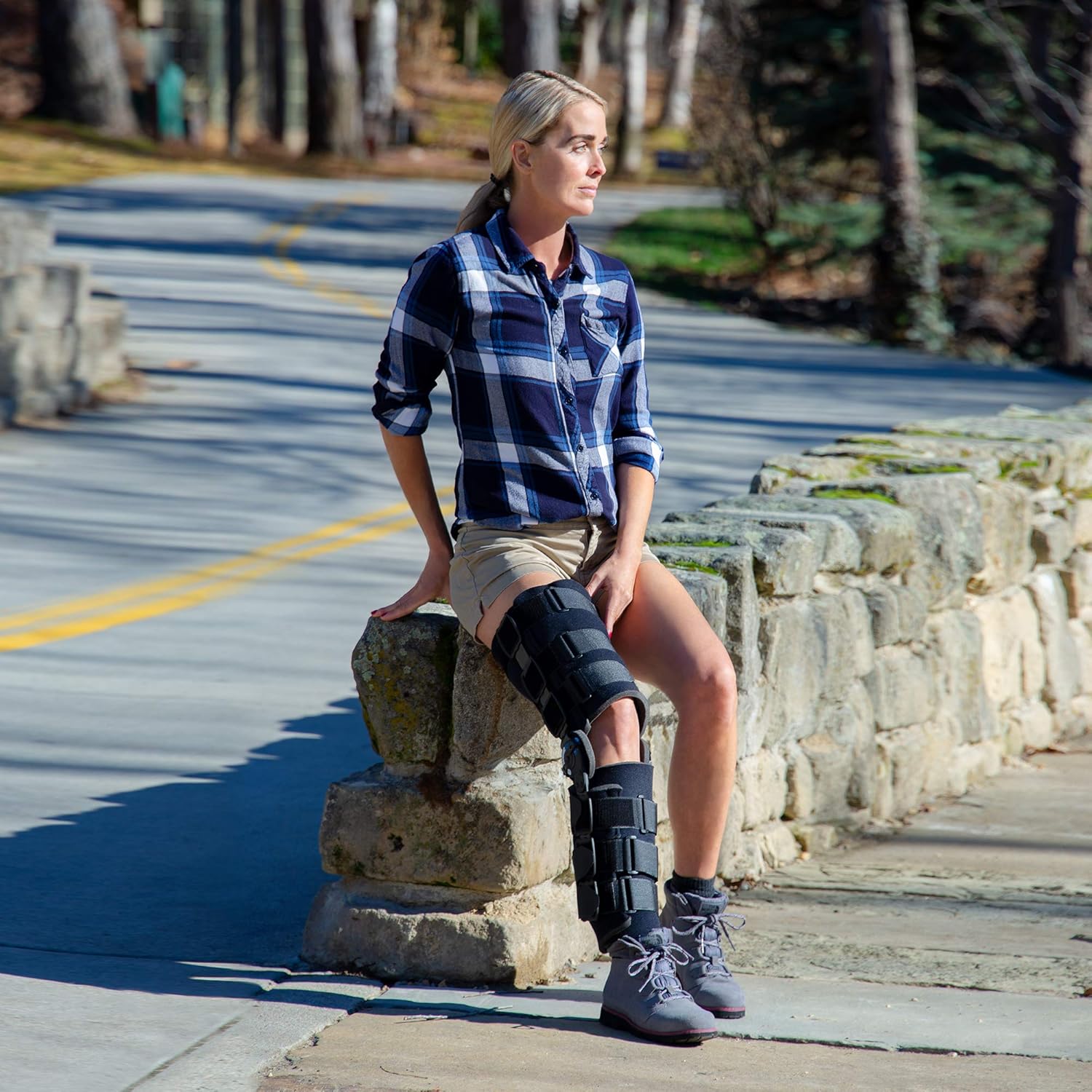
Image: Proper wearing of the Ossur Post-Op Knee Brace on the leg.
Adjusting Range of Motion (ROM)
The Innovator Hinge allows for precise control over knee flexion (bending) and extension (straightening) limits.

Image: Instructions for easily adjusting the extension and flexion limits on the Innovator Hinge.
- Setting Extension: Locate the extension adjustment button on the hinge. Press the button to release the lock and rotate the dial to the desired extension angle (e.g., 0°, 10°, 20°). Release the button to lock the setting.
- Setting Flexion: Locate the flexion adjustment button on the hinge. Press the button to release the lock and rotate the dial to the desired flexion angle (e.g., 30°, 60°, 90°). Release the button to lock the setting.
- Locking Settings: For long-term immobilization or to prevent accidental changes, the hinge settings can be secured using the provided zip ties. Thread a zip tie through the designated holes on the hinge and tighten it to lock the desired flexion/extension range.
- Daily Use: Periodically check the brace's fit throughout the day. Re-tighten straps if they become loose. Ensure the hinge settings remain as prescribed by your healthcare professional.
Maintenance
Proper care will extend the life of your Ossur Post-Op Knee Brace and ensure its continued effectiveness.
- Cleaning: The brace pads and straps are designed for hand washing only. Use mild soap and cold water. Rinse thoroughly and air dry completely before reattaching to the brace frame. Do not machine wash, tumble dry, iron, or bleach.
- Frame Cleaning: Wipe the aluminum frame with a damp cloth. Do not submerge the hinge mechanism in water.
- Inspection: Regularly inspect the brace for signs of wear, such as frayed straps, loose fasteners, or damaged hinge components. If any damage is observed, contact Ossur customer support or your healthcare provider.
- Storage: Store the brace in a clean, dry place away from direct sunlight and extreme temperatures when not in use.
Troubleshooting
If you encounter issues with your Ossur Post-Op Knee Brace, refer to the following common solutions:
- Brace Slipping: Ensure all straps are securely fastened and snug. Re-adjust the frame length if it is too long or too short for your leg. The brace should not slide down during normal activity.
- Discomfort or Pressure Points: Loosen straps slightly if they are too tight. Check for any wrinkles in the padding or clothing underneath the brace. If discomfort persists, consult your healthcare professional for a fit adjustment.
- Hinge Not Locking: Ensure the adjustment buttons on the Innovator Hinge are fully released after setting the desired angle. If using zip ties, ensure they are properly threaded and tightened.
- Skin Irritation: Ensure the brace is clean and dry. Check for any sharp edges or worn padding. If irritation continues, consult your healthcare provider.
Specifications
| Brand | Ossur |
| Model Number | 403101 |
| Material | Aluminum |
| Item Weight | 1.28 Kilograms |
| Item Dimensions | 29.72 x 5.51 x 5.51 inches |
| Specific Uses | ACL, Patella, PCL, Meniscus Tear, Rehabilitation, LCL, MCL, Tendon, Locking |
| Age Range | Adult |
| Special Features | Adjustable |
| Product Care Instructions | Hand Wash Only |
Warranty and Support
For information regarding product warranty, technical support, or to report any issues with your Ossur Post-Op Knee Brace, please contact Ossur customer service directly. Contact details can typically be found on the Ossur official website or product packaging.