
1. Introduction
This manual provides detailed instructions for the setup, operation, maintenance, and troubleshooting of your TCL 50UP130 LED Smart Roku TV. This 50-inch television integrates 4K Ultra HD resolution with the Roku TV streaming platform, offering a comprehensive entertainment experience.
Please read this manual thoroughly before using your television to ensure proper and safe operation. Keep this manual for future reference.
2. What's in the Box
Verify that all components are present in the packaging:
- TCL 50UP130 LED Smart Roku TV
- Remote Control with Batteries (2 AAA batteries included)
- Detachable Power Cord
- Quick Start Guide
- TV Stand Components (if not pre-attached)
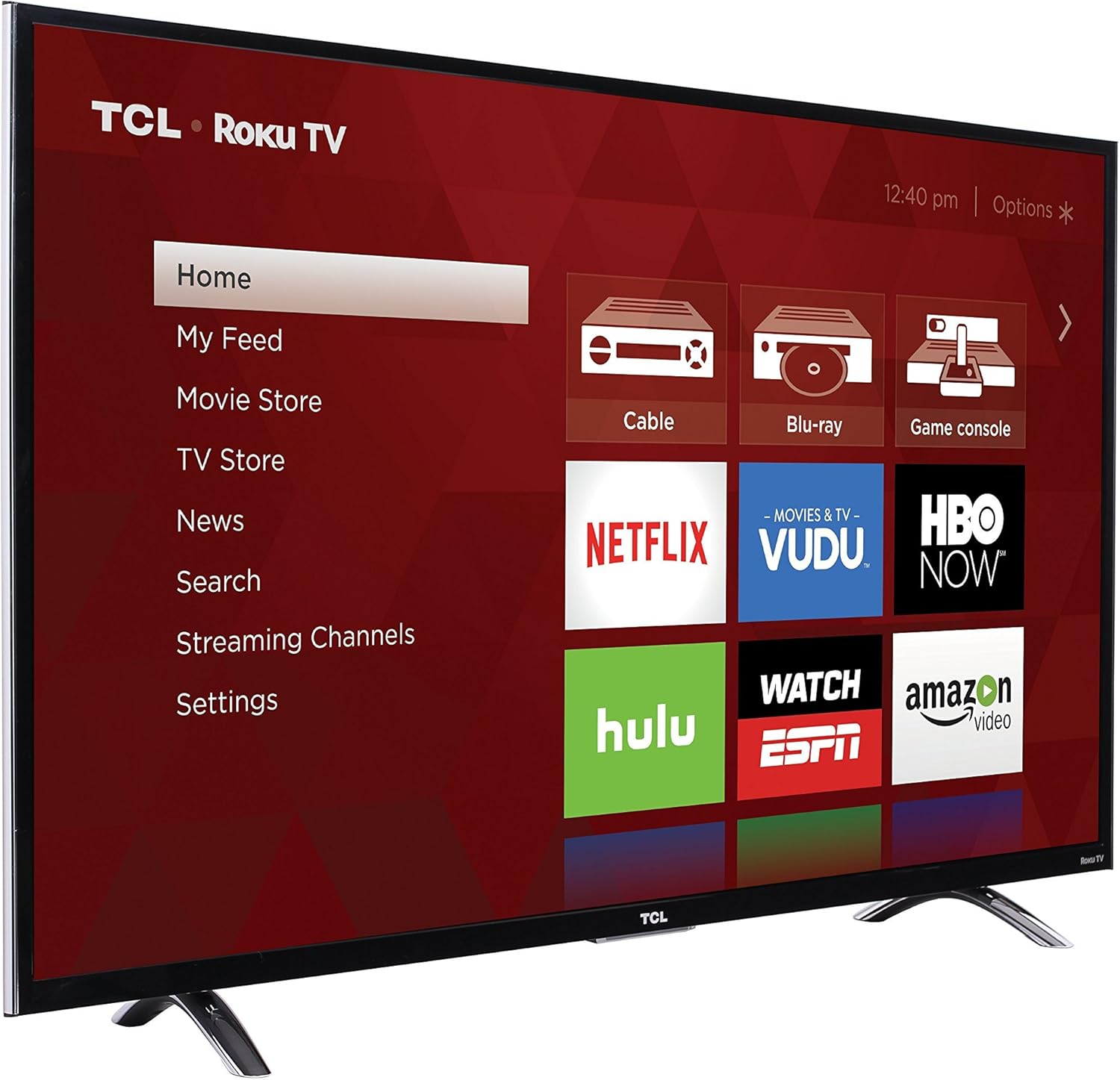
Image: The TCL 50UP130 LED Smart Roku TV displaying its main interface, featuring streaming service icons and input selections.
3. Setup
3.1 Physical Setup
- Unpacking: Carefully remove the TV from its packaging. It is recommended to have two people for this process due to the size and weight of the television.
- Attaching the Stand (Optional): If you are not wall-mounting the TV, attach the included stand components to the bottom of the television using the provided screws. Ensure the stand is securely fastened.
- Wall Mounting (Optional): If wall-mounting, refer to the instructions provided with your wall-mount kit. The TV is VESA compliant.
- Placement: Place the TV on a stable, level surface or securely mount it on a wall. Ensure adequate ventilation around the TV.
- Power Connection: Connect the detachable power cord to the TV's power input and then to a wall outlet.

Image: The TCL 50UP130 LED Smart Roku TV with its physical dimensions indicated, showing the height, width, and depth with the stand attached.
3.2 Connecting External Devices
Your TCL 50UP130 TV offers multiple input options for connecting various devices:
- HDMI Inputs (x4): Four HDMI 2.0 ports with HDCP 2.2 support. One port includes HDMI ARC (Audio Return Channel) for simplified audio connections to compatible sound systems. Connect Blu-ray players, game consoles, cable/satellite boxes, and other HDMI-enabled devices.
- USB Port (x1): For connecting USB storage devices to play media files.
- RF Input: For connecting an antenna or cable TV feed.
- Composite Input: For older devices using RCA (red, white, yellow) cables.
- Headphone Jack: For private listening with wired headphones.
- Optical Audio Out: For connecting to a soundbar or audio receiver for digital audio output.
3.3 Initial Power On and Network Connection
- Power On: Press the power button on the remote control or the TV.
- First-Time Setup: Follow the on-screen instructions to complete the initial setup process. This includes selecting your language, country, and connecting to your home network.
- Wi-Fi Connection: The TV features built-in dual-band Wi-Fi. Select your Wi-Fi network from the list and enter the password. A stable internet connection is essential for Roku TV features.
4. Operating the TV
4.1 Remote Control Functions
The included remote control is designed for intuitive navigation of the Roku TV interface. It features:
- Navigation Pad: Use the directional buttons and OK button to move through menus and make selections.
- Home Button: Returns you to the Roku TV home screen.
- Back Button: Returns to the previous screen.
- Volume Buttons: Adjust the TV's volume.
- Channel Buttons: Change channels on live TV inputs.
- Instant Replay: Jumps back a few seconds in streaming content.
- Star Button (*): Accesses options for the selected item.
- Search Button: Initiates voice search (if supported by your remote model).
- Private Listening: Plug headphones into the remote for private audio.
- Lost Remote Finder: Some enhanced remotes include a feature to help locate a misplaced remote.
Video: This video demonstrates the features of the TCL Roku TV, including its 4K Ultra HD resolution, 4K upscaling engine, access to over 3000 streaming channels, and the enhanced remote control with private listening and voice search capabilities. It highlights the simple interface for accessing various devices and streaming content.
4.2 Roku TV Interface
The Roku TV home screen provides easy access to all your entertainment options:
- Home Screen: Displays your installed streaming channels, connected input devices (e.g., Cable, Blu-ray, Game Console), and featured content.
- Streaming Channels: Access thousands of free and paid streaming channels, including popular services like Netflix, Hulu, HBO Now, and more.
- Input Selection: Easily switch between connected devices by selecting their icons on the home screen. You can rename inputs for better organization.
- Settings: Access TV settings for picture, sound, network, system, and privacy options.
4.3 Picture and Sound Settings
Customize your viewing and listening experience:
- Picture Modes: Select from predefined picture modes (e.g., Movie, Normal, Vivid, Game) or customize settings like brightness, contrast, color, and sharpness.
- Sound Modes: Choose from various sound modes (e.g., Standard, Music, Movie) or adjust bass, treble, and other audio enhancements.
- Advanced Settings: Explore advanced options for color temperature, noise reduction, and motion processing.
4.4 4K Ultra HD and Upscaling
Your TCL 50UP130 TV supports 4K Ultra HD resolution, offering four times the pixels of Full HD. It also features a 4K Creative Pro Upscaling Engine, which intelligently enhances lower-resolution content (like 1080p Full HD) to near-4K quality, providing a sharper and more detailed image.
5. Maintenance
- Cleaning the Screen: Gently wipe the screen with a soft, dry, lint-free cloth. For stubborn marks, lightly dampen the cloth with water or a screen-cleaning solution specifically designed for TVs. Avoid harsh chemicals or abrasive materials.
- Cleaning the TV Body: Use a soft, dry cloth to wipe the TV's frame and back panel.
- Software Updates: Your Roku TV automatically receives software updates over the internet. Ensure your TV is connected to Wi-Fi to receive the latest features and performance improvements.
- Power Management: Unplug the TV from the power outlet during lightning storms or when it will be left unattended for long periods.
6. Troubleshooting
If you encounter issues with your TV, refer to the following common problems and solutions:
- No Power:
- Ensure the power cord is securely connected to both the TV and a working electrical outlet.
- Check if the outlet is receiving power by plugging in another device.
- Try a different power outlet.
- No Picture/Black Screen:
- Verify the TV is powered on.
- Check the selected input source. Press the Home button on the remote and select the correct input.
- Ensure all cables from external devices are securely connected.
- Try restarting the TV by unplugging it for 60 seconds and then plugging it back in.
- No Sound:
- Check the TV's volume level and ensure it is not muted.
- If using external audio equipment, ensure it is powered on and correctly connected.
- Check the audio output settings in the TV menu.
- Remote Control Not Working:
- Replace the batteries (2 AAA).
- Ensure there are no obstructions between the remote and the TV's IR sensor.
- For enhanced remotes, ensure it is paired correctly.
- Network Connection Issues:
- Verify your Wi-Fi router is powered on and functioning.
- Go to Settings > Network > Check Connection on your TV to diagnose the issue.
- Try restarting your router and modem.
- Ensure you have entered the correct Wi-Fi password.
7. Specifications
| Feature | Specification |
|---|---|
| Brand | TCL |
| Model Number | 50UP130 |
| Screen Size | 50 Inches |
| Display Technology | LED (Full Array Backlight) |
| Resolution | 4K Ultra HD (3840 x 2160) |
| Refresh Rate | 60Hz (Native), 120Hz Clear Motion Index (Effective) |
| Smart Functionality | Roku TV Streaming Platform with built-in dual-band Wi-Fi |
| Inputs | 4 HDMI 2.0 (HDCP 2.2, 1 with ARC), 1 USB, RF, Composite, Headphone Jack, Optical Audio Out |
| Connectivity Technology | Wi-Fi |
| Product Dimensions (with stand) | 44.5" W x 27.6" H x 8.7" D |
| Product Dimensions (without stand) | 44.5" W x 25.8" H x 2.7" D |
| Item Weight | 28 Pounds |
| Wattage | 130 watts |
| Color | Black |
| Special Features | Flat Screen, Energy Star Certified |
8. Warranty and Support
For warranty information, please refer to the warranty card included with your product or visit the official TCL support website. TCL provides customer support for product inquiries, technical assistance, and warranty claims.
To obtain support, you may need your TV's model number (50UP130) and serial number, which can typically be found on a label on the back of the TV.
For additional resources and contact information, please visit the TCL Store on Amazon or the official TCL website.


